100mm in a Courtyard: Athletic Simplicity and the Compression Shot
I wanted a clean editorial portrait — no drama, just compression and light. Here's what I picked in Studio and what came back.
I wanted a clean shot. No dramatic lighting rig. No elaborate set. Just me in easy clothes, standing in warm afternoon sun, with a telephoto doing the quiet work of flattening the world behind me into something cohesive.
That's the shot I set out to make today in Studio. Here's what I picked, what it cost, and what I noticed when it came back.
How Studio actually works
Studio is a form-first workspace — you don't write a prompt to get started. You work through the sections: Camera Lab for your equipment and lighting, Pose Library for how the body sits or stands, Camera Angle for where the lens is positioned, Background for the environment, Fashion Designer for the outfit, and so on. Each pick feeds a section of the assembled prompt. When you're done choosing, Studio composes the full prompt for you. You can edit it before you generate — but most people never need to. The form handles the photographic thinking so you can focus on the creative decision.
What I picked from Studio
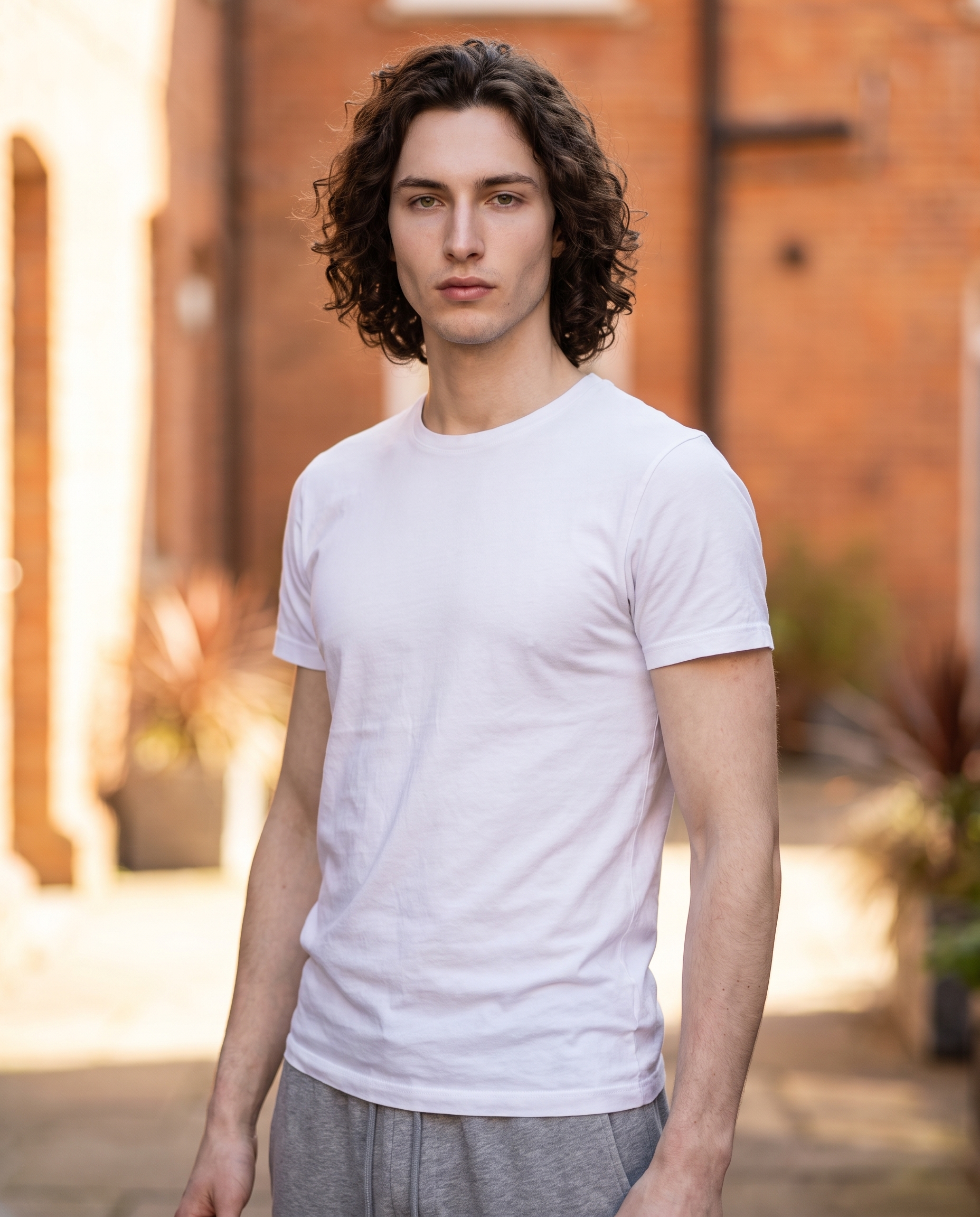
Athleisure Clean — the outfit preset I picked from the Fashion Designer. The catalog describes it as "clean athleisure: white jersey tee with grey cotton joggers", which is exactly what I wanted. Nothing that fights for attention. The whole concept of this shot was that the clothes should recede and let the light do the work — a white tee and grey joggers do that without asking anything of you.
100mm — the focal length I selected in Camera Lab, categorized as TELE. The catalog calls it "short tele; subtle compression. Style: headshots, macro-like detail." This is the real engine of the shot. At 100mm, the background doesn't just blur — it compresses. Distances collapse. That terracotta wall behind me stops being architecture and becomes a warm wash of colour. The Studio tip that applies directly here: Camera Equipment Matters. Picking a real focal length isn't decorative — the model simulates authentic compression and depth-of-field behaviour based on what you select. I've seen people choose focal lengths almost at random and wonder why their background doesn't look right. At 100mm, you feel it immediately.
For lighting, I kept it natural — afternoon side-light that comes through in the prompt as sculpted jaw, grounded energy. No Rembrandt setup, no studio strobes. Sometimes the absence of a dramatic rig is the choice.
Worth knowing while you're in there: when I opened Studio and selected myself as the character, my reference photos loaded automatically and locked my face, body, and skin tone into the generation. Every image Studio produces from that point maintains visual continuity with those refs — that's the character reference system working quietly in the background. If you're building an AI character on ArtCoreAI, the same thing happens for them: pick your character, load their refs, and Studio keeps their identity consistent across every shoot.
The assembled prompt
This is what the form composed for me — you don't have to write any of this yourself unless you want to:
A tall, muscular young man with dark curly hair, porcelain skin, and green almond-shaped eyes stands in a sun-drenched urban courtyard. He wears a clean white jersey tee and grey cotton joggers, relaxed but composed. Shot at 100mm — the slight telephoto compression flattens the warm terracotta background into a soft, cohesive wash of colour behind him, isolating his figure with subtle macro-like sharpness. Natural afternoon side-lighting sculpts his angular jaw. Calm, grounded energy. Editorial lifestyle mood.I did edit this one slightly before generating — I added the phrase "editorial lifestyle mood" at the end because I wanted the model to lean toward that register rather than pure sportswear catalogue. But the bones of the prompt came entirely from the form picks.
What I noticed
The compression landed exactly as I hoped. The terracotta background reads as colour, not as a specific wall — which is the whole point of shooting long in a tight space. The figure isolation is clean without looking composited.
The natural lighting did more work than I expected. Side-lighting at that angle catches the jaw the way a Rembrandt setup would, but it reads as real afternoon sun rather than studio craft. That's a harder balance to hit than it looks.
The one thing I'd adjust on the next run: the energy sits slightly more neutral than I wanted. "Calm, grounded" came through — maybe too literally. A refinement in the Pose Library, pulling the expression toward something with a little more quiet confidence, would push this from editorial-lifestyle into editorial-fashion. Small difference, but worth a second generation at 2K to test it before committing to 4K.
What it cost
- Credits spent: 2.70
- What you'd pay: $0.27
- Generation time: ~29s
I ran this at 4K — maximum resolution, best detail. For iteration runs while you're dialling in pose and expression, 1K is the move. Same form picks, fraction of the cost.
If you want to try this: open Studio, select your character, pick a focal length from Camera Lab, dress them from the Fashion widget, and hit generate. You don't need a prompt. The form builds one. Pick your equipment, pick your light, pick your look — and see what comes back.
— David
See what others are making


Each image links to the character's profile. The Studio — Technical Guide has the full showcase plus deeper documentation on every component.