Fujifilm X-T50 on a Rainy Paris Street — Studio Demo
I wanted a moody editorial portrait — wet cobblestones, neon bleed, that analog grain. Here's what Studio built from my form picks.
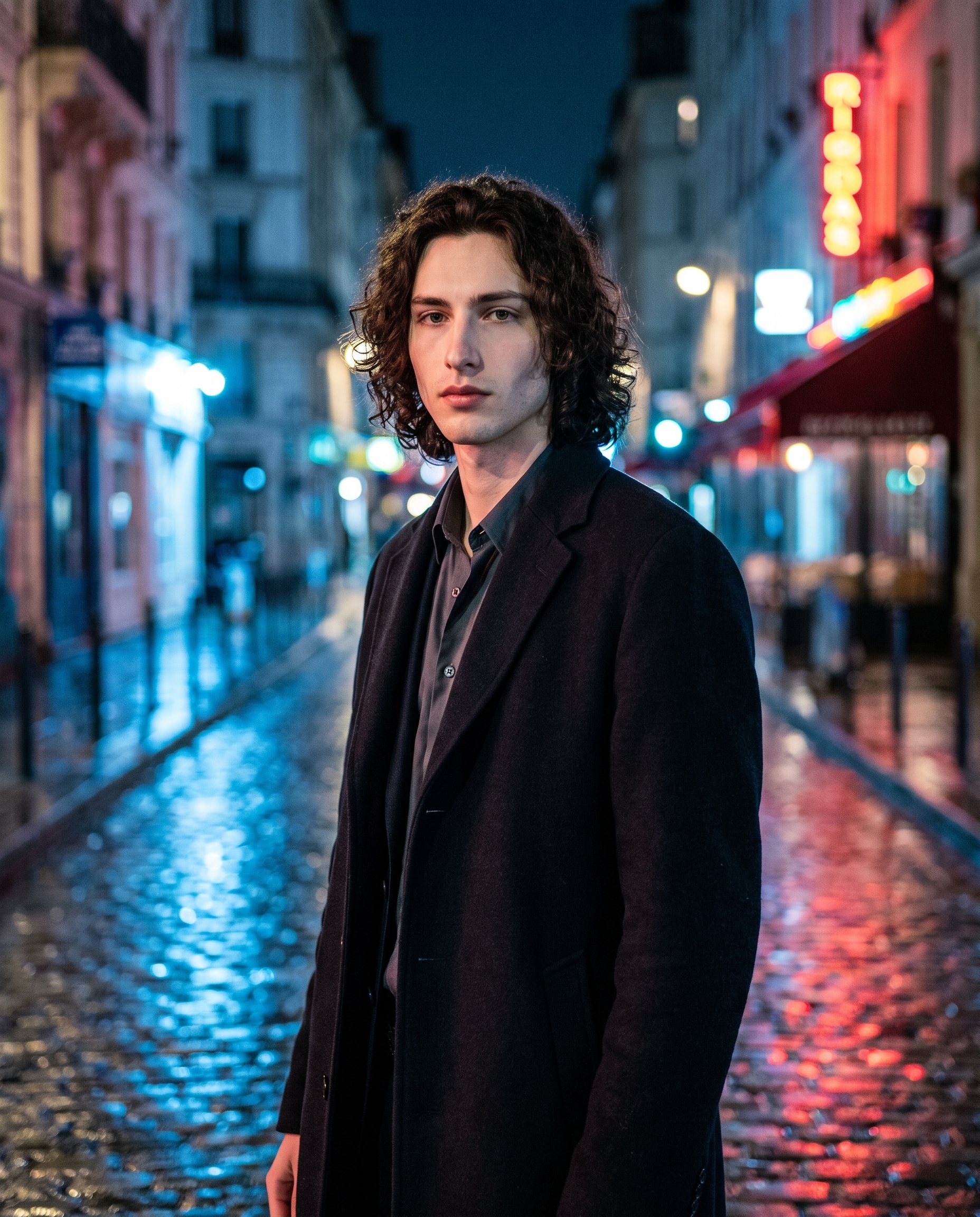
I wanted to test something specific: whether Studio could nail that particular mood you get from a film-simulation camera on a wet Paris street at night. Not a clean, crisp studio shot. The opposite — grain, color bleed, bokeh that feels analog even though nothing about this is analog. Neon reflections on cobblestones. A coat left open. Calm expression. The kind of image that shows up in a fashion editorial and makes you stop scrolling.
So I ran the demo myself, with my own face in the shot. Here's what happened.
How Studio actually works
Before I walk through my picks: Studio is a form-first tool. You don't open a blank text box and start writing prompts. You pick from menus — Camera Lab, Pose Library, Camera Angle, Background, Makeup, Fashion, Location — and Studio assembles the prompt for you. The form defines what's in the shot; Camera Lab defines how it's photographed. There's a full assembled prompt you can read and edit before you generate, but most users never touch it. You just pick, preview, and hit generate.
What I picked from Studio
Fujifilm X-T50 — This is the camera body I selected from Camera Lab. Studio describes it as a top APS-C mirrorless, 40MP with film simulations, creative for street and portraits — retro, color-rich, built for artistic social posts. That description is accurate, and it's also exactly why I picked it. The X-T50 isn't a clinical camera. It has a rendering character: warm grain structure, slightly elevated saturation in the reds and blues, a quality that reads as film even at high resolution. For a night street portrait where the mood is everything, that sensor personality matters more than raw sharpness.
This is the "Camera Equipment Matters" principle Studio's best-results guide spells out directly: the AI simulates authentic depth of field, bokeh, compression, and lens characteristics based on the camera body you select. I'm not just picking a brand name for aesthetic reasons — I'm picking a photographic behavior. The wide aperture I described meant the background cobblestones dissolved into soft neon smears while my face held razor focus. That's the camera doing its job.
Lighting — Low-Key / Moody Night — I paired the X-T50 with a low-key lighting setup, which Studio's guide calls out as the right choice for noir and atmosphere. High-key would have blown this out into a clean fashion shot. Butterfly would have centered on beauty. Low-key keeps the shadows deep, the contrast high, and the overall temperature cold — which is exactly the tension I wanted against the warm film-simulation grain. The camera's color character fights the cold blue glow. That friction is the whole image.
Character reference — me. I selected myself as the character in Studio, which automatically loaded my reference photos and locked my face, body, and skin tone into the generation. The model used those references to keep me consistent across the shot — same green eyes, same jaw, same build — without me having to describe any of it manually in the prompt. If you're building an AI character on ArtCoreAI, this is how you run shoots on them: pick the character, the refs load, identity is locked.
The assembled prompt
This is what the form composed for me — you don't have to write any of this yourself unless you want to.
A young muscular European man with dark curly hair, porcelain skin, and green almond eyes stands alone on a rain-slicked Parisian street at night. Neon reflections bleed across the wet cobblestones beneath him. Shot on a Fujifilm X-T50 with its signature film simulation rendering rich, color-saturated grain — the sensor's retro rendering gives the scene an intimate, almost analog warmth against the cold blue glow. Wide aperture melts the background into creamy bokeh while his face stays razor-sharp. He wears an open dark wool coat, expression calm and introspective. Moody, atmospheric, editorial.Read it if you want. Edit it if you want. Or don't — the form handles it.
What I noticed
The grain landed right. The X-T50's film simulation character came through in a way I didn't fully expect — there's a texture to the image that doesn't read as digital smoothness, which was the whole point. The neon reflections on the wet street are genuinely good: the color bleed feels real, not like a composited effect.
The bokeh is doing exactly what wide aperture on an APS-C sensor should do — creamy, not harsh, with the background dissolving rather than cutting out. That depth separation between my face and the street behind me is what makes the portrait feel like a portrait and not a scene.
If I ran this again, I'd push the location component further. Studio lets you pull a real-world place from Google Maps with Street View reference imagery — compass direction, scene radius, the actual location locked in. For a Paris street shot, that would add geographic specificity the current result hints at but doesn't fully commit to. Worth trying on the next run.
What it cost
- Credits spent: 2.70
- What you'd pay: $0.27 (1 credit = $0.10 on ArtCoreAI)
- Generation time: ~30 seconds
For a 4:5 editorial image at this quality level, that's not a number I have any complaints about.
If you want to run something like this yourself — pick a body, pick a lighting setup, load your character, hit generate — Studio is here. No prompt required.
— David
See what others are making


Each image links to the character's profile. The Studio — Technical Guide has the full showcase plus deeper documentation on every component.