Gothic Luxe in a Candlelit Library — 135mm Studio Demo
I wanted dark glamour, a collapsing background, and candlelight. Here's what Studio built when I picked Gothic Luxe and a 135mm lens.
I had a specific image in my head: standing in a dim library, surrounded by old books dissolving into darkness behind me, wearing something that costs more than it should. Dark, editorial, a little theatrical. The kind of shot that belongs in a fashion magazine that only prints in black and runs the occasional velvet spread in color.
So I opened Studio and started picking.
How Studio actually works
Before I walk through my picks — if you've never used Studio, here's the key thing to understand: you don't write a prompt. You pick from the form.
Camera Lab, Pose Library, Camera Angle, Background, Makeup, Fashion, Location — each section is a menu. You select what you want, and Studio assembles the prompt for you. The "what to shoot" comes from your picks; the "how it's shot" comes from Camera Lab. There's an assembled prompt you can preview and edit before generating, but most users never touch it. You're picking from a catalog, not writing copy.
I'll show you the assembled prompt at the end so you can see exactly what the form built — but none of that text is something you had to author.
What I picked from Studio
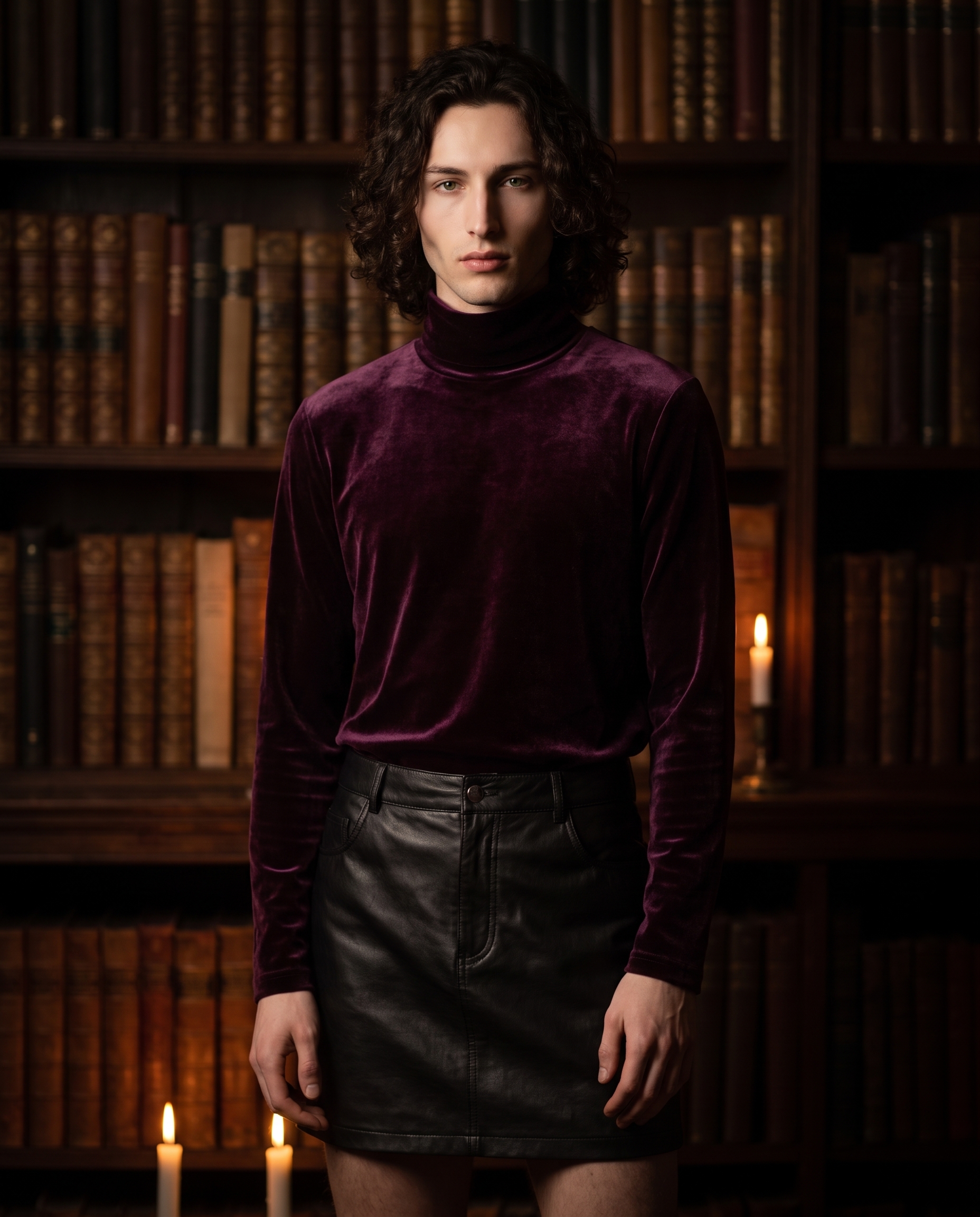
Gothic Luxe — the outfit preset. Studio's Fashion Designer lets you compose an outfit piece by piece (top, bottom, shoes, accessories, each with color and material controls), but it also surfaces presets for when you already know the vibe. Gothic Luxe is described in the catalog as dark glamour: plum velvet turtleneck with black leather mini skirt. That's exactly what I wanted — the velvet for texture that catches warm light, the leather for contrast, the plum for color that reads richly even in dim conditions. The preset handles all the garment-level description automatically.
135mm — the focal length, filed under TELE in Camera Lab. The catalog description: tele portrait; strong isolation. Style: dramatic bokeh, fashion compression. This is where the operating tip "Camera Equipment Matters" is literal, not metaphorical — the AI simulates real optical behavior from the equipment you name. At 135mm, the background doesn't just blur. It collapses. The compression also flattens the apparent depth of the scene, which is what gives telephoto fashion shots that cinematic, two-dimensional quality — everything in the frame feels like it's on the same plane, even when it isn't. I paired it with low Rembrandt lighting to push the dramatic contrast: one cheekbone lit amber, the other in deep shadow.
I also picked myself as the character, which is worth explaining. Studio's reference-images system lets you load a character and auto-import their saved reference photos. When I selected my own character profile, my reference shot loaded automatically and locked my face, build, and skin tone into the generation. Same system works for any character you've built on ArtCoreAI — pick the character, their refs come with them.
What the form composed
This is what Studio assembled from my picks. You don't have to write any of this yourself unless you want to.
A tall young man with dark curly hair, porcelain skin, and green eyes stands in a dim candlelit library, shelves of old leather-bound books stretching into bokeh behind him. He wears a deep plum velvet turtleneck tucked into a black leather mini skirt — rich fabric texture catching the warm candlelight. Shot on a 135mm telephoto lens, the background collapses into creamy darkness, isolating him dramatically. The compression flattens depth, making the scene feel cinematic and editorial. Low Rembrandt lighting, deep shadows on one cheekbone, amber glow from below. Vertical frame, fashion editorial mood.What I noticed
The background compression landed exactly right. The bookshelves are recognizable — you know you're in a library — but they dissolve into warm dark bokeh fast enough that the figure stays completely isolated. That's the 135mm doing its job.
The velvet texture surprised me. I expected it to flatten in low light, but the candlelight gave it this directional sheen — the plum reads almost burgundy where the light catches the pile, and almost black in shadow. Good fabric choice for this setup.
If I ran this again, I'd push the Rembrandt contrast one step further — dial the shadow side darker, make the amber glow feel more like a single candle. The current result is close but the lighting is slightly more balanced than I wanted. Still editorial. Just not quite as noir as the image in my head.
Worth knowing while you're in there: Studio's Location component lets you pick a real place from Google Maps and pull Street View imagery as a reference — so if I'd wanted this to be a specific library (the Bibliothèque nationale de France, say), I could have locked that actual location in instead of describing it in the prompt. That's a form-only feature I'll be running a dedicated demo on soon.
What it cost
- Credits spent: 2.70
- What you'd pay: $0.27 (1 credit = $0.10 on ArtCoreAI)
- Generation time: ~30 seconds
This was a 4:5 vertical at production resolution. Twenty-seven cents for a shot I'd actually use.
If you want to run something similar: open Studio, pick a character, pick an outfit from Fashion Designer, set your focal length in Camera Lab, choose a lighting style, and hit generate. The form builds the rest. You don't need to touch the prompt unless you want to.
— David
See what others are making


Each image links to the character's profile. The Studio — Technical Guide has the full showcase plus deeper documentation on every component.