Rembrandt Light, Chin Rest, One Shot: How I Made This Portrait in Studio
I wanted a moody editorial portrait — the kind with real shadow drama. Here's how Studio's form built it for me, component by component.
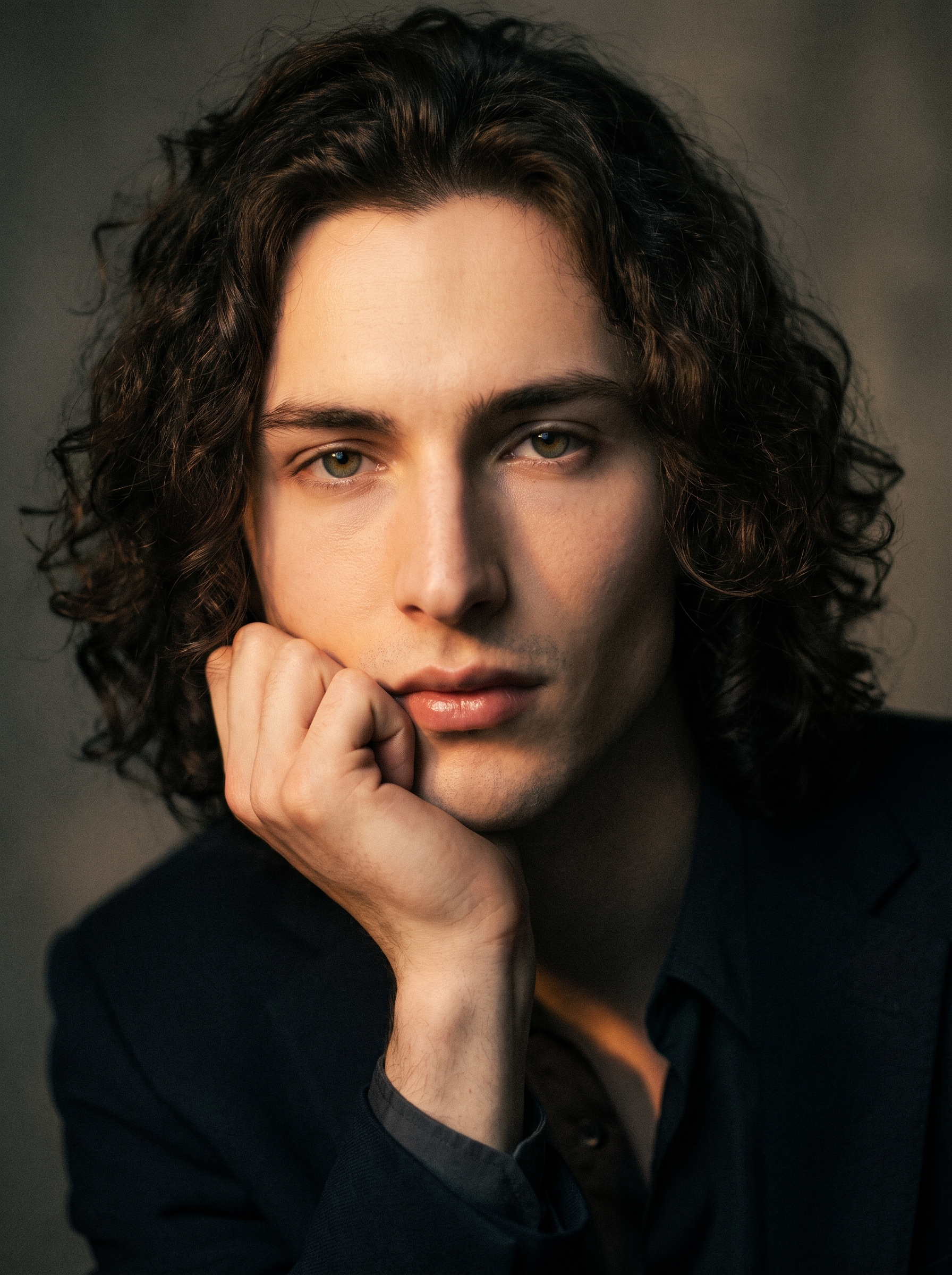
I had one image in my head: that classic editorial close-up where the shadow does half the work. Chin resting on the back of the hand. Eyes straight into the lens. Not brooding exactly — more like someone with something on their mind and no interest in hiding it.
So I opened Studio and started picking.
How Studio actually works
If you've never used Studio before, here's the one thing to understand: you don't write a prompt. You pick from a form.
Camera Lab, Pose Library, Camera Angle, Background, Makeup Artist, Fashion Designer, Location — each section handles a different dimension of the shot. You make your picks, and Studio composes the prompt for you. The assembled prompt is fully editable if you want to push something specific, but most users never need to touch it. The form does the heavy lifting; you make the creative decisions.
The way I think about it: what to shoot comes from how you describe the scene, and how it's shot comes from the Camera Lab. Two separate things, controlled separately. That clarity is actually useful.
What I picked from Studio
Rembrandt lighting
This is a classic setup — 45° key light above and to one side, which creates that triangular patch of light on the shadowed cheekbone. Studio's catalog description calls it "45° key; triangle shadow. Result: dramatic, artistic faces." That's exactly right and undersells it slightly.
The operating tip that applies here: Lighting Sets the Mood. Rembrandt isn't the right call for a clean beauty shot or a bright fashion editorial — it's the call when you want the face to feel like a painting. I wanted that. So I picked it.
What it did in the result: the shadow on my right side is deep, almost graphic. The triangle catch of light on my cheekbone is sharp enough to read at a glance. The whole image feels like it has weight — not because of anything I wrote, but because of that one lighting selection.
Chin Rest Hand pose
Studio's Pose Library has 140+ named poses organized by body focus. This one sits under Portrait. The catalog describes it as: "Model resting chin lightly on back of hand, eyes looking directly at camera, upper body angled, classic thoughtful editorial close-up."
I picked it because it fits the Rembrandt pairing — both choices lean into the same editorial tradition. A relaxed chin rest with direct eye contact reads as considered, not posed. The slight upper-body angle keeps it from going flat. And the mood tags on this pose (thoughtful, editorial, classic) lined up exactly with what I was going for.
Worth knowing while you're in Studio: the reference-image system is doing something important in the background here. When I selected myself as the character, Studio auto-loaded my reference photo and locked my identity into the generation — face, curly dark hair, green eyes, porcelain skin. You can do the same with any character you've built on ArtCoreAI. Pick your character, and your references travel with the shot automatically.
The prompt Studio assembled
This is what the form composed for me — you don't have to write any of this yourself unless you want to.
A young European man with dark curly hair, porcelain skin, and green almond-shaped eyes rests his chin lightly on the back of his hand, gazing directly into the camera with quiet intensity. The upper body is angled slightly, classic editorial close-up framing. A single key light strikes his face at 45 degrees from above-left, casting the signature triangular shadow on his cheekbone — warm amber pooling against deep shadow on the opposite side of his face. Moody studio background, desaturated tones, film-grain texture. Dramatic and artistic.That's precise, technically grounded, and reads like something a photographer would write in a brief. I didn't type any of it. I just picked Rembrandt and Chin Rest Hand, and Studio built this from those choices.
What I noticed
Three things stood out when I saw the result:
The shadow is doing real work. The Rembrandt triangle is visible and sharp — this isn't a soft approximation of the lighting setup, it's a recognizable execution of it. That's the difference between a camera Lab that's decorative and one that's functional.
The film-grain texture adds age. The desaturated tones and grain pulled the image away from "AI photo" and toward something that could have been shot on film. I didn't ask for that in isolation — it came from how the background and lighting selections combined.
I'd push the angle next time. The current framing is straight-on editorial. I'm curious what a slight low-angle would do with Rembrandt — more authority, maybe something colder. That's a five-second change in the Camera Angle section: azimuth, elevation, distance, done.
What it cost
- Credits spent: 2.70
- What you'd pay: $0.27
- Generation time: ~27 seconds
For a 3:4 editorial portrait at this quality level, that's a reasonable trade. I ran one generation and kept it — no iteration spiral.
If you want to try this yourself: open Studio, pick a lighting setup, pick a pose, pick a body — and hit generate. The form handles the rest.
— David
See what others are making


Each image links to the character's profile. The Studio — Technical Guide has the full showcase plus deeper documentation on every component.