Bold Glam Meets Editorial Intensity — Studio Demo
I wanted a shot that felt like a high-fashion magazine cover — all jaw, all gaze, no softness. Here's what I picked, what Studio built, and what it cost me.
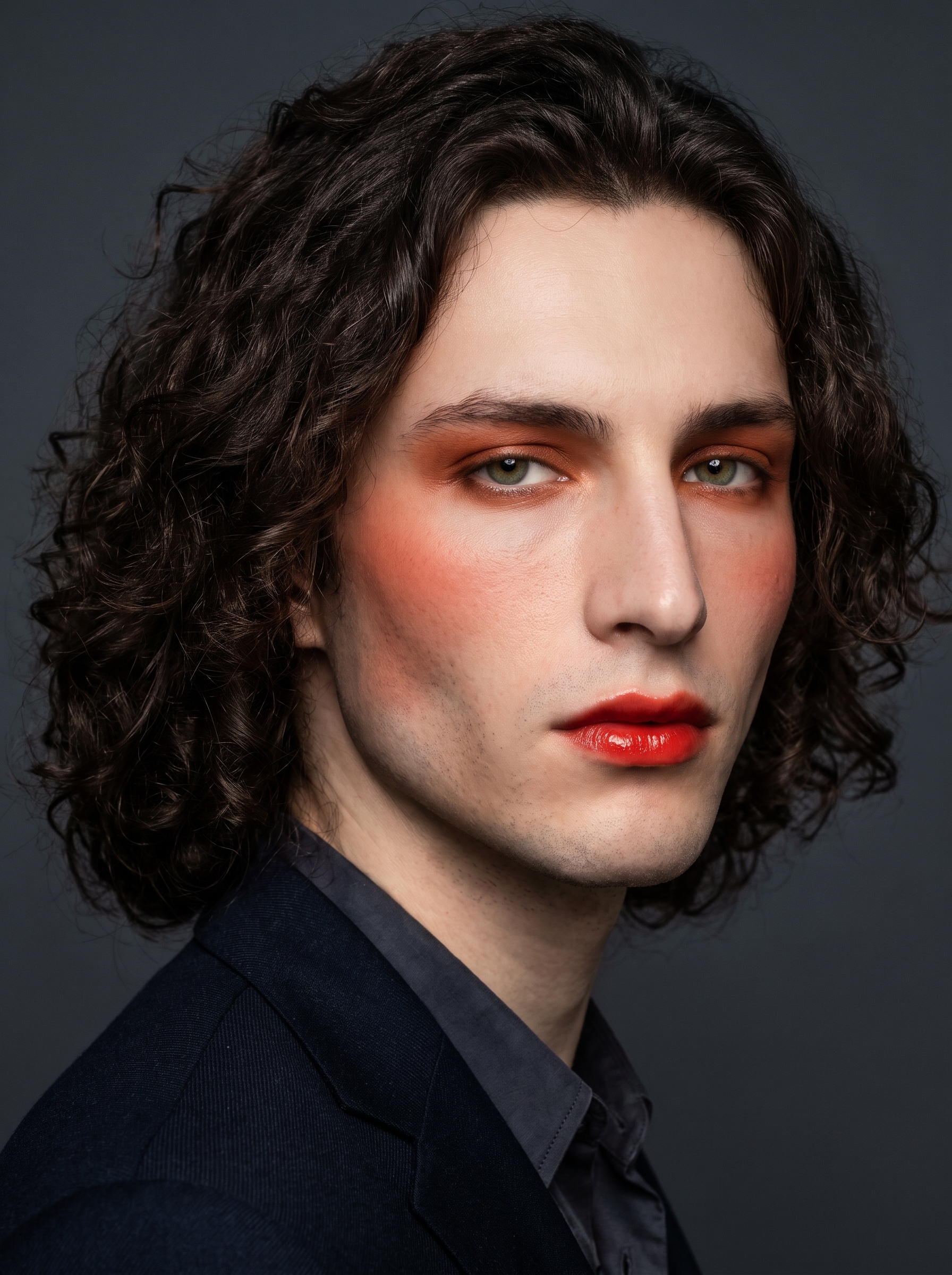
I wanted a specific feeling: that moment in a fashion editorial where the camera is so close you can't look away. Not a pretty headshot. A confrontational one — the kind where the lighting does something to the cheekbones and the makeup is loud enough to be a statement on its own. Bold glam meets athletic intensity. That was the brief I gave myself this morning.
So I opened Studio and started picking.
How Studio actually works
If you've never used Studio, the first thing to know is that you don't start by writing a prompt. You pick from forms. Camera Lab gives you a real camera body, lens, focal length, aperture, and lighting style. Pose Library gives you named poses. Camera Angle gives you presets or a manual 3D globe. Background, Makeup, Fashion — each one is its own section with specific options. You make your picks, and Studio assembles the prompt for you. What to shoot comes from your form choices; how it's shot comes from Camera Lab. The assembled prompt is fully editable before you generate — but I rarely touch it. The form does the heavy lifting.
What I picked from Studio
Slight Three-Quarter Power Gaze
This is a Portrait pose from Studio's Pose Library. The catalog describes it as: extremely close, symmetrical three-quarter face, turned exactly 10–15 degrees off-center, intense direct eye contact, strong jaw and cheekbone definition, minimal head tilt, shoulders squared with one pushed slightly forward. High-fashion editorial headshot energy.
I picked it because that 10–15 degree rotation is doing real work. Full-frontal portraits can flatten a face. Even a small rotation catches the jaw differently, pulls the cheekbones forward, and creates natural shadow on one side — which is exactly the drama I was after. The "one shoulder slightly forward" note in the description is subtle but it changes the whole posture. It reads confident, not stiff.
Persimmon Sunset Glam
This is from Studio's Makeup Artist section — one of the 12+ editable makeup looks in the catalog. The description: warm, bold, sunset-inspired. A 2026 trend look built around confidence and glow.
In practice: deep burnt-orange shadow on the lids, flushed coral cheeks, vivid sunset-red lip with a glossy finish. I chose this because I didn't want neutral makeup that disappears into the shot. I wanted makeup that was the shot — a second focal point competing with the gaze. The warm persimmon tones against my porcelain skin and the deep slate grey background create enough contrast that the face reads immediately, even at a glance.
This is the "Lighting Sets the Mood" principle from Studio's best-results guide — except applied to makeup, not just Camera Lab. What you put on the face shapes the entire emotional register of the image. Persimmon Sunset Glam pushes this into editorial territory rather than natural or beauty territory.
Worth knowing while you're in there: I also used Studio's character reference system for this shot. When you select your character before generating, Studio auto-loads your saved reference photos and locks your identity into the result — my face, my skin tone, my curly dark hair, my build. No @tags needed; it happens automatically. If you've built a character on ArtCoreAI, this is how you make sure every Studio shot stays yours and not a generic face.
The assembled prompt
This is what the form composed for me — you don't have to write any of this yourself unless you want to.
A young European man with dark curly hair, porcelain skin, and green almond eyes, turned exactly 12 degrees off-center in an intense three-quarter portrait, jaw and cheekbones sharply defined, one shoulder pushed slightly forward, direct unwavering eye contact. Skin warmed by bold persimmon-toned makeup — deep burnt-orange shadow on the lids, flushed coral cheeks, and a vivid sunset-red lip with a glossy finish. Studio seamless background in deep slate grey. High-fashion editorial lighting with strong frontal key and rim separation. Close crop from collar to crown.You can see exactly what Studio built from my picks. The 12-degree turn is the pose. The persimmon makeup is the Makeup Artist section. The deep slate grey seamless and the frontal key with rim separation are Background and Camera Lab. I could edit any of this — but I didn't need to.
What I noticed
Three things stood out when the image came back.
First, the rim separation. That line of light along the edge of my jaw and shoulder lifts the subject off the background cleanly — the deep grey doesn't swallow the figure, it frames it. That's the Camera Lab doing exactly what it's supposed to.
Second, the makeup landed warmer than I expected. The persimmon tones read almost golden under the editorial lighting — which I wasn't sure would happen with a cool-undertone complexion like mine. It worked better than it had any right to.
Third: if I ran this again, I'd push the shoulder rotation a few more degrees and try a slightly longer focal length to get more background compression. The current crop is tight and correct — but I think there's a version of this shot with a little more breathing room around the collar that would hit differently.
What it cost
- Credits spent: 2.70
- What you'd pay: $0.27 (1 credit = $0.10 on ArtCoreAI)
- Generation time: ~26 seconds
That's a $0.27 editorial portrait at 4K resolution. I'll take it.
If you want to run something like this yourself — pick a pose, pick a makeup look, set your background, hit generate — Studio is right here. The form does the work. You just make the creative calls.
— David
See what others are making


Each image links to the character's profile. The Studio — Technical Guide has the full showcase plus deeper documentation on every component.