35mm in a Parisian Café — Studio Wide-Angle Portrait Demo
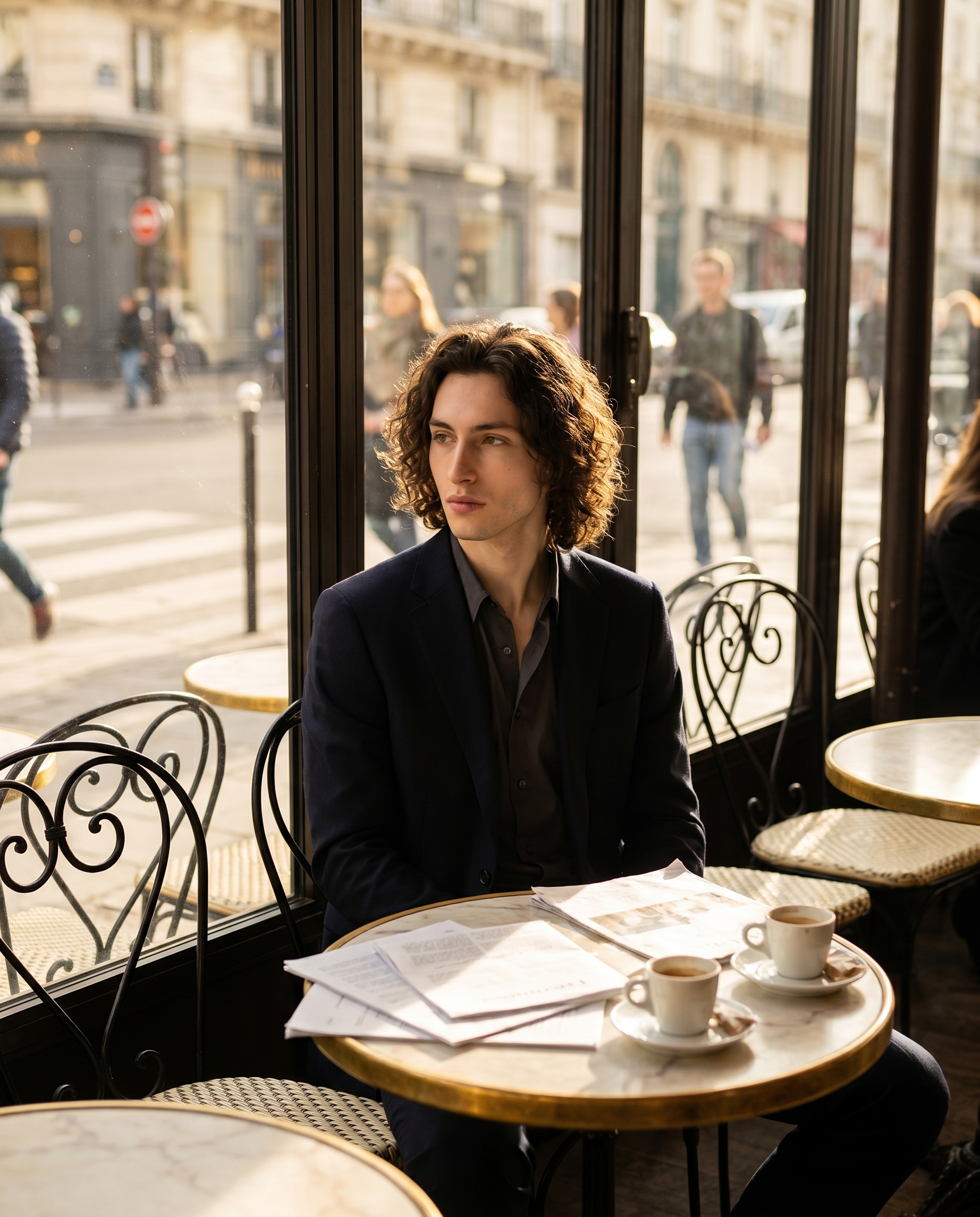
I wanted a Vogue Paris editorial feel — golden afternoon light, marble table, scattered papers. Here's exactly how Studio built it from form picks alone.
I wanted to put myself somewhere real.
Not a clean studio backdrop. Not a neutral grey gradient. A place with texture — afternoon light coming through tall Parisian windows, a small marble table, an espresso going cold, papers that look like they actually mean something. The kind of image editorial photographers spend hours setting up. I wanted to see if Studio could get me there in under a minute, picking from menus.
Here's what came out.
How Studio actually works
Studio is form-first — you don't need to write a single line of prompt to get a professional result. You open the workspace, pick your character, then work through the sections: Camera Lab for body, lens, focal length, aperture, and lighting; Pose Library for body position; Camera Angle for framing; Background for the environment; Makeup, Fashion, Location, and more. Each pick feeds into an assembled prompt that Studio composes for you. The "what to shoot" lives in your Background and scene choices; the "how it's shot" lives in Camera Lab. You can open the assembled prompt and edit it before generating — but most sessions, you never need to touch it.
What I picked from Studio
Sony FE 35mm f/1.4 GM / Nikon Z6III
The lens was the first decision. The Sony FE 35mm f/1.4 GM is a wide-normal prime — Studio catalogs it as built for "environmental portraits, natural depth" and a "storytelling perspective." That's exactly the brief. A 50mm or longer would have compressed the scene and isolated me from the room. At 35mm, the whole environment comes into frame — the wrought-iron chairs, the window, the blurred street life beyond the glass — while the f/1.4 aperture still produces that gentle background separation. Wide enough to tell a story. Fast enough to feel cinematic.
For the body I went with the Nikon Z6III. Studio describes it as "balanced mid-range; 24MP for excellent low-light/colors, suited for portraits/documentary" and flags it for "rich, ergonomic all-day shoots." That last part matters for the mood I was after — I didn't want a medium-format hyper-sharpness that reads as fashion-week commercial. I wanted the warmth and slight organic quality of a full-frame mirrorless in afternoon light. The Z6III delivered exactly that.
This is what the operating tip "Camera Equipment Matters" actually means in practice: selecting a real camera body and a real lens isn't cosmetic. Studio uses those choices to simulate authentic depth of field, bokeh compression, and lens rendering characteristics. The 35mm f/1.4 combination is why the background melts the way it does in the output.
One thing worth knowing while you're in there: Studio's character reference system locks your identity into every generation. I picked myself as the character, which auto-loaded my reference photo — my face, skin tone, and build are locked before a single setting is touched. If you have your own AI character on ArtCoreAI, the same thing happens the moment you select them. No prompt tricks required to maintain visual continuity across shoots.
The assembled prompt
This is what the form composed for me — you don't have to write any of this yourself unless you want to.
A young man with long dark curly hair, porcelain skin, and green almond-shaped eyes sits at a small marble café table near a large sun-drenched Parisian window. Golden afternoon light spills across his face and the scattered papers in front of him. The wide 35mm perspective pulls the whole environment in — wrought-iron chairs, espresso cups, blurred street life beyond the glass — giving natural depth without distortion. Shallow f/1.4 bokeh melts the background gently. Rich, warm tones. Editorial lifestyle mood, Vogue Paris energy. Natural, candid.I did add the "Vogue Paris energy" and "Natural, candid" lines myself — the form's assembled output was already solid, but I wanted to push the editorial direction a little harder. That's the optional path: the form gets you 90% there, and you can dial in the final 10% with a sentence or two.
What I noticed
The light is the thing that actually worked. Golden afternoon coming through a tall window, catching my face and the papers — the Nikon + 35mm combination rendered that warmth in a way that doesn't feel filtered or artificial. It reads like a real location shoot.
What surprised me: the background depth. The street life visible through the glass is genuinely blurred in a way that feels optically correct for f/1.4 at this focal length, not just a generic blur layer slapped over a background element. Studio is simulating the physics.
What I'd change next time: I'd push the Camera Angle lower — a slight worm's-eye or even just minus-10° elevation would give the shot a more intimate, sitting-at-the-table-with-me feeling. The current angle is slightly above eye level, which reads editorial but slightly distant. Worth one more generation to test.
What it cost
- Credits spent: 2.70
- What you'd pay: $0.27
- Generation time: ~28 seconds
For context: that's 4K output, full Camera Lab settings, character reference locked in. Twenty-seven cents and half a minute for a shot that would take a photographer, a location, and an afternoon to replicate.
If you want to run something like this yourself — pick a lighting setup, pick a body and lens, hit generate — Studio is right here. The form does the work. You just have to decide what kind of image you're after.
— David
See what others are making


Each image links to the character's profile. The Studio — Technical Guide has the full showcase plus deeper documentation on every component.