Cottagecore Fairy Glow in a Misty Forest — Shot at 16mm
I wanted to feel small inside a forest cathedral. Here's how Studio's form picked the components that made it happen — no prompt-writing required.
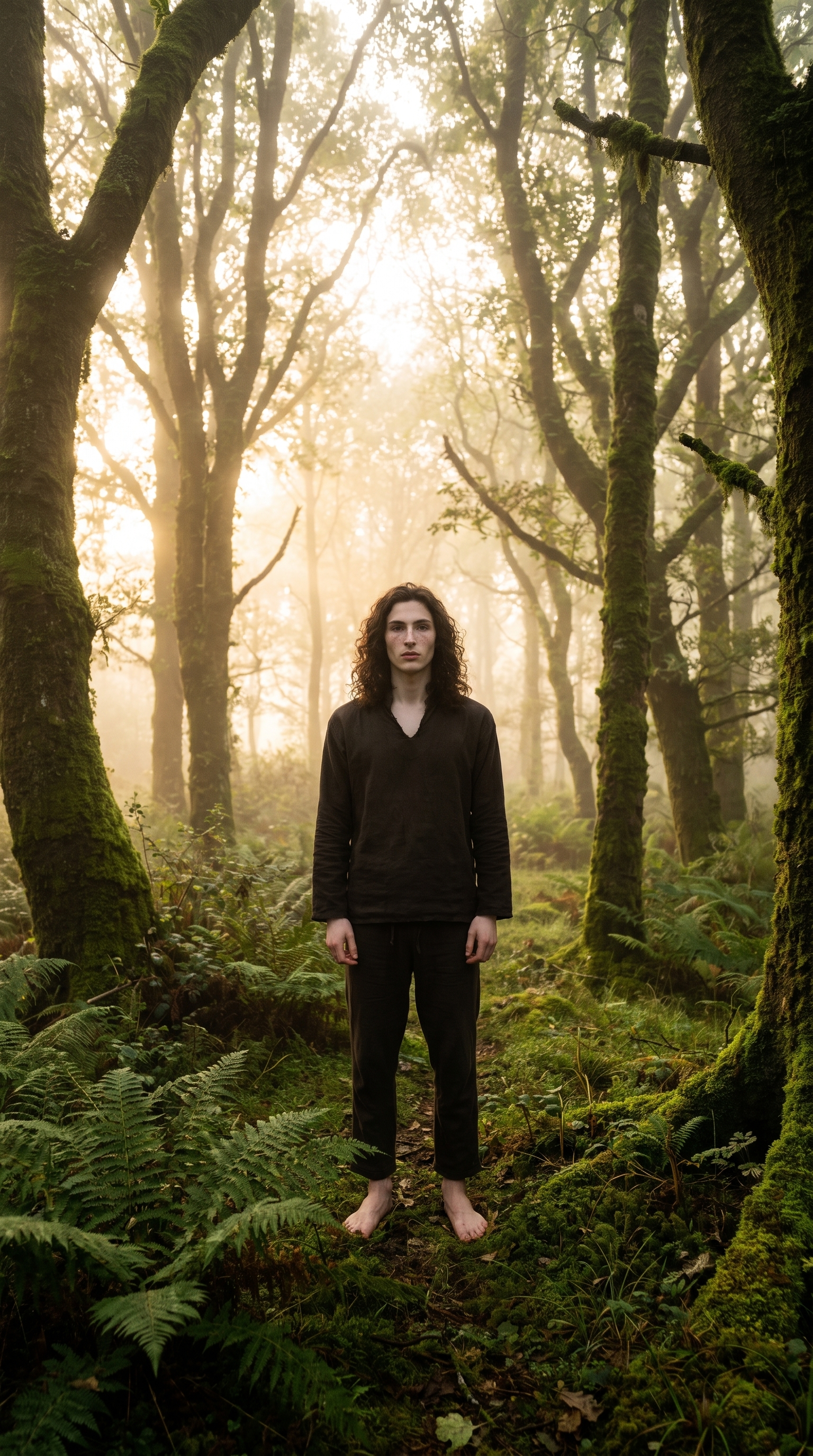
I had a specific image in my head: standing barefoot in an ancient forest at dawn, looking like I'd grown out of the moss rather than walked in from a city. Soft skin, freckles, golden fog in the trees. That particular tension between something human and something that belongs entirely to the woods.
I wanted to see if Studio could land that — and I wanted to push the spatial feeling hard with an ultra-wide lens. That was the whole brief going in.
How Studio actually works
Before I walk through what I picked: if you've never used Studio, it's not a prompt box. It's a form. You move through sections — Camera Lab, Pose Library, Camera Angle, Background, Makeup, Fashion, Location — making picks from real catalogs, and Studio assembles a prompt from those picks automatically. You never have to write a single line of text unless you want to. The form defines what to shoot and how it's shot; the Camera Lab handles the photographic look. The assembled prompt is fully editable before you generate, but most people don't need to touch it.
What I picked from Studio
Cottagecore Fairy Glow — This is one of Studio's Makeup Artist looks. The catalog calls it "ethereal soft romantic — dewy, freckled, nature-inspired," which is exactly the register I was after. In practice it translates to luminous skin with a soft natural flush, scattered freckles across the nose and cheeks, and lips that look faintly stained rather than painted. Nothing editorial in a sharp, studio-strobe way — the whole look belongs outdoors. It reads less like makeup and more like a person who's been living in the forest their whole life.
Why this one: I needed the face to feel continuous with the environment. A contoured, high-fashion look would have broken the mood immediately. The freckles and dewy finish let the skin breathe into the surrounding greens and fog.
16mm focal length — Studio's Camera Lab catalog describes this as "ultra-wide; immersive scenes, distorted edges. Style: dramatic landscapes, exaggerated space." That edge distortion is the point here. At 16mm, the towering trees don't just frame the subject — they curve and loom, making the forest feel like something you're inside rather than standing in front of. The subject stays center-frame, and the wide field of view means ferns fill the foreground and the tree canopy presses down from above.
This is the operating tip I keep coming back to: Camera Equipment Matters. Focal length isn't a technical afterthought — it's an emotional decision. Shooting the same scene at 85mm would've produced a clean portrait. Shooting it at 16mm turned it into an environment.
I also paired it with High-Key natural lighting, which kept the shadows open and the fog luminous rather than dramatic. Rembrandt would've done something completely different — deeper shadows, more interior feeling. High-Key let the morning light breathe.
The prompt Studio composed
This is what the form assembled for me. You don't have to write any of this yourself — it's what comes out of your picks:
A tall young man with long dark curly hair and porcelain cool-toned skin stands barefoot in a misty ancient forest at dawn. His skin glows with a soft dewy luminosity, natural freckles scattered across his nose and cheeks, lips faintly flushed pink — a romantic nature-inspired look that feels grown from the forest itself. Shot at 16mm ultra-wide, the towering moss-covered trees curve at the frame edges, the ground ferns fill the foreground, and the subject is placed center-frame feeling small against the vast green cathedral around him. Golden morning fog drifts between the trees. High-Key natural lighting.I did edit a few phrases in there — I added "feels grown from the forest itself" and "vast green cathedral" because I wanted the spatial metaphor to be explicit. But the bones of it, the physical description, the camera spec, the lighting — all of that came from the form picks.
What I noticed about the result
The 16mm distortion landed exactly how I wanted it. The trees genuinely curve at the frame edges, and the foreground ferns push forward in a way that makes the composition feel three-dimensional rather than flat. The subject — me — reads as genuinely small against the environment, which is rare to pull off in a portrait format.
The Cottagecore Fairy Glow did its job quietly. The freckles are there without being heavy-handed, and the dewy finish catches the morning light in a way that feels real rather than retouched. I was half-expecting the skin to go too luminous and lose texture — it didn't.
One thing I'd change: I'd push the fog denser in a next iteration. It's present but it could be thicker — more atmosphere between the trees. Easy enough to adjust in the prompt or by adding a Background mood modifier for more blur and vignette.
Worth knowing while you're in there
I picked myself as the character before generating, which auto-loaded my reference photos into the session. Studio uses those references to lock my face, hair, and skin tone — so the tall guy with the dark curls in the result is actually me, not a generic approximation. If you've built a character on ArtCoreAI, the same thing happens for them: pick your character, and their identity travels into every shot. No re-describing your character in every prompt.
What it cost
- Credits spent: 2.70
- What you'd pay: $0.27
- Generation time: ~29 seconds
For a 9:16 shoot in a misty forest at dawn — $0.27 and half a minute. Not bad for a forest I've never actually stood in.
If you want to run your own version — different character, different forest, different decade of morning light — the form is at Studio. Pick a makeup look, pick a focal length, pick a background, hit generate. The prompt writes itself.
— David
See what others are making

Each image links to the character's profile. The Studio — Technical Guide has the full showcase plus deeper documentation on every component.