Marble and Mono: A Studio Portrait Demo in Charcoal and White
I wanted a shot that felt like a luxury editorial — minimal, architectural, confident. Here's what Studio built from two form picks and a single prompt.
The idea was simple: what happens when you strip a portrait down to almost nothing?
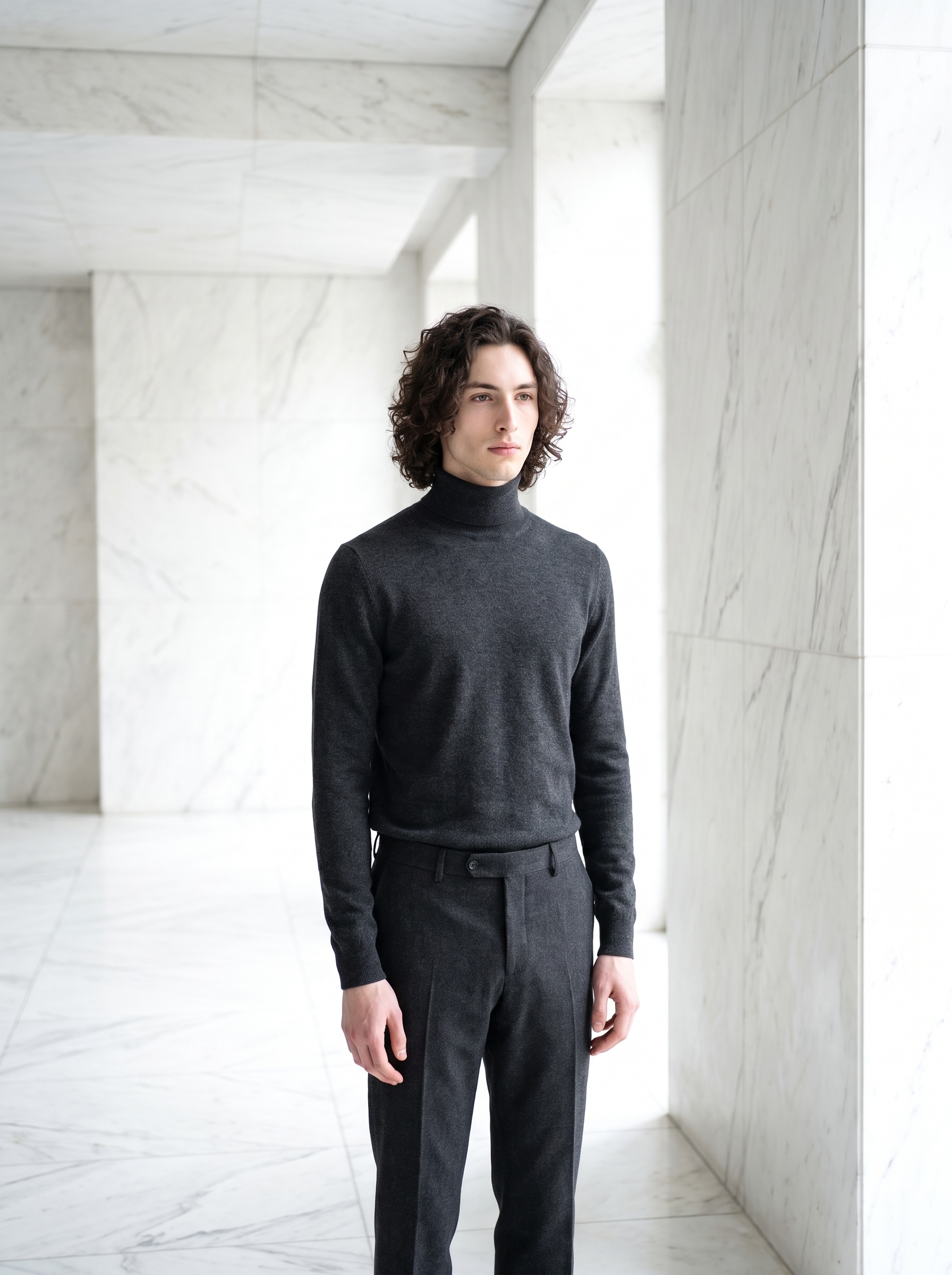
No color. No props. No busy background. Just a man in charcoal standing in front of white marble — the contrast doing all the work.
I've been wanting to try this angle for a while. Monochromatic outfits against pale stone interiors are everywhere in high-end editorial photography right now, and I was curious how Studio would handle the tonal tension — keeping the outfit readable against a background that's almost the same value.
So I ran it. Here's the result.
How Studio actually works
If you've never been inside Studio, here's the thing to know: you don't start with a blank text box. You start with a form.
You pick your character, then work through sections — Background, Fashion, Pose Library, Camera Angle, Camera Lab, Makeup, Location — and Studio assembles the prompt for you from those picks. The Camera Lab handles how the shot is photographed (body, lens, aperture, lighting). The other sections handle what's in the frame. There's an assembled prompt you can preview and edit before you generate, but most users never need to touch it. Pick from the form, hit generate.
That's the main path.
What I picked from Studio
White Marble Interior
This is a Background style in Studio's catalog. The full description is: in a luxurious white marble interior, bright natural light. I picked it because I wanted the background to feel architectural — not a studio seamless, not a location, but a constructed environment that reads as intentional. Floor-to-ceiling veined marble panels and natural light flooding in from off-frame windows. It's restrained in the best way: the marble adds texture and luxury without competing with the subject.
The pale background also created the exact challenge I was after — forcing the outfit to hold contrast against something almost as light as it is dark.
Minimalist Mono
This is a Fashion preset in Studio's catalog. The full description: Clean minimalist: charcoal cashmere turtleneck with matching wool trousers. I chose it because a turtleneck is one of the most architectural garments you can put on a person — it has no collar to distract, no lapel, no break at the chest. The monochromatic head-to-toe charcoal turned the outfit into a single shape. Against the white marble, that shape reads immediately.
The tip I kept in mind here comes straight from Studio's best-results guidance: Lighting Sets the Mood. Even though I didn't manually dial in a lighting style for this shot, the White Marble Interior background pulls bright natural light into the scene by design. That ambient, even illumination is what keeps the charcoal from going flat — it wraps around the fabric and gives the cashmere texture somewhere to live.
One more thing worth knowing
Worth knowing while you're in there: Studio's reference-images system is what made this shot mine rather than generic. When I picked myself as the character, Studio automatically loaded my saved reference photos and locked my identity into the generation — face, curly dark hair, green eyes, porcelain skin, the whole thing. The model maintains that visual continuity across every shoot. If you have your own AI character set up on the platform, this works exactly the same way for you. Select the character, and Studio does the rest.
The assembled prompt
This is what the form composed for me — you don't have to write any of this yourself unless you want to.
A tall young man with dark curly hair, green eyes, and porcelain skin stands in a luminous white marble interior — floor-to-ceiling veined marble panels, bright natural light pouring in from off-frame windows. He wears a fitted charcoal cashmere turtleneck with matching charcoal wool trousers, the monochromatic outfit creating a sharp tonal contrast against the pale marble. Relaxed upright posture, arms loose at his sides, gaze directed slightly off-camera. Full-body editorial frame, clean and architectural. Mood: refined, minimal, confident.You can see exactly how Studio translated the form picks into language. The marble environment, the cashmere turtleneck, the wool trousers, the mood — all of it came from the Background and Fashion selectors. I adjusted the posture and gaze direction in the editable prompt before generating, but the bones of the scene were already there.
What I noticed
Three things stood out after the generation landed.
First — the tonal contrast actually worked. The charcoal holds its weight against the marble without going muddy. The cashmere texture is visible, which I wasn't fully expecting at this value range.
Second — the natural light from the White Marble Interior setting did something interesting: it gave the image a time-of-day feel without me specifying one. Looks like mid-morning to me. That's the background preset doing real work.
Third — if I ran this again, I'd try a slightly lower camera angle. The full-body editorial frame is right for this look, but getting a worm's-eye or low 3/4 angle would push the architectural feel further. Studio's Camera Angle section has both as named presets — easy to swap next time.
What it cost
- Credits spent: 2.70
- What you'd pay: $0.27
- Generation time: ~26 seconds
For a 3:4 portrait at that quality level, that's a fast turnaround. I ran it once and the result was worth posting. No iterations needed on this one — though at $0.27 a run, iterating is cheap if you want to experiment.
If you want to try the same approach: go to Studio, select your character, pick White Marble Interior from the Background section, pick Minimalist Mono from Fashion — and hit generate. You don't need to write a single line. The form does it.
— David
See what others are making


Each image links to the character's profile. The Studio — Technical Guide has the full showcase plus deeper documentation on every component.