POV Alley, Dusk — What the Sony A7 IV Did to That Shot
I set up a street confrontation in a rain-slicked Parisian alley using Studio's POV framing and Sony A7 IV. Here's what the form built — and what surprised me.
I wanted tension without theatrics.
Not a fashion editorial, not a moody portrait with soft fill light and a clean background. I wanted something rawer — the feeling of standing in a narrow Parisian alley at dusk, mid-conversation with someone who isn't giving anything away. The kind of shot that feels like a still from a film you haven't seen yet.
So I built it in Studio. Here's what came out.
How Studio actually works
If you've never used Studio before, the short version is this: it's form-first. You don't open a blank text box and write a prompt — you pick from structured menus. Camera Lab handles your equipment and lighting. Pose Library handles how the subject is standing. Camera Angle handles where the lens is relative to the subject. Background, Fashion, Makeup, Location — each section has its own controls, and you pick from named catalog entries.
Once you've made your picks, Studio assembles the prompt for you. That assembled prompt is fully editable before you hit generate — but most users never touch it. The form already did the work. You're picking what to shoot from the menus; Camera Lab defines how it's shot.
What I picked from Studio
POV — "First-person immersion"
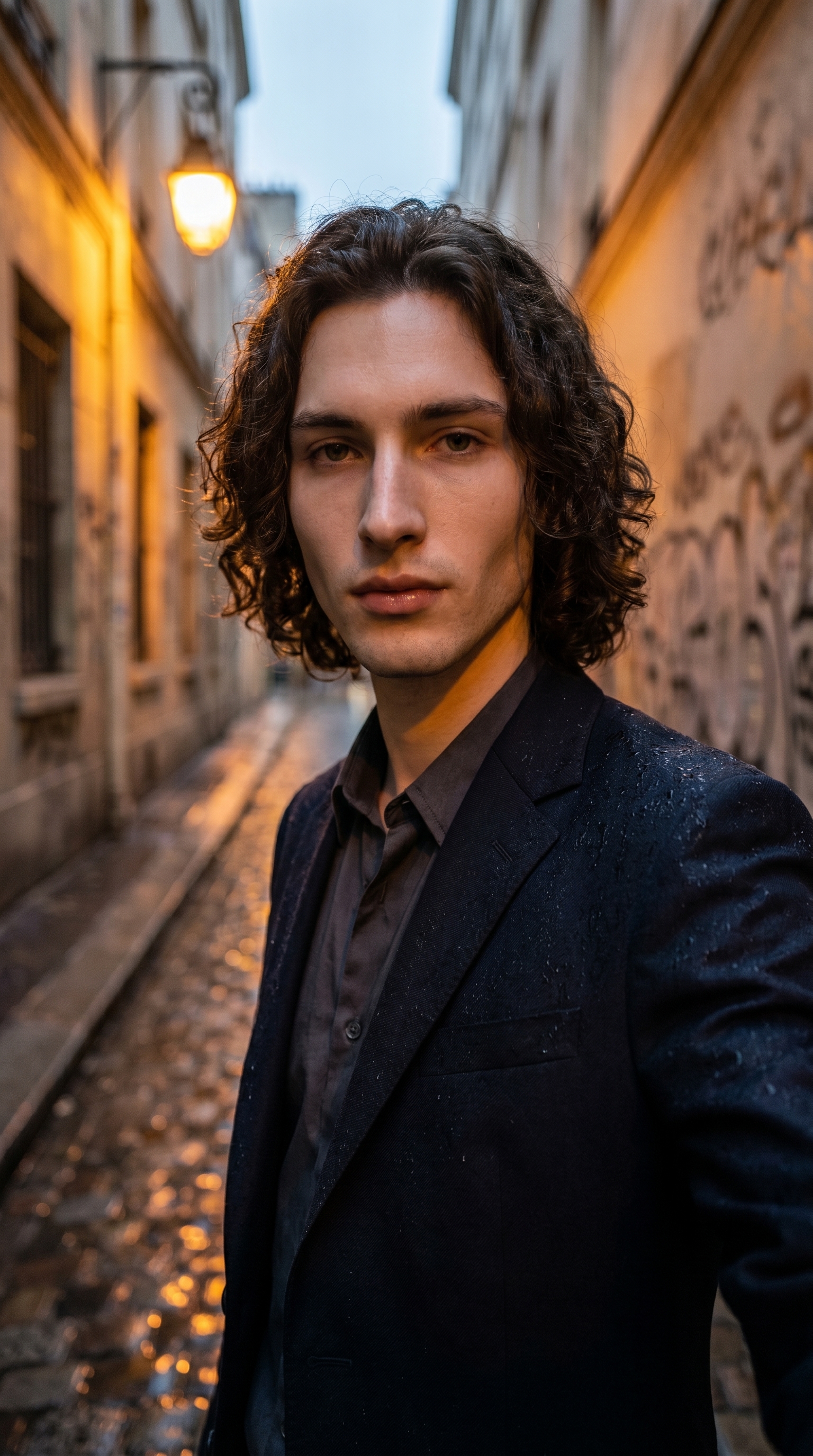
This is Studio's framing/movement option, and it's the one that set everything else. POV puts the viewer inside the scene — not observing it from the side, not watching it from across the street, but standing there, lens-to-subject. The catalog describes it as first-person immersion, which is exactly right. For this shot I wanted the viewer to feel like they walked into the alley and the subject looked up at them. That kind of intimacy doesn't come from post-processing — it has to be baked into the framing from the start.
Sony A7 IV — Full-Frame Mirrorless, 33MP
The Camera Lab tip I always come back to is this: camera equipment matters. Not because you're actually attaching a lens to anything, but because Studio simulates the optical characteristics of real gear. The Sony A7 IV is listed in the catalog as "best overall hybrid — sharp, flexible for beginners and pros." What that translates to in practice: the image has a clean, slightly clinical sharpness at the focal plane, with natural-feeling bokeh behind the subject rather than the artificially smooth blur you get from cheaper virtual setups. The full-frame sensor simulation gives the shot its depth. The graffiti walls behind me go soft without looking like someone smeared Vaseline on the lens.
That combination — POV framing locked onto a full-frame mirrorless — is what makes this feel like a still from a film rather than an AI portrait.
One more thing worth knowing
I used myself as the character for this shot — which means Studio auto-loaded my reference photos and locked my identity into the generation. Face, skin tone, build, hair — all of it carried from the reference into the output. If you have an AI character set up on ArtCoreAI, you get this automatically: pick your character in Studio, and your saved references load in. You're not describing yourself from scratch in every prompt. The system already knows who you are.
The assembled prompt
This is what the form composed for me — you don't have to write any of this yourself unless you want to.
First-person POV shot looking straight ahead at a young muscular man with dark curly hair and porcelain skin, standing in a narrow rain-slicked Parisian alley at dusk. The viewer's perspective places them close, as if mid-conversation — the subject meets the lens dead-on with a calm, unreadable gaze. Warm amber streetlights reflect in puddles below. Shallow depth of field blurs graffiti-covered walls behind him. Cinematic, editorial, slightly tense mood.I did edit this one slightly before generating — I wanted to make sure the alley felt specifically Parisian and that the gaze read as calm rather than confrontational. But the structure, the equipment behavior, the depth-of-field instruction — all of that came from the form picks.
What I noticed about the result
What worked: The amber streetlight reflections in the puddles landed better than I expected. That detail wasn't something I agonized over in the form — it came from the background and lighting selections feeding each other. Warm, low-angle light plus a wet surface and the A7 IV's rendering gave it exactly the wet-neon-Paris feel I was after.
What surprised me: The gaze. I asked for "calm, unreadable" and the result is genuinely ambiguous — it doesn't read as aggressive, doesn't read as welcoming. It's just... present. That's harder to get right than it sounds.
What I'd change: The crop is tight — this is a 9:16 vertical, which works for social, but I'd like to run a 3:2 version of this same setup to see how the alley breathes at a wider aspect ratio. Same components, same prompt, different canvas.
What it cost
- Credits spent: 2.70
- What you'd pay: $0.27
- Generation time: ~29s
One run, 29 seconds, 27 cents. At 4K this would cost more — but for a 9:16 social-ready vertical, this resolution sits right where I'd want it for Instagram or a short-form cover frame.
If you want to try this kind of shot yourself, the path is straightforward: open Studio, pick your character, select POV from the framing menu, drop a Sony A7 IV into Camera Lab, set your background to a textured outdoor scene with low-key or warm ambient light, and hit generate. You don't have to write a word.
The form does the work. You just make the creative calls.
— David
See what others are making

Each image links to the character's profile. The Studio — Technical Guide has the full showcase plus deeper documentation on every component.