Vintage Prep on a Cobblestone Street — Studio Demo
I picked a sky blue oxford, camel chinos, and a sunlit European street — then let Studio build the shot. Here's what came back.
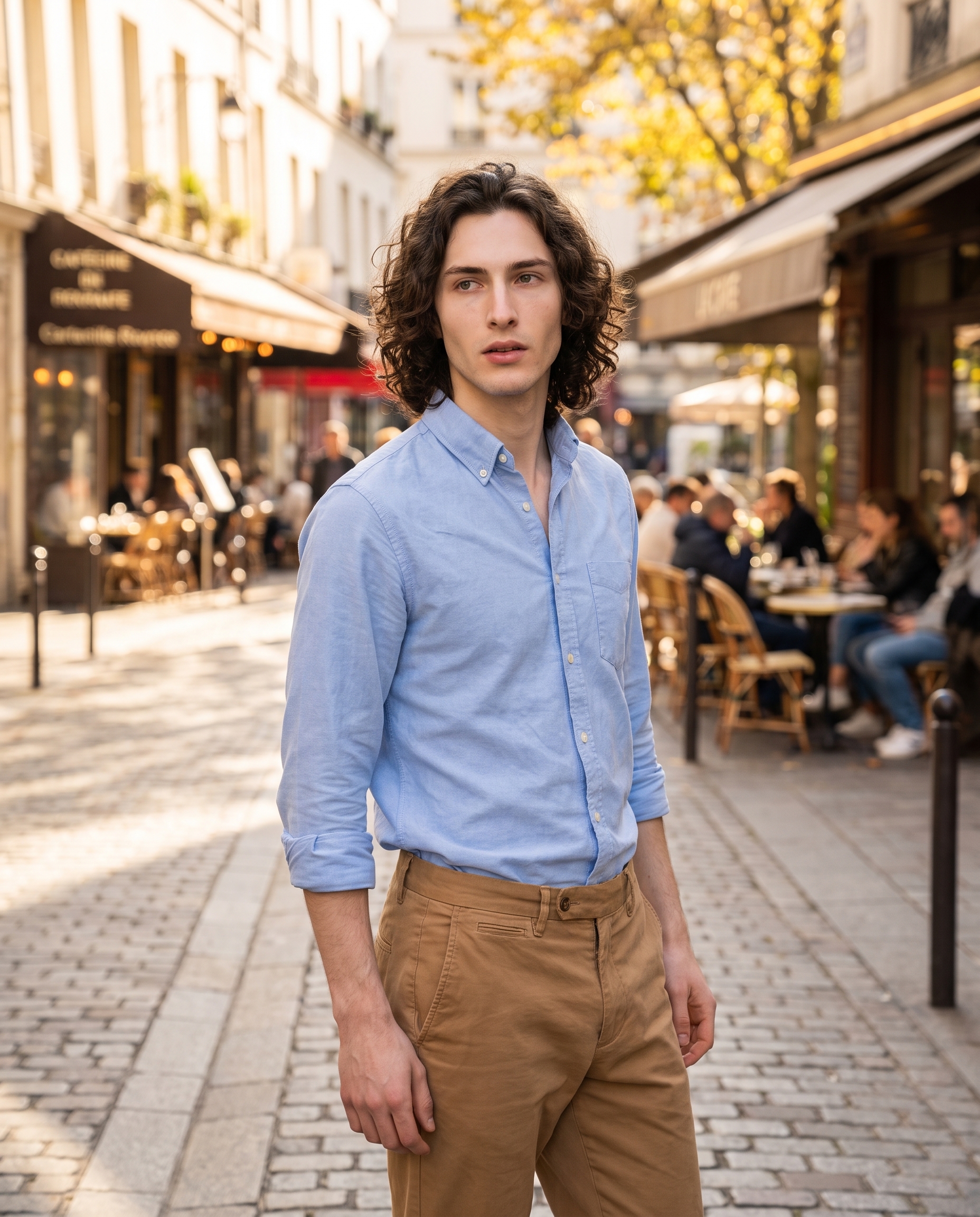
I wanted a candid. Not a studio white-wall portrait, not a fashion plate — something that looked like a photographer caught me mid-stride on a Saturday afternoon in some unnamed European city. Cobblestones, golden autumn light, a cafe facade bleeding out of focus behind me. The kind of image that reads as editorial without trying to.
That's the brief I gave myself today. Here's what Studio gave back.
How Studio actually works
If you've never opened Studio, here's the thing that surprises most people: you don't write the prompt. You pick from the form — Camera Lab for your equipment and lighting, Pose Library for body position, Camera Angle for your viewpoint, Background for the environment, Fashion Designer for the outfit, and so on. Every pick you make feeds into a prompt that Studio assembles for you. The "what to shoot" comes from your form choices; the "how it's shot" comes from Camera Lab. You can edit the assembled prompt before hitting generate — but most users never need to touch it.
What I picked from Studio
Vintage Prep — this is a named outfit preset in Studio's Fashion Designer section. The catalog description reads as a classic preppy combination: sky blue cotton oxford shirt with camel chinos. I picked it because it's specific without being loud. Sky blue reads as clean and approachable in daylight; camel is warm enough to absorb afternoon light without going golden. For a street portrait where the location is doing a lot of work, you want clothes that belong — not clothes that shout.
One thing worth naming here: the operating tip that keeps showing up in my best results is Describe the Scene, let Camera Lab handle the look. With Vintage Prep handling the outfit description automatically, I could focus the prompt text on the environment and energy — cobblestones, cafe facades, autumn leaves, candid feel — rather than spending words on clothing. The form did that work for me.
I also picked myself as the character for this generation. That's Studio's reference-images feature at work: when you select a character, their saved reference photos auto-load and lock identity into the result — face, body type, skin tone, hair. My reference is already saved in the system, so the model knew it was generating me: tall, long dark curly hair, porcelain cool-toned skin, green almond eyes. No additional setup required. If you have your own AI character on ArtCoreAI, it works exactly the same way — pick your character and their identity is locked before you make a single other choice.
Worth knowing while you're in there: Studio also has a Location component that pulls real places from Google Maps with Street View reference imagery. For a European cobblestone street like this, you could actually pin a specific rue in Lyon or a square in Lisbon and the AI generates the scene at that exact location. I didn't use it today — I described the environment in the prompt instead — but for shots where place specificity matters, that component is worth opening.
What the form composed
This is what Studio assembled from my picks. You don't have to write any of this yourself unless you want to.
A tall young man with long dark curly hair, porcelain cool-toned skin, and green almond eyes, wearing a sky blue cotton oxford shirt with camel chinos, standing casually on a sunlit European cobblestone street. Shot in a wide-normal street style capturing the full environmental context — cafe facades and golden autumn leaves in the background softened by a fast aperture. Natural light, authentic candid energy, warm afternoon color grading, slight foreground-to-midground depth. Vibrant, immersive, magazine photojournalism feel.What I noticed
Three things stood out.
First, the depth separation landed better than I expected. The foreground-to-midground instruction actually read — there's a real sense of layers in the result, not a flat composite. The bokeh on the cafe background is soft without being aggressive.
Second, the light direction is consistent. Afternoon sun hitting from the right, which matches the warm color grading without fighting it. That's the kind of thing that breaks immersion in AI images when it goes wrong, and here it held.
The one thing I'd change: the pose. I didn't specify one from the Pose Library today — I let the prompt description carry it. "Standing casually" is doing a lot of work, and the result is a fairly neutral stance. Next time I'd go into Pose Library and pick something with a bit more movement — weight shifted, maybe mid-stride. The environment earns a more dynamic subject.
What it cost
- Credits spent: 2.70
- What you'd pay: $0.27
- Generation time: ~29 seconds
For 4:5 format at this quality level, that's a fair trade. I'd iterate freely at this price — run three or four variations on the pose before committing.
If you want to try this yourself, Studio is here. Pick a lighting setup, pick an outfit preset, pick a background — the form builds your shot. You don't need to write a prompt to get a result worth using.
— David
See what others are making

Each image links to the character's profile. The Studio — Technical Guide has the full showcase plus deeper documentation on every component.