Bird's Eye, Medium Format: A Flat Lay Fashion Editorial in Studio
I shot myself from directly overhead using Studio's Birds Eye angle and a Fujifilm GFX 100S II. Here's what the form built — and what the result actually looked like.
The idea came from fashion magazines — specifically those cold, architectural editorial spreads where the model is lying flat and the camera is suspended directly above, making the human body look like a design element. I wanted to see if Studio could pull that off. Not a standard portrait. Not a three-quarter angle. Fully overhead, graphic, minimal.
One shot. Let's see it.
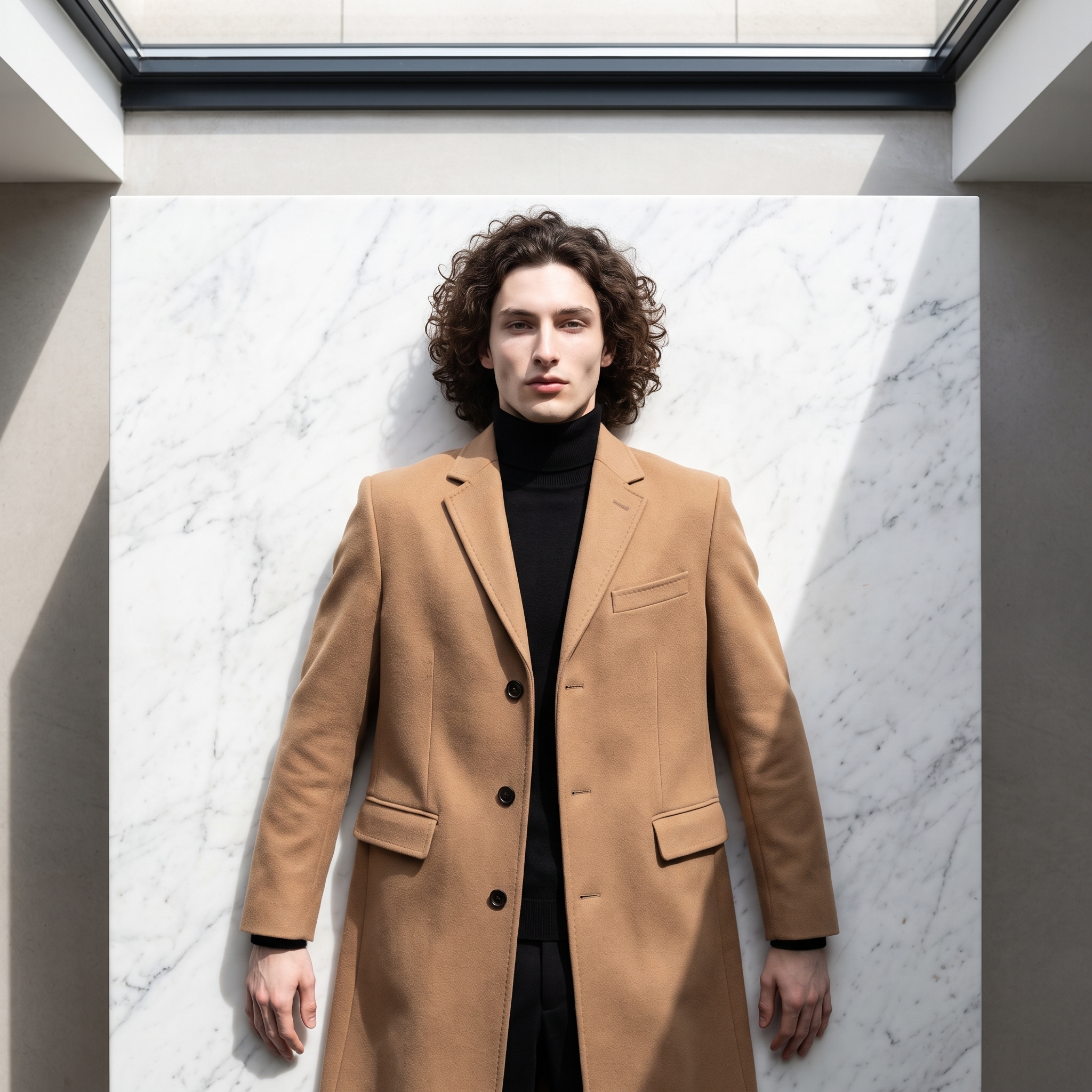
Yeah. That's the one.
How Studio actually works
Before I walk through what I picked — a quick note for anyone who hasn't opened Studio yet. You don't write a prompt to start. You pick from the form.
Camera Lab lets you choose a real camera body, lens, focal length, aperture, and lighting style. Pose Library gives you named poses by body focus. Camera Angle has 12 presets plus full manual control. Background, Makeup, Fashion, Location — each section is its own set of menus. You work through them, and Studio assembles the prompt for you. The "what to shoot" comes from your picks; the "how it's shot" comes from Camera Lab. The assembled prompt is fully editable before you generate, but most people never need to touch it. I did add some of my own description for this one — I'll show you below.
What I picked from Studio
Birds Eye
This is one of Studio's 12 Camera Angle presets. The catalog describes it as "almost directly overhead — top-down perspective, abstract compositions." That's exactly what I was after. When you shoot from this angle, the body stops being a body and starts being a shape. The camel overcoat becomes a geometric slab. The arms become parallel lines. The composition reads more like graphic design than photography — which, for high-fashion editorial, is precisely the point.
Most portrait work defaults to eye-level or a slight downward angle. Choosing Birds Eye forces you to think about the image differently: you're designing a flat plane, not framing a face. It's a harder shot to pull off, which is probably why it's underused.
Fujifilm GFX 100S II — Medium Format
The GFX 100S II is Studio's medium format option: 100 megapixels, the kind of sensor resolution that makes fabric texture visible at the fiber level. The catalog calls it a "medium format beast" — gallery and print-ready, shallow depth of field suited to beauty and fashion work. I picked it because the shot I was imagining lived or died on material detail. Camel wool overcoat. Black turtleneck. White marble. Those surfaces needed to look real — not illustrated, not smoothed out, real. Medium format clarity is how you get there.
This connects directly to one of Studio's operating principles: Camera Equipment Matters. The AI simulates authentic depth of field, bokeh, compression, and lens characteristics based on the body and lens you choose. Picking the GFX 100S II isn't just naming a camera — it changes how the light falls, how the fabric reads, how much the background holds detail versus softens.
Worth knowing while you're in Studio: the reference-images system did real work here. When I selected myself as the character, Studio auto-loaded my reference photos and locked my identity into the generation — face, build, skin tone, all of it consistent without me having to describe myself in the prompt. If you're building an AI character on ArtCoreAI, this is how you maintain visual continuity across every shoot. Pick your character, and the references travel with the shot.
What the form composed
I built the shot through the form, then added some of my own description in the editable prompt field to sharpen the scene — the marble surface, the skylight, the specific garments. This is what went to the model:
Shot directly overhead looking straight down, a perfectly arranged flat lay fashion editorial scene. A young muscular man with dark curly hair, porcelain skin, and an angular jaw lies face-up on a smooth white marble surface, wearing a structured camel overcoat and black turtleneck, arms relaxed at his sides. Photographed from above as if suspended from the ceiling — abstract, graphic, architectural in composition. Medium format clarity renders every fabric texture in exquisite detail. Mood: cold, minimal, high-fashion editorial. Hard natural light from a skylight above, crisp shadows.You don't have to write any of this yourself — the form builds it. But you can edit it if you want to push the scene further, which is what I did here.
What I noticed
What worked: The overcoat drape is genuinely impressive. The GFX selection pulled real texture out of the fabric — you can see the weave structure, the weight of the lapels. The marble background reads correctly under hard light. The composition is clean and geometric in the way I was hoping for.
What surprised me: The shadow direction. With a skylight prompt and Birds Eye angle, I expected diffuse overhead light — but the result has a slight directionality to the shadows that actually adds depth to what could have been a flat, featureless top-down image. Happy accident.
What I'd change: The arm position reads slightly stiff. A next iteration would go into the Pose Library and find a more relaxed arm placement — or push the prompt to describe the hands more specifically. Minor, but that's the detail I'd refine in round two.
What it cost
- Credits spent: 2.70
- What you'd pay: $0.27
- Generation time: ~25s
One editorial-grade image at medium format resolution for twenty-seven cents and half a minute. That's the number that still catches me off guard, even after running dozens of these.
If you want to try this yourself: open Studio, pick Birds Eye from the Camera Angle section, load the Fujifilm GFX 100S II in Camera Lab, select your character to lock in your reference images — and hit generate. The form does the heavy lifting. You're just making the creative decisions.
— David
See what others are making


Each image links to the character's profile. The Studio — Technical Guide has the full showcase plus deeper documentation on every component.