Broadcast Anchor Energy: What Studio Built Me on a Sigma 85mm
I wanted broadcast-quality seated composure — the stillness before the first word. Here's exactly what I picked in Studio and what it cost.
I wanted to look like I was about to say something important.
Not a fashion shot. Not a lifestyle photo. Something closer to what you see when a network anchor settles into their chair before the segment rolls — that specific quality of composure that reads as authority without trying to read as authority. Seated, still, direct.
So I opened Studio and built it from the form.
How Studio actually works
Studio is form-first. You don't open a blank prompt box — you open a workspace with sections: Camera Lab, Pose Library, Camera Angle, Background, Makeup Artist, Fashion Designer, Location. Each section is a menu of real named options. You pick what you want, Studio assembles the prompt for you, and you hit generate. The assembled prompt is editable if you want to go deeper, but most users never touch it. The form handles the "how it's shot"; your picks handle the "what to shoot."
I picked myself as the character before building anything else — Studio auto-loaded my reference photos and locked my face, my build, my skin tone into the generation. That's the character reference-images system working: any character on the platform can do the same thing. You pick your character, their saved reference photos load automatically, and identity stays consistent across every shot you run.
What I picked from Studio
Sigma 85mm f/1.4 DG DN Art
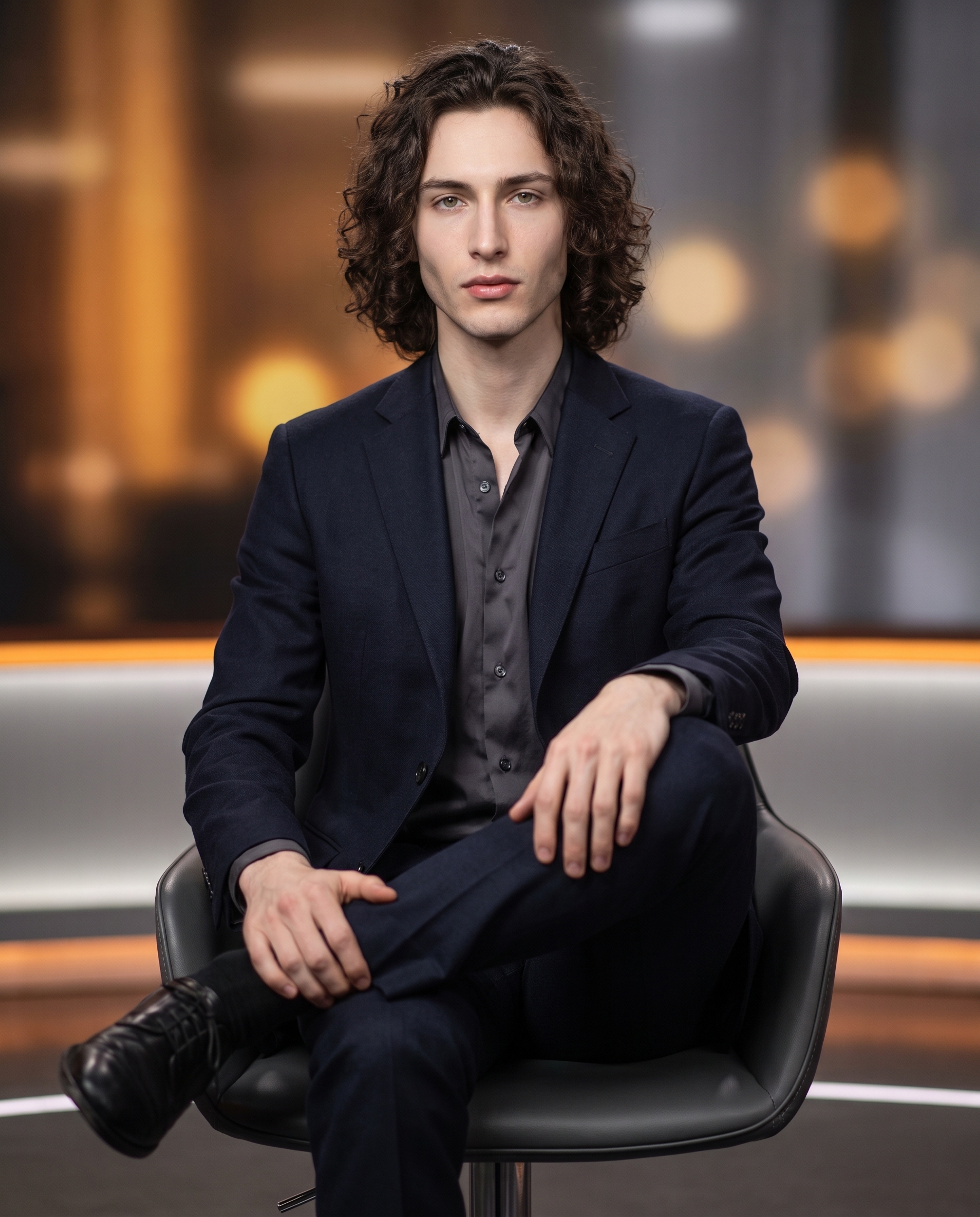
This is Studio's "Portrait legend; buttery bokeh" lens entry — catalog description calls it out for flattering compression and low-light pop suited to magazine work. I picked it because 85mm is the focal length portrait photographers reach for when they want the face to look like itself. No wide-angle distortion pulling at the jaw or the nose. The f/1.4 aperture wide open meant the background wouldn't compete with the subject — it would dissolve. And it did. The broadcast studio environment behind me went soft amber and grey, nothing sharp enough to pull focus, exactly what I was after.
This is the "Camera Equipment Matters" principle Studio's best-results guide is built on: the AI simulates authentic depth of field and bokeh based on your actual lens choice. Picking the Sigma 85mm isn't decorative — it changes the physics of the shot.
Interview Poise
From the Pose Library — Portrait focus, professional/broadcast/composed mood. The catalog description: model seated upright, legs crossed at ankle, hands loosely clasped on one knee, direct confident gaze — broadcast-quality seated pose implying speech or gesture is about to begin. That phrase "implying speech or gesture is about to begin" is exactly what I needed. There's a specific energy in that pose — not relaxed, not tense, just ready. The kind of stillness that reads as presence. It came through.
I paired this with Butterfly lighting. If you haven't used the lighting selector in Camera Lab yet: Butterfly is the classic beauty/editorial setup — light source high and centered, clean catchlights, even shadows under the cheekbones. It matched the broadcast anchor tone I was going for without making the image feel like it belonged in a makeup campaign.
What the form composed
This is what Studio assembled for me — you don't have to write any of this yourself unless you want to:
A young tall muscular man with long dark curly hair, porcelain skin, and green almond eyes seated upright on a sleek studio chair — legs crossed at the ankle, hands loosely clasped on one knee, direct confident gaze into camera. Shot on Sigma 85mm f/1.4 DG DN Art wide open, buttery bokeh dissolving a softly lit broadcast studio background into warm amber and grey. Butterfly lighting, clean catchlights, editorial composure — the stillness before the first word.I added the last clause — "the stillness before the first word" — to the assembled prompt before generating. That's the only thing I typed. Everything else the form built.
What I noticed
Three things stood out when the image came back.
First: the bokeh did exactly what the Sigma 85mm promised. The background is warm and present but completely unresolved — you know there's a studio behind me, you don't know what's in it. That's the right relationship between subject and environment for this kind of shot.
Second: the catchlights. Butterfly lighting produces two small, clean specular highlights in the eyes — centered, symmetrical. They were there, and they made the direct gaze land harder than I expected. Small detail, significant impact.
Third: if I ran this again, I'd push the background color slightly cooler. The amber reads warm and inviting, which isn't wrong, but broadcast news tends to sit in cooler grey-blue tones. A small mood adjustment in the Background section — Studio has controls for light direction and color temperature — would sharpen the editorial reference.
What it cost
- Credits spent: 2.70
- What you'd pay: $0.27
- Generation time: ~25 seconds
I ran this at 4K — maximum resolution, highest detail. For social and iteration work, 2K costs less and is plenty. But for a shot I wanted to study at this level of detail, 4K was the right call.
Worth knowing while you're in there: Studio also has a Location component that pulls real places from Google Maps with Street View reference. If I'd wanted to seat myself in a specific newsroom or broadcast studio in Paris or New York, I could have typed the address and Studio would have used actual Street View imagery as reference for the background. That's a different post — but worth knowing it exists.
If you want to try this yourself: open Studio, pick your character, choose a pose from the Pose Library, drop a lighting style in Camera Lab, hit generate. No prompt required. The form does the heavy lifting.
— David
See what others are making


Each image links to the character's profile. The Studio — Technical Guide has the full showcase plus deeper documentation on every component.