Grunge Revival: I Put Myself on a Rain-Slicked Runway
I wanted dark alt-fashion editorial — smudged kohl, distressed leather, a confident stride. Here's how Studio's form built it for me in 29 seconds.
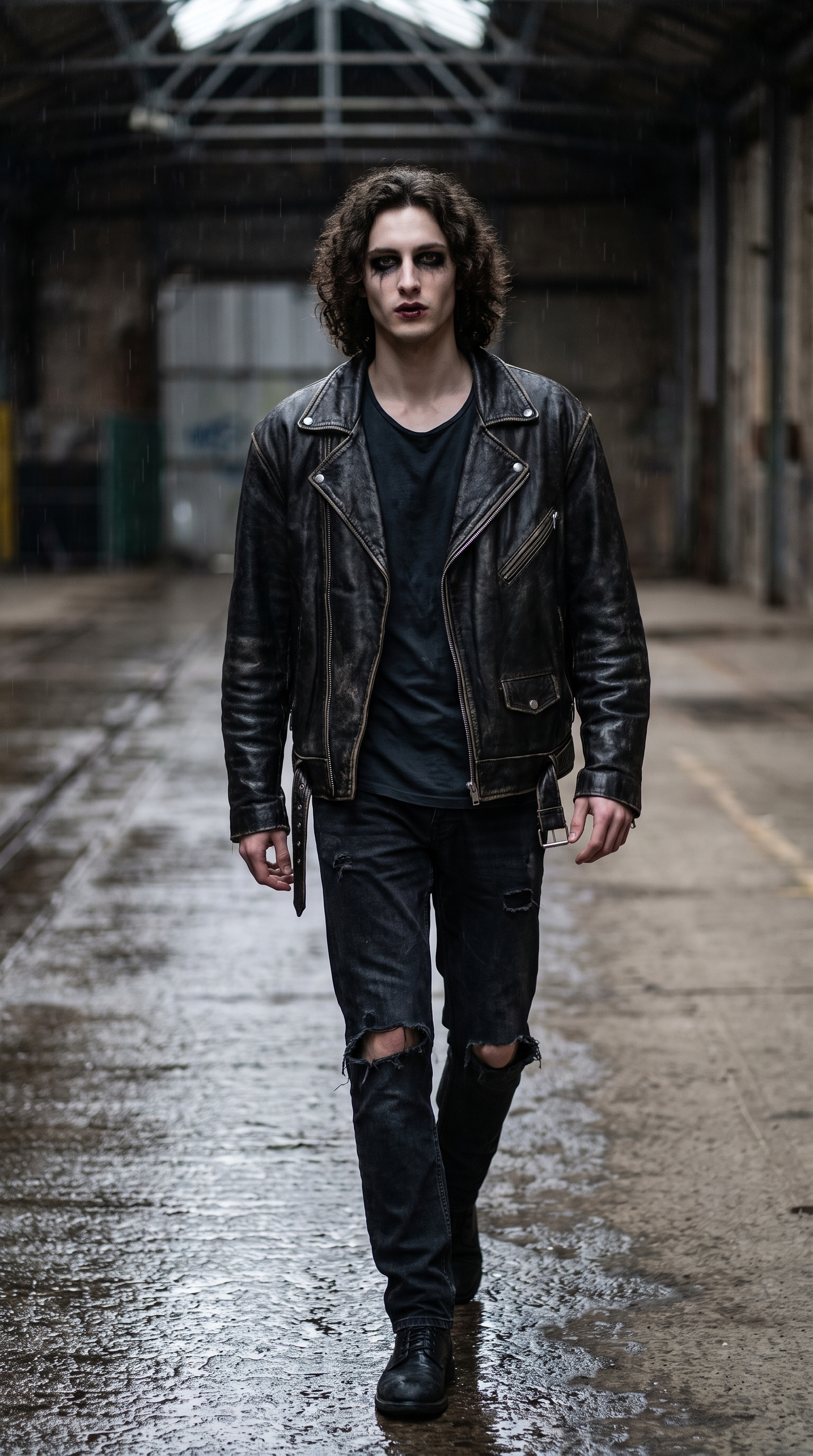
I wanted a specific image in my head: me, striding forward on a wet urban runway, makeup that looks like it survived a three-day festival, leather jacket that's seen better decades. Dark, editorial, a little undone. The kind of shot that belongs in a print spread that takes itself seriously.
So I opened Studio and picked my way to it — no prompt writing required.
How Studio actually works
Studio is a form-first workspace. You don't open a blank text box and start writing — you pick from menus: Camera Lab, Pose Library, Camera Angle, Background, Makeup Artist, Fashion Designer, Location. Each section controls one specific dimension of the shot. When you're done picking, Studio assembles the full prompt for you. The "what to shoot" comes from your form choices; the "how it's shot" comes from Camera Lab. There's an assembled prompt you can preview and edit before you generate — but most of the time, you never need to touch it.
What I picked from Studio
Makeup look: Grunge Revival 90s
This is one of Studio's named makeup presets in the Makeup Artist section. The catalog calls it "smudged, undone — dark, messy, heroin chic revival," and that description is accurate to what landed in the image. Heavy kohl bleeding at the corners, dark lips slightly parted, the whole thing carrying that intentional-mess energy. I chose it because the look is the story here — the makeup isn't supporting the shot, it's what the shot is about. If I'd gone with something cleaner, the whole editorial angle would've collapsed.
Pose: Runway Walk
From the Pose Library, body focus Full Body, mood tagged as confident / fashion / dynamic. The catalog description: "model striding confidently forward, one foot crossing in front of the other, arms swinging naturally." What I needed here was motion that read as deliberate — not a static stand, not a casual walk. The runway walk delivers exactly that: the crossing foot placement is what makes a runway walk look like a runway walk, and Studio renders it correctly. The full-body pose also meant the outfit reads — there was no point in dressing me in distressed leather and torn jeans and then cropping it to a portrait.
One note on lighting — and this is from the Studio operating tips I actually follow: Lighting Sets the Mood. I specified low dramatic side lighting in the assembled prompt, and it did exactly what side lighting does: it carves shadows, puts depth into the face, makes a high-contrast editorial image feel like it was shot in a real space. If I'd used flat high-key fashion lighting, the grunge aesthetic would've read as costume. Lighting is not decoration — it's half the image.
Worth knowing: character reference images
I picked myself as the character at the top of the Studio session — which auto-loaded my reference photos and locked my identity into the generation. Face, body type, skin tone, hair — it all carries through. If you have an AI character built on ArtCoreAI, that same feature works for them: select your character, their saved reference images load, and Studio maintains visual continuity across every shot you run. No extra setup.
The assembled prompt
This is what the form composed for me — you don't have to write any of this yourself unless you want to:
A tall muscular young man with long dark curly hair and porcelain cool-toned skin strides confidently forward on a rain-slicked urban runway, one foot crossing in front of the other, arms swinging naturally. His face carries smudged dark eye makeup, undone and messy — heavy kohl bleeding at the corners, dark lips slightly parted, heroin-chic undone aesthetic. Oversized distressed leather jacket, torn dark jeans. Industrial warehouse backdrop, low dramatic side lighting, deep shadows, editorial fashion mood.That's the full thing. You can edit it before you generate — change the backdrop, swap the jacket, pull the lighting direction — but the form already did the structural work.
What I noticed about the result
The makeup landed exactly as the preset promised. The smudged eye reads immediately — not subtle, not "editorial clean with a hint of edge," actually undone. That was the right call for this angle.
The pose works. The crossing-foot placement is there, the body language reads as deliberate forward motion. At 9:16 aspect ratio with a full-body pose, you get the full stride — which is what I needed.
If I ran this again, I'd experiment with the Camera Angle — specifically a low worm's-eye elevation to push the power dynamic further. The current framing is strong, but a ground-level angle on a runway walk would make the whole thing feel more confrontational. That's my next iteration.
What it cost
- Credits spent: 2.70
- What you'd pay: $0.27
- Generation time: ~29s
That's $0.27 for a 4K-capable editorial shot at 9:16. One generation, 29 seconds.
If you want to run this yourself — pick a makeup preset, pick a pose, hit generate — Studio is here. You don't need to write a single word of the prompt unless you want to.
— David
See what others are making


Each image links to the character's profile. The Studio — Technical Guide has the full showcase plus deeper documentation on every component.