Rooftop Drift: A Disconnected Portrait Above Paris
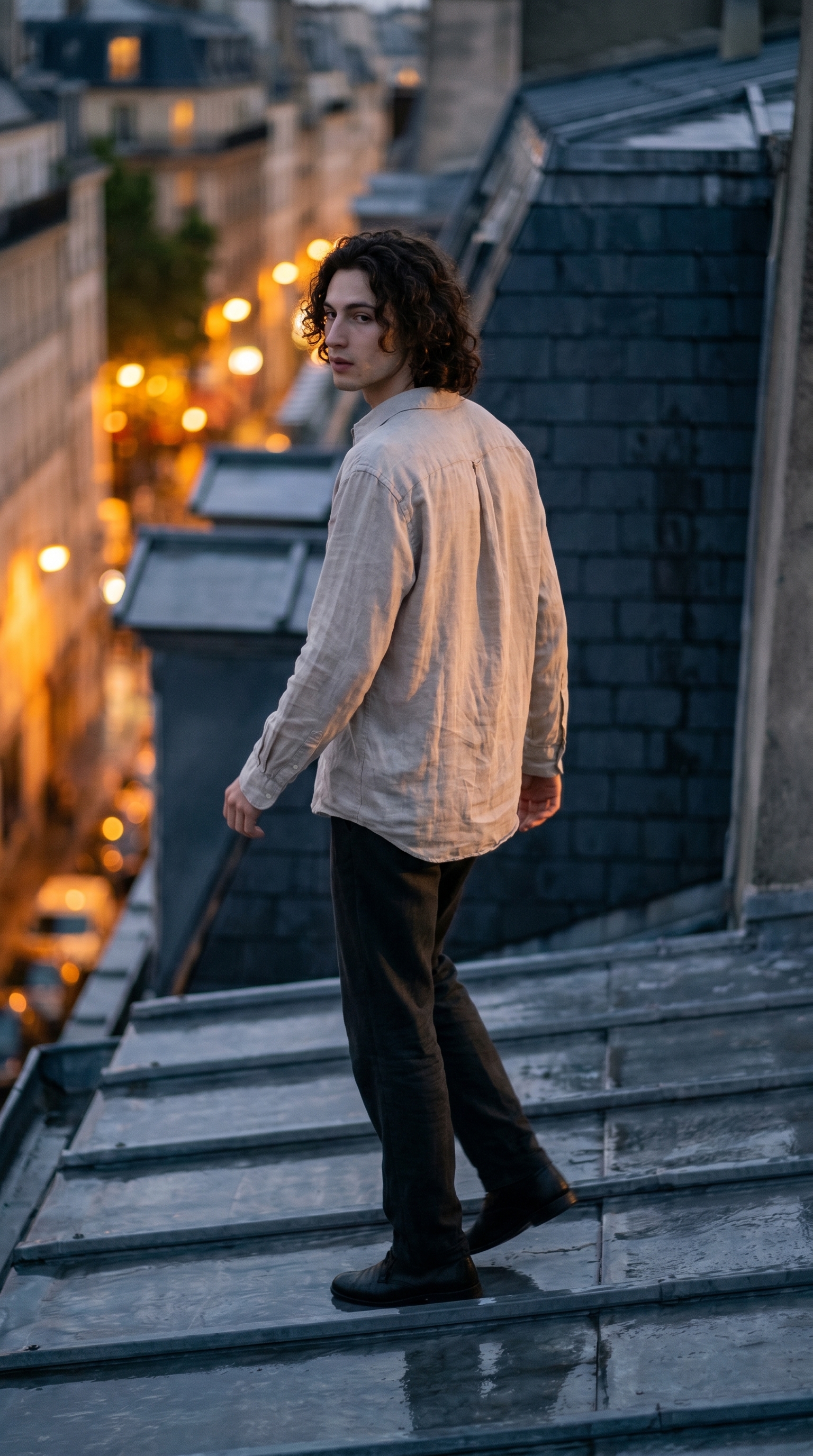
I wanted a shot that felt like a memory dissolving — me on a rain-slicked Parisian rooftop at dusk, mid-step, gaze trailing nowhere. Here's how Studio built it.
I wanted a shot that felt like you caught me between moments.
Not posed. Not looking at the lens. Just — mid-step, somewhere above the city, gaze drifting toward something off-frame that doesn't exist. That particular feeling of being present in a place while your mind is already elsewhere.
That's the shot I went into Studio to make today.
How Studio actually works
Studio is form-first — which matters, because a lot of people assume AI image tools require you to write a detailed prompt from scratch. They don't. Not here.
You open Studio, pick your character, then work through the sections: Camera Lab, Pose Library, Camera Angle, Background, Makeup, Fashion, Location. Each section controls a different dimension of the shot. Studio assembles everything into a prompt for you — you never have to write a word unless you want to. The "what to shoot" comes from your form picks; the "how it's shot" comes from Camera Lab. The assembled prompt is editable before you generate, but most users never touch it.
I'll show you exactly what I picked.
What I picked from Studio
Look-Away Drift — Pose Library, Portrait category
This is the pose that made the whole concept possible. The catalog describes it as: model drifting laterally while looking away from direction of travel, body in a gentle side-step, gaze off to the side — dreamy disconnected motion keyframe. In plain terms: I'm mid-step, body facing one direction, eyes pointed somewhere else entirely. It reads as someone lost in thought, not performing for a camera. That disconnection is the entire mood of this shot. If I'd picked a static forward-facing pose, none of the rest of it would have landed.
Over Shoulder Left — Camera Angle
The catalog description: behind-left angle looking over the shoulder. Cinematic storytelling. I picked this because it completes what Look-Away Drift started. I'm already looking away from the camera — and now the camera is behind me, looking over my shoulder into wherever my gaze is going. The viewer follows me into the frame instead of being confronted by it. It's the difference between a portrait and a scene.
One operating tip worth taking seriously here: Camera Equipment Matters. Even though I'm focusing on pose and angle in this post, I still went into Camera Lab and set a shallow aperture to get that soft background blur — the amber city lights dissolving below the rooftop. Without that depth-of-field setting, those lights would have been sharp and distracting. The Camera Lab isn't just for photographers who care about specs. It changes what the image looks like.
The assembled prompt
This is what the form composed for me — you don't have to write any of this yourself unless you want to.
Young European man with dark curly hair and porcelain skin, wearing a loose linen shirt, captured from behind-left over his shoulder as he drifts sideways across a rain-slicked Parisian rooftop at dusk. His body mid-step, gaze trailing away from direction of travel — dreamy and disconnected. Warm amber city lights blur softly below. Cinematic editorial mood, shallow depth of field, cool-toned shadows with golden rim separation.I did make one small manual addition after the form assembled it — I asked for "golden rim separation" on the shadows, because I wanted that warm city light to trace my silhouette against the cool blue dusk. That's the kind of thing you add when you know what you want. Most shots? The form handles it.
Worth knowing: character references
Before I hit generate, I selected myself as the character in Studio. That auto-loaded my reference photos and locked my face, hair, and skin tone into the generation. I didn't have to describe myself in the prompt — Studio already knew what I look like. If you've built an AI character on ArtCoreAI, you can do exactly the same thing: pick your character, and their identity travels into every shot.
What I noticed
The rain-slicked surface worked better than I expected. I didn't specify a wet rooftop explicitly in the form — that came through in the location and mood settings — and the reflections read as genuinely photographic. The golden rim light separating me from the background was the detail I'm happiest with. It stops the figure from dissolving into the dusk.
What I'd change: I'd push the linen shirt to something with more texture — maybe a worn canvas jacket — so the fabric reads more distinctly at this angle. The loose linen is a little indistinct from the over-shoulder view.
The 9:16 format was the right call. This shot needed vertical space — city below, sky above, me somewhere in the middle of it.
What it cost
- Credits spent: 2.70
- What you'd pay: $0.27
- Generation time: ~23 seconds
One generation at 2K. Fast enough that I ran two iterations to get the rim light where I wanted it before committing.
If you've been waiting to try Studio, this is the kind of shot that takes about three minutes to set up — pick a pose, pick a camera angle, pick a lighting style, hit generate. You don't need to write a single word.
Open Studio and build your shot →
— David
See what others are making


Each image links to the character's profile. The Studio — Technical Guide has the full showcase plus deeper documentation on every component.