High Front, Classic Stance: A Studio Editorial Portrait Demo
I ran a full-body editorial portrait in Studio today — picked two components, let the form do the work, and spent $0.27. Here's what came out.
I wanted to make something that felt like a fashion editorial cover — the kind of shot where the subject owns the frame. Not a headshot, not a lifestyle candid. A full-body image with real authority to it.
The question was: which two Studio components would carry that feeling most?
I landed on Classic Stance for the pose and High Front for the camera angle. Those two choices, more than anything else in the session, shaped the result.
How Studio actually works
Studio is form-first. You don't open a blank text box and start typing — you open a workspace with named sections: Camera Lab, Pose Library, Camera Angle, Background, Makeup Artist, Fashion Designer, Location, Product Placement. You pick from menus. Studio assembles the prompt for you.
The way to think about it: your picks describe what to shoot (the pose, the background, the outfit, the mood). Camera Lab handles how it's shot (the camera body, the lens, the aperture, the lighting). Those two layers combine into a single generated prompt you can preview before you hit generate. Most users never need to edit it — but it's there if you want to.
What I picked from Studio
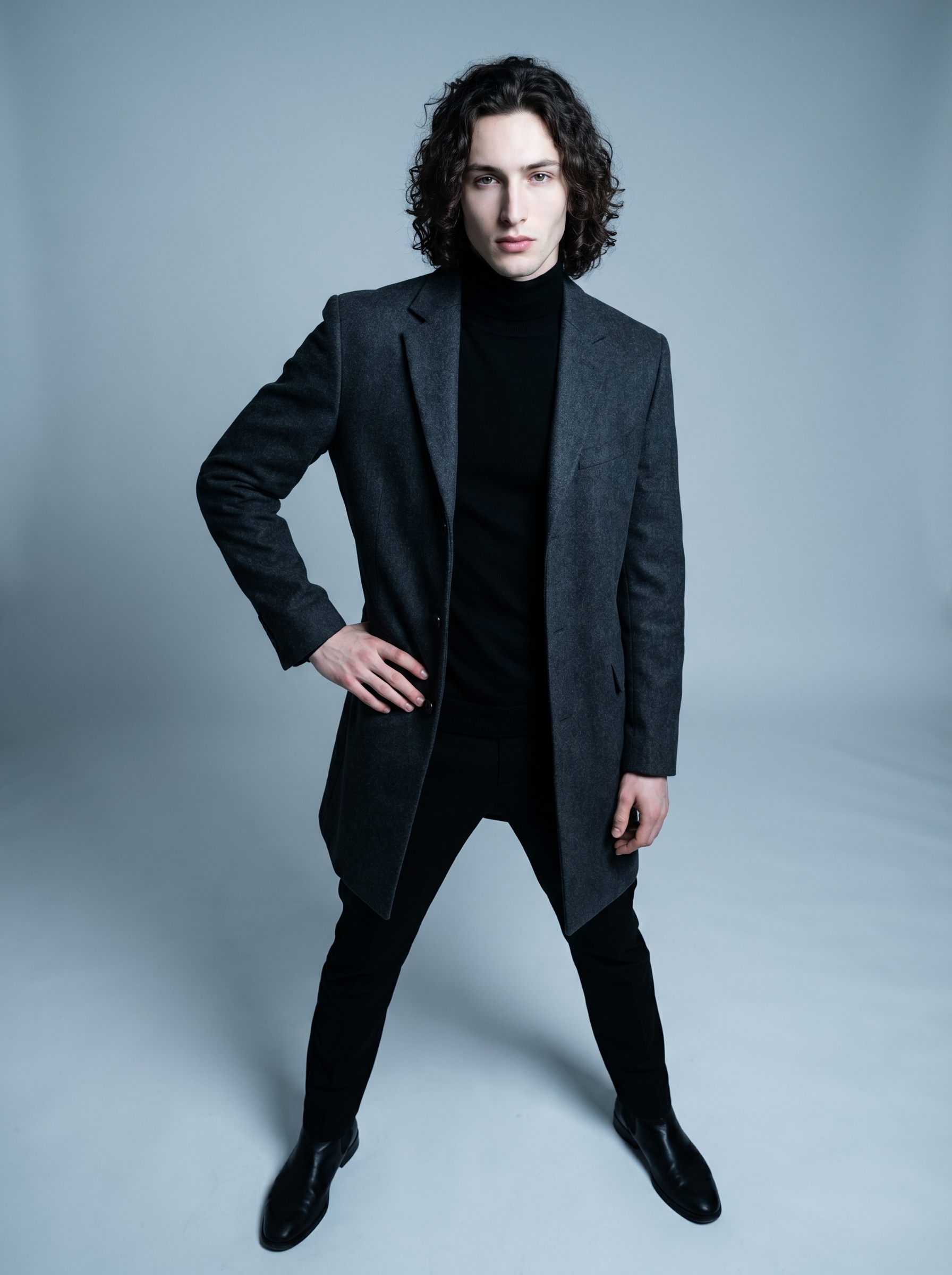
Classic Stance is one of Studio's named poses from the Pose Library, filed under Full Body. The catalog description is exactly what it sounds like: model standing tall, feet shoulder-width apart, one hand on hip, weight shifted slightly to one leg. It's the foundation of editorial posing — not dramatic, not casual, just composed and grounded. I picked it because I didn't want tension or motion in this shot. I wanted stillness that reads as confidence. Classic Stance delivers that.
High Front is a Camera Angle preset — one of twelve named presets in Studio's angle catalog. Elevated front angle, looking down. The catalog tags it for fashion editorial and authority, and that's exactly the effect: shooting slightly downward on a full-body subject compresses the frame in a way that makes the stance feel deliberate, intentional. It adds weight without adding drama.
These two picks together are doing most of the compositional work. The pose grounds the subject. The angle frames them with editorial distance.
On the lighting side: I went High-Key — crisp, clean, cool-toned. This connects directly to one of Studio's core operating principles: Lighting Sets the Mood. High-Key fashion lighting is what separates an editorial image from a casual snapshot. It keeps the focus on form and silhouette, which is exactly right for a full-body stance shot. Rembrandt would have introduced shadow drama that would have fought the "authority" read. High-Key keeps it clean.
The assembled prompt
This is what the form composed for me — you don't have to write any of this yourself unless you want to:
A tall, muscular young man with long dark curly hair and porcelain skin stands with feet shoulder-width apart, one hand resting on his hip, weight shifted slightly to one leg — composed, editorial, powerful. Shot from an elevated front angle looking down, emphasizing authority and scale. Wearing a tailored charcoal coat over a black turtleneck. Cool-toned studio seamless background. High-key fashion lighting, crisp and clean. Full body frame, commanding presence.That prompt is the direct output of my form picks. I didn't write it manually.
One thing worth knowing: character reference images
Before I hit generate, I selected myself as the character in Studio. That auto-loaded my reference photos and locked my identity into the generation — face, body type, skin tone, all of it. The result is me in the shot, not a generic model who vaguely fits the description.
If you have your own AI character set up on ArtCoreAI, this works the same way for you. Select your character, their references load automatically, and Studio keeps visual continuity across every shot you generate. It's one of the features that makes Studio genuinely useful for character-based content rather than just one-off image generation.
What I noticed
The High Front angle did exactly what I expected — it flattened the background slightly and pushed the stance forward. The charcoal coat reads well at full body; the silhouette is clean.
What surprised me: the hand-on-hip detail from Classic Stance came through with real specificity. The hand placement isn't vague or approximated — it's actually there, correctly positioned, with the right weight in the wrist. That's the Pose Library doing its job. Named poses with structured descriptions produce more consistent results than freeform pose descriptions in the prompt.
If I ran this again, I'd experiment with a slightly tighter crop — maybe upper body instead of full frame — to see how the High Front angle interacts with a closer focal distance. That's a quick variation: same pose, same angle, different body focus in the Pose Library.
What it cost
- Credits spent: 2.70
- What you'd pay: $0.27 (1 credit = $0.10 on ArtCoreAI)
- Generation time: ~26s
For a 3:4 editorial image with identity locked via character references, that's about as efficient as it gets.
If you want to run something like this yourself, open Studio here. Pick a pose from the Pose Library, pick a camera angle, pick a lighting setup — hit generate. The form handles the rest.
— David
See what others are making


Each image links to the character's profile. The Studio — Technical Guide has the full showcase plus deeper documentation on every component.