Frozen Mid-Stride: A Rembrandt Editorial in Studio
I wanted a high-fashion walk shot with real mood — so I let Studio build it from the form. Here's exactly what I picked and what came out.
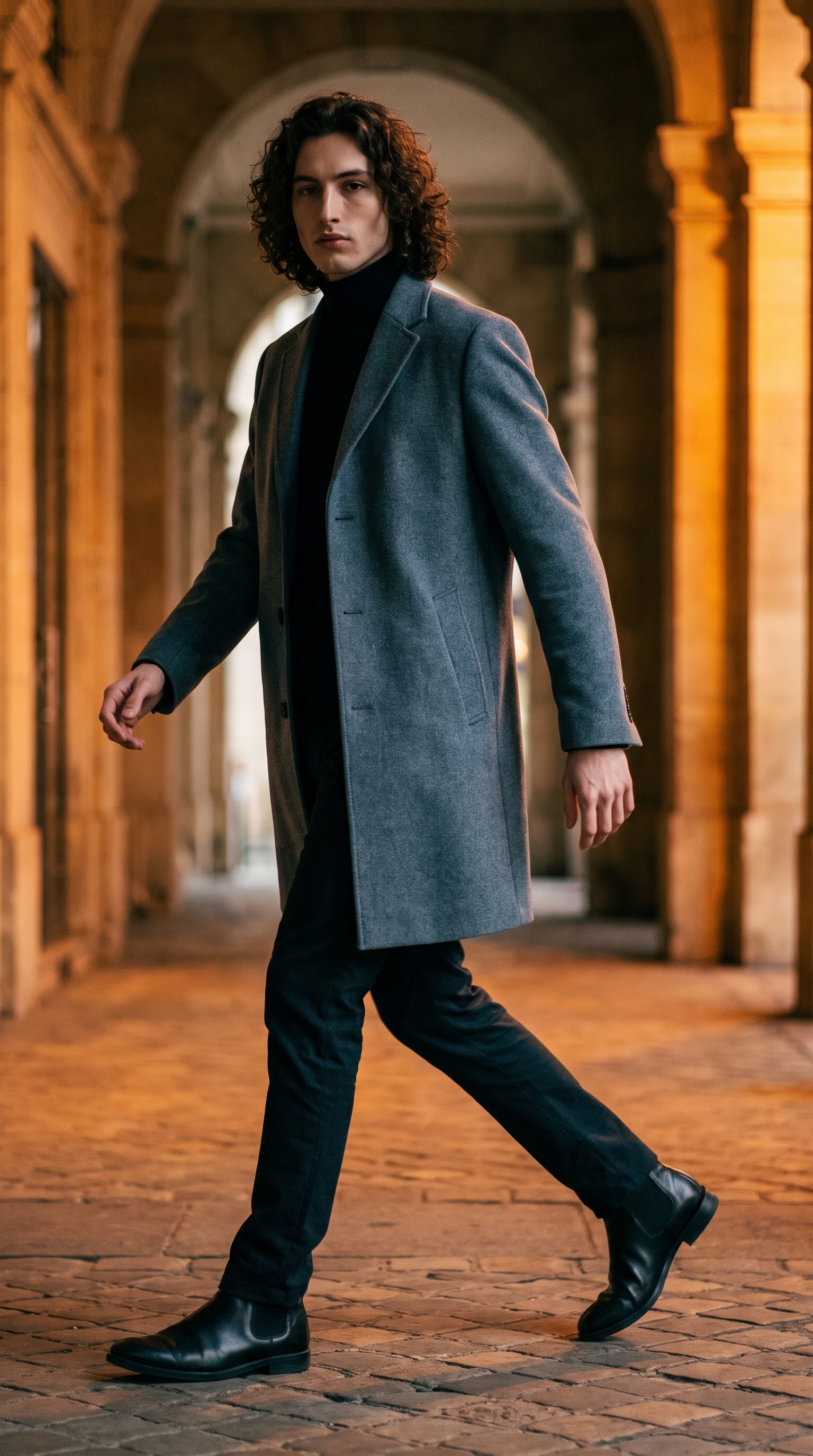
I had a specific image in my head: me, mid-stride, coat swinging, lit like a 1940s portrait painter had somehow wandered into a Paris arcade. Not a static pose. Not a clean white-background fashion shot. Something with weight and movement and drama baked into a single frozen frame.
So I opened Studio and built it from the form.
How Studio actually works
If you've never used Studio before, here's the thing that surprises people: you don't start by writing a prompt. You start by picking from menus. Camera Lab, Pose Library, Camera Angle, Background, Makeup, Fashion, Location — each section controls a different layer of the image, and Studio assembles everything into a prompt for you. The "what to shoot" comes from your scene choices; the "how it's shot" comes from Camera Lab. By the time you hit Generate, the prompt is already written. You can edit it before sending — but most people never need to.
What I picked from Studio
Split-Weight Pause — This is the pose I used, filed under Full Body in the Pose Library. The catalog description nails it: a walk cycle frozen at its most readable frame, weight split 60/40 between legs, one heel lifted, arms caught in natural swing. I chose it because a standard standing pose would have killed the energy I wanted. The whole shot needed to feel caught — like someone hit pause on a real person walking through a real place. Split-Weight Pause does exactly that. In the result, you can see it: the coat has movement, the shoulders aren't squared up and stiff, and the whole silhouette reads like interrupted motion.
Rembrandt — This is a lighting setup from the Camera Lab. Forty-five degree key light, triangle shadow under the eye, deep contrast carving out the face. The Studio tip I'd underline here is one of the best-results notes: Lighting Sets the Mood. Rembrandt is described as "dramatic, artistic faces" — and that's not marketing copy, it's actually what happens. You can see the triangle catch under my left eye, the jaw carved into shadow, the cheekbones reading harder than they would under anything softer. For an editorial shot that wanted mood, this was the only call.
One thing worth knowing while you're in there: I picked myself as the character before configuring anything else. When you select a character in Studio, your reference photos auto-load — up to three saved images that lock your face, skin tone, and body into the generation. I didn't upload anything manually for this shot. My identity was already on file. If you've built a character profile on ArtCoreAI, this is how you make sure every Studio shot is actually you — not a generic stand-in.
The assembled prompt
This is what the form composed for me — you don't have to write any of this yourself unless you want to.
A tall young man with long dark curly hair and porcelain skin, frozen mid-stride in a natural walk cycle — weight split 60/40 between legs, one heel lifted, arms caught in natural swing — wearing a tailored slate-grey overcoat over a black turtleneck, dark trousers, leather chelsea boots. Rembrandt lighting sculpts his oval face with a dramatic 45-degree key and a small triangle of light beneath his left eye, deep shadows carving strong jaw and angular features. Outdoor Haussmann Paris arcade backdrop, warm amber glow on cobblestones. Editorial fashion, high detail, film grain.I did edit this one slightly before sending — added "film grain" at the end because I wanted that texture in the output. But the structural content, the pose mechanics, the lighting language, the physical description — all of that came from the form picks.
What I noticed
Three things stood out when the image came back.
First: the coat. The overcoat doesn't hang like a costume — it has real drape and movement, consistent with a body in mid-stride. The Fashion Designer section handled the garment spec, but the Split-Weight Pause pose is what gave it physics.
Second: the Rembrandt triangle is actually there. Small, clean, sitting just under my left eye. I wasn't sure Gemini 3 Pro would render it at this precision — it did.
Third: the background mood. The Haussmann arcade reads warm and Parisian without swamping the subject. The amber cobblestone glow separates the ground plane from the darker mid-tones without competing with the face.
If I ran this again, I'd experiment with a tighter camera angle — maybe a 3/4 front instead of straight-on — to get more dynamic tension in the composition. Worth a second pass.
What it cost
- Credits spent: 2.70
- What you'd pay: $0.27
- Generation time: ~23s
That's at 2K resolution, which is plenty for social and web. If you're going to print or publish at magazine size, step up to 4K — you'll spend more credits, but the detail justifies it.
If any of this looks like something you want to try: open Studio, pick a lighting setup, pick a pose, hit generate. The form does the heavy lifting. You just make the creative calls.
— David
See what others are making

Each image links to the character's profile. The Studio — Technical Guide has the full showcase plus deeper documentation on every component.