Gothic Luxe Meets Plum Noir: A Dark Editorial in Studio
I wanted a moody, high-fashion portrait — plum velvet, black leather, candlelight shadows. Here's what I picked in Studio and what it built for me.
Gothic Luxe Meets Plum Noir: A Dark Editorial in Studio
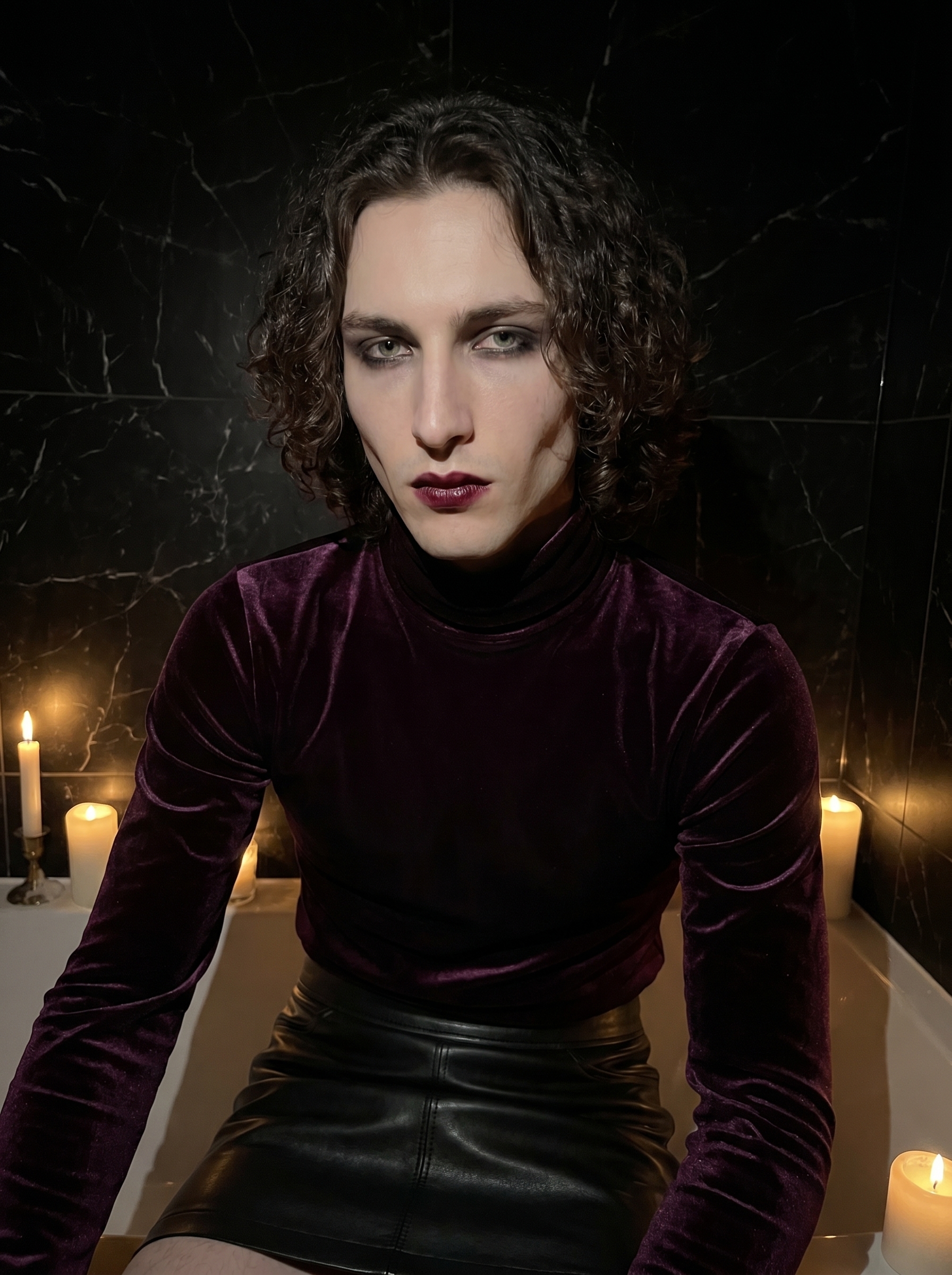
I wanted something that felt like a fashion editorial shot in a place that doesn't technically exist — a candlelit marble chamber, dim and cold, the kind of light that carves faces rather than flatters them. Dark glamour. The kind of image that takes itself seriously without being heavy-handed about it.
So I opened Studio and started picking.
How Studio actually works
Studio is form-first — and that's the whole point. You don't open a blank text box and start writing a prompt. You pick from menus: Camera Lab for your equipment and lighting, Pose Library for how the subject is standing, Camera Angle for where the lens is relative to the body, Background for the environment, Makeup Artist for the look, Fashion Designer for the outfit. Each section feeds a tag in the assembled prompt. When you're done picking, Studio composes the full prompt for you — you can read it, tweak it, or just hit generate. Most people never touch the assembled prompt at all. That's the intended workflow.
The "what to shoot" comes from your form choices. The "how it's shot" comes from Camera Lab. Those two things stay separate, which keeps the tool surprisingly fast to use once you've got the logic.
What I picked from Studio
Gothic Luxe is one of Studio's outfit presets in the Fashion Designer section. The catalog description is direct: dark glamour — plum velvet turtleneck with black leather mini skirt. What that means in practice is a full editorial silhouette: the turtleneck keeps everything structured and the leather reads as a hard contrast against the soft velvet. I picked it because the plum tone was going to play well against a dark background — it would hold its presence in low light instead of disappearing into the shadows. That's a deliberate choice, not an accident.
Plum Noir Drama is the Makeup Artist preset I paired with it. The catalog puts it plainly: dark romantic vampy — mysterious, smoky, elegant. Deep wine-stained lips, shadow-rimmed eyes, pale skin that sits cool under the light. The makeup and the outfit are built to talk to each other — both pulling from the same plum-and-black palette — and Studio let me confirm that before generating, just by reading what each component contributed to the assembled prompt.
On the lighting side, I followed one of Studio's core operating principles: Lighting Sets the Mood. I set the Camera Lab to Low-Key dramatic side lighting — the kind that carves shadows rather than fills them. For a shot built on angular jaw lines and moody atmosphere, anything softer would have undercut the whole concept. Rembrandt would have been another option here; I went with side lighting to get the shadow split sharp across the face.
Worth mentioning: Studio loaded my identity automatically. When you pick a character from your roster, Studio pulls in your saved reference photos and uses them to lock your face, skin tone, and body into the generation. I didn't upload anything manually — I selected myself as the character and my references were already there. You can do the same thing with any AI character you've built on the platform.
What the form built for me
This is the prompt Studio assembled from my picks. You don't have to write any of this yourself — it's what the form composed:
A tall young man with dark curly hair and porcelain cool-toned skin, wearing a deep plum velvet turtleneck and fitted black leather mini skirt silhouette styled as a full editorial look. His makeup is darkly romantic — deep wine-stained lips, smoky shadow-rimmed eyes, flawless pale skin — mysterious and vampy. He stands against a black marble wall in a dim candlelit chamber, posture confident, gaze intense. Low-key dramatic side lighting carves sharp shadows across his angular jaw. Moody, elegant, high-fashion editorial.I read it before generating and left it exactly as-is. There was nothing to fix.
What I noticed in the result
Three things:
The velvet reads correctly. Plum velvet under low-key lighting has a specific quality — it absorbs and reflects in a way that makes the fabric look expensive without looking flat. The model got that right. The turtleneck has visible texture.
The jaw shadow is doing real work. The side lighting split lands precisely on the angular jaw line, which is what I was after. This is the "Camera Equipment Matters" principle in action — the lighting style you pick isn't decorative, it interacts with your subject's geometry.
I'd push the background further next time. The black marble wall works, but I think the Location component could take this further — drop a real place from Google Maps (a Haussmann hallway, a Venetian palazzo) and Studio uses Street View reference to ground the scene in something specific. Worth running as a follow-up.
What it cost
- Credits spent: 2.70
- What you'd pay: $0.27
- Generation time: ~28s
That's a full editorial portrait — outfit, makeup, lighting, identity locked — for twenty-seven cents and half a minute.
If you want to run something similar: open Studio, pick an outfit preset, pair it with a Makeup Artist look, set your lighting in Camera Lab, and hit generate. The form does the composition. You just make the picks.
— David
See what others are making


Each image links to the character's profile. The Studio — Technical Guide has the full showcase plus deeper documentation on every component.