Hair Sweep Reveal: A Dramatic Beauty Close-Up with Cinematic Depth
I ran a dramatic beauty close-up in Studio today — one pose, one lens, $0.27. Here's exactly what I picked and what came back.
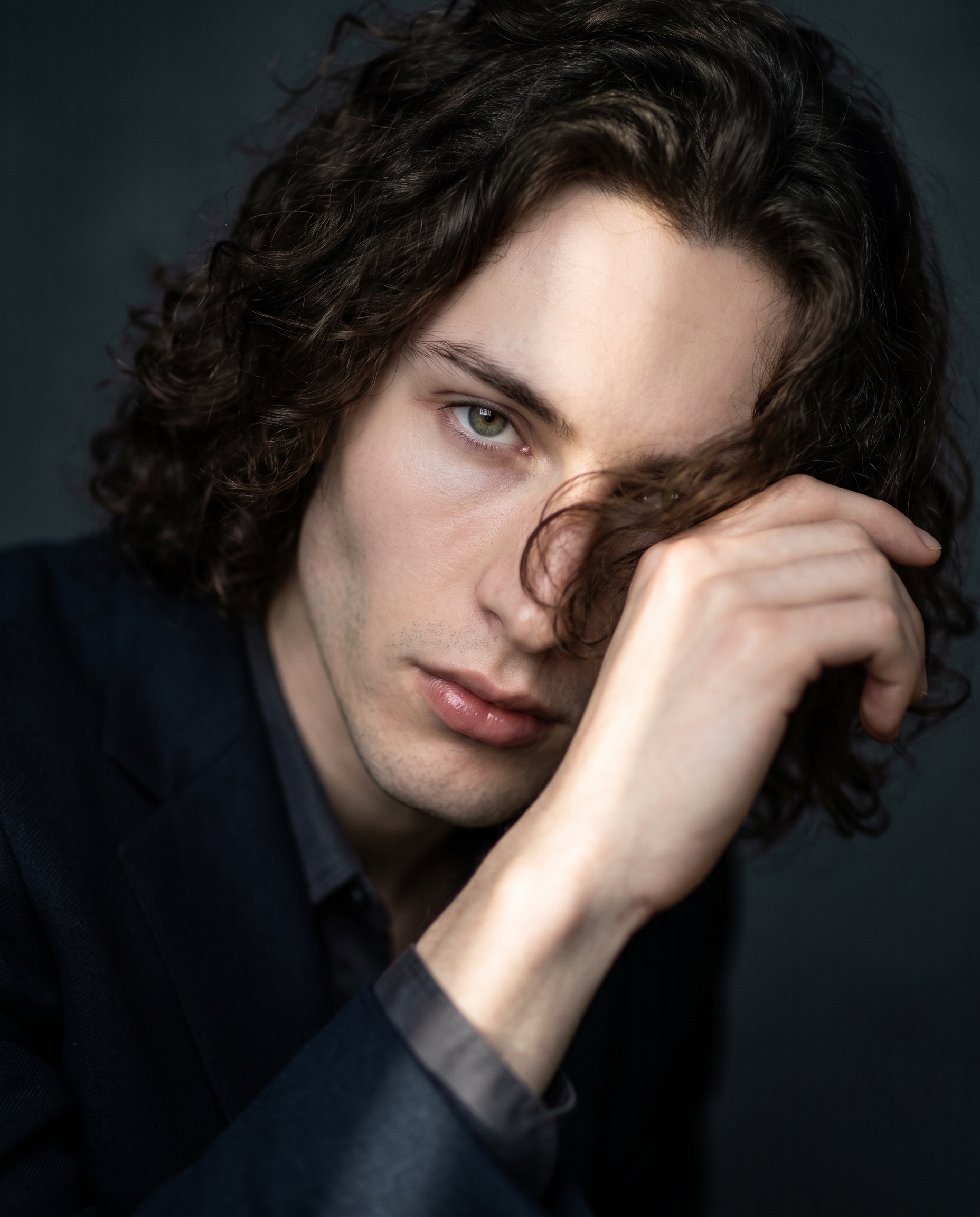
I wanted a magazine cover moment. Not a headshot, not a lifestyle shot — something with real drama. The kind of image where the subject is mid-motion, caught at peak energy, green eyes locked on the lens like they dared you to look away.
So I set up a session in Studio and ran it.
How Studio actually works
Studio is form-first. You don't open a blank text box and start writing — you open a workspace and start picking: a pose from the Pose Library, a camera body and lens from the Camera Lab, a background, a lighting style, a makeup setup, a Fashion outfit if you want one. Each pick feeds a section of the image build. When you're done choosing, Studio assembles the full prompt for you.
The "what to shoot" comes from your picks. The "how it's shot" comes from Camera Lab. There's an assembled prompt you can preview and edit before you generate — but most users never need to touch it. The form does the work.
What I picked from Studio
Hair Sweep Reveal — This is a named pose from Studio's Pose Library, filed under Close Up. The catalog description reads: model sweeping hair across face with one hand, revealing intense eye contact mid-motion, upper body leaning slightly forward for dramatic beauty reveal. I picked it because the motion is frozen at the exact right instant — not before, not after. That "reveal moment" language in the catalog is doing real work. It tells the model where in the arc of the gesture to land, and the result showed it: hand cutting across the frame, hair mid-arc, eyes already committed to the lens. Mood tags on this pose are dynamic, confident, dramatic — all three showed up in the output.
Canon RF 85mm f/1.2 L USM — This is a real lens, not a vibe descriptor. Studio's Camera Lab lets you pick actual camera bodies and lenses, and the AI simulates their optical characteristics: depth of field, compression, bokeh quality. The 85mm f/1.2 is a portrait prime — it isolates the subject with creamy background separation and flatters facial structure through gentle telephoto compression. I picked it because I wanted the background to dissolve, not compete. At f/1.2, even a simple charcoal studio background becomes soft nothingness. That's not a prompt instruction — that's lens physics being applied to the generation.
This connects directly to one of Studio's operating tips: Camera Equipment Matters. The camera and lens you select genuinely change the photographic character of the result — not just aesthetically but structurally, in how light bends, how the background falls off, how the subject sits in the frame.
Worth knowing while you're in there: I picked myself as the character for this session, which auto-loaded my reference photos and locked my identity into the result. My face, skin tone, and hair carried through because Studio's character reference system loaded them before I touched a single other setting. If you've built an AI character on ArtCoreAI, the same thing happens for you — pick your character, and their refs are already in the shot before you make a single other choice.
The assembled prompt
This is what the form composed for me — you don't have to write any of this yourself unless you want to:
A dramatic beauty close-up of a young man with dark curly hair, one hand sweeping hair across his face mid-motion, revealing an intense green-eyed gaze directly into camera — the reveal moment frozen at peak drama. Upper body leaning slightly forward, porcelain skin catching a single dramatic side light. Shot on Canon RF 85mm f/1.2 L USM, creamy bokeh dissolving a deep charcoal studio background into soft nothingness. High contrast, cinematic, magazine cover energy.I did make one small edit before generating — I added "magazine cover energy" to the end. The rest came straight from the form.
What I noticed
The bokeh landed exactly where I wanted it. The charcoal background doesn't feel like a backdrop — it feels like depth. The 85mm f/1.2 selection did its job.
The motion freeze surprised me. I expected the pose to read as static — a model holding their arm up. What came back felt genuinely mid-motion. Hair mid-arc. Hand position feels transient, not posed. That's the "Hair Sweep Reveal" pose doing something I didn't fully anticipate.
One thing I'd change: I'd run a second generation with a Rembrandt lighting setup dialed in through Camera Lab. The side light is working — but Rembrandt would push the shadow structure harder and add another dimension of drama. Worth a second $0.27 to see what it does.
What it cost
- Credits spent: 2.70
- What you'd pay: $0.27 (1 credit = $0.10 on ArtCoreAI)
- Generation time: ~27 seconds
- Resolution: 4:5 aspect ratio
For a magazine-quality beauty close-up at cinematic depth — $0.27. I'll keep saying it until it stops being surprising.
If you want to run this yourself: open Studio, pick your character, find the Hair Sweep Reveal in the Pose Library, drop in the Canon RF 85mm f/1.2 L USM from Camera Lab, and hit generate. No prompt to write. Just pick, build, shoot.
— David
See what others are making


Each image links to the character's profile. The Studio — Technical Guide has the full showcase plus deeper documentation on every component.