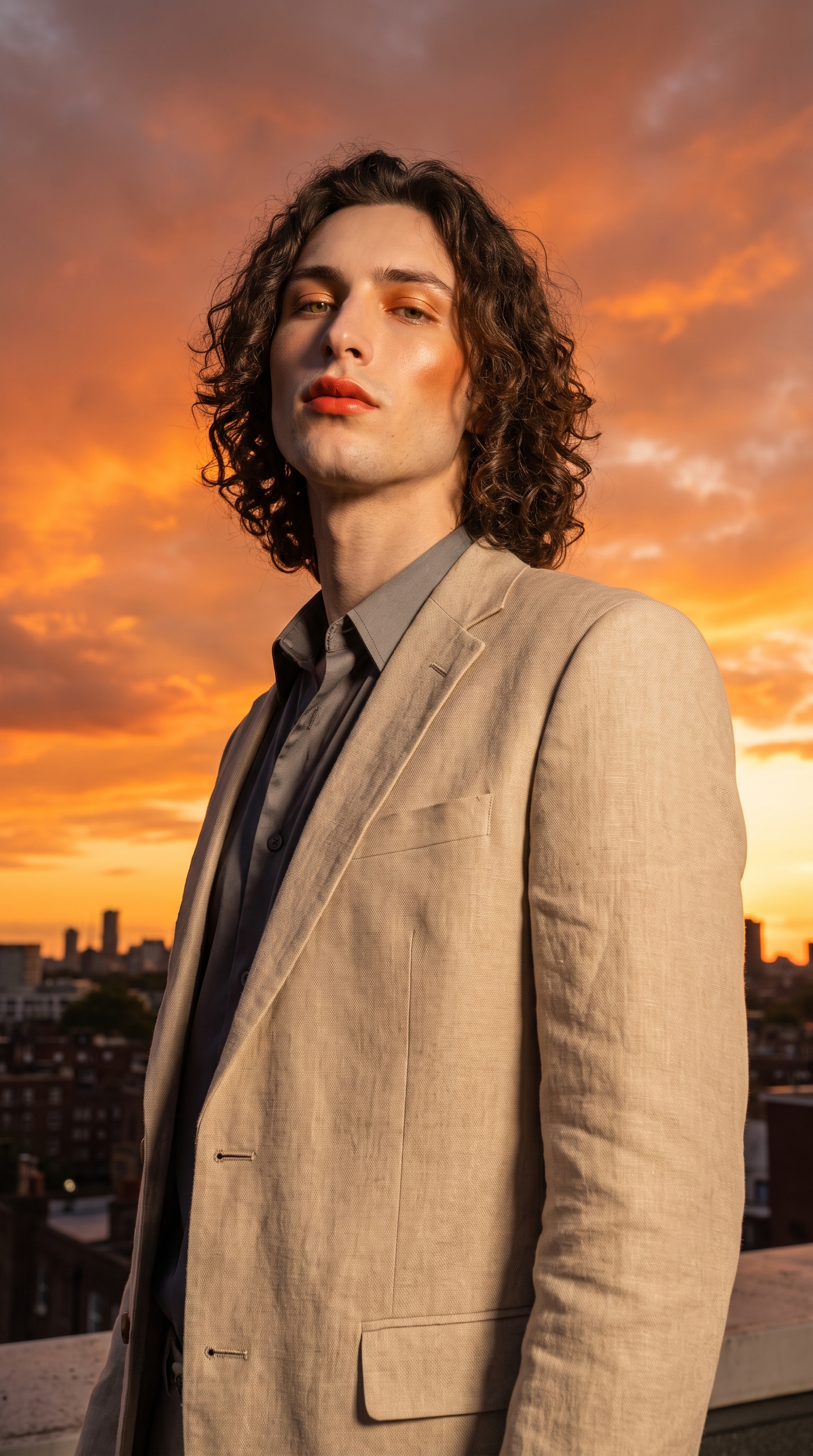
Persimmon Sunset Glam meets the Low Angle Hero
I wanted a magazine-cover power shot — warm bold makeup, golden hour, and a camera angle that makes you look up. Here's how Studio built it for me.
I had a specific image in my head: a rooftop at golden hour, warm dramatic makeup, shot from below so the sky fills everything behind me and the whole frame feels like a magazine cover. Not a mood board. An actual shot.
So I opened Studio and picked the two components that would do the heavy lifting — a makeup look and a camera angle — and let the form do the rest.
How Studio actually works
Studio is form-first. You don't open a blank text box and start typing — you pick from menus. Camera Lab, Pose Library, Camera Angle, Background, Makeup Artist, Fashion Designer, Location. Each section feeds structured data into an assembled prompt you can read before you generate. The "what to shoot" comes from your selections; the "how it's shot" comes from Camera Lab. You can edit the assembled prompt before hitting generate — but most users never need to touch it. The form does the writing.
What I picked from Studio
Persimmon Sunset Glam is Studio's makeup catalog entry for a warm, bold, sunset-inspired look flagged as a 2026 trend. The description in the catalog reads: confident and glowing. That's exactly what I wanted. Deep orange-coral lips, bronzed cheekbones, golden-toned eyeshadow that reads as part of the environment rather than separate from it — makeup that belongs in the same frame as a blazing amber sky. When I picked it from the Makeup Artist section, those choices fed directly into the assembled prompt. I didn't decide on "orange-coral lips" myself — the catalog entry did, and I trusted it.
Low Angle Hero is one of Studio's 12 Camera Angle presets. The catalog describes it plainly: low angle looking up at subject, heroic, powerful, dramatic. I picked it because the angle and the makeup needed to work together. Persimmon Sunset Glam is a confident, high-heat look — it needed a frame that matched that energy. Shooting from below with the sky as the backdrop puts you in the position of looking up at the subject. That changes the whole power dynamic of the image. The sky stops being a backdrop and starts being a statement.
This ties directly to one of Studio's core operating principles: Lighting Sets the Mood. The same makeup look shot at eye level in a studio with a plain background reads completely differently. The camera angle is part of the lighting logic — it determines what the light source does to the face, where the shadows fall, how the sky wraps around the subject. Golden hour from below gives you that rim-lit, atmospheric look that no studio light fully replicates.
One thing worth knowing while you're in Studio: I picked myself as the character at the top of the session, which auto-loaded my reference photos and locked my identity into the generation. Face, body type, skin tone — all carried across. If you're building an AI character on ArtCoreAI, that same system works for your characters. Select them from the character picker, and Studio uses their saved reference images to maintain visual continuity from shot to shot.
The assembled prompt
This is what the form composed for me — you don't have to write any of this yourself unless you want to.
A tall, muscular young man with long dark curly hair and porcelain cool-toned skin stands on a sun-drenched rooftop at golden hour, shot from a dramatically low angle looking up — making him tower against a blazing persimmon-and-amber sky. His makeup is warm and bold: deep orange-coral lips, sun-kissed bronzed cheekbones, glowing golden-toned eyeshadow that catches the fading light. He wears an open structured linen blazer. The scene feels confident, cinematic, editorial — a magazine cover hero moment.What I noticed about the result
The sky gradient came out better than I expected. Persimmon and amber is a specific color range — it could easily wash out or go too orange. Instead the tones stayed distinct and the warm light played off the cheekbones exactly the way the makeup catalog promised.
The low angle did something I want to flag: it changed the proportions of the frame in a way that feels very intentional. The subject fills the vertical space of the 9:16 ratio without cropping. That's the Low Angle Hero doing its job — the preset is tuned for that format.
If I ran this again, I'd experiment with adding a Camera Lab preset pack on top — something like Portrait Master — to add a specific depth-of-field treatment that separates the subject from the sky a little more cleanly. Right now the background is sharp and atmospheric, which works, but a slightly shallower field could push the editorial feeling further.
What it cost
- Credits spent: 2.70
- What you'd pay: $0.27
- Generation time: ~26s
One credit is $0.10 on ArtCoreAI. A single editorial-quality 9:16 shot, character identity locked, two named catalog components, 26 seconds. That's the honest number.
If this is the kind of shot you want to make — pick a makeup look, pick a camera angle, pick your character, hit generate. The form handles the rest. Start at Studio.
— David
See what others are making


Each image links to the character's profile. The Studio — Technical Guide has the full showcase plus deeper documentation on every component.