Over-the-Shoulder at a Tokyo Crossing — a Studio Demo
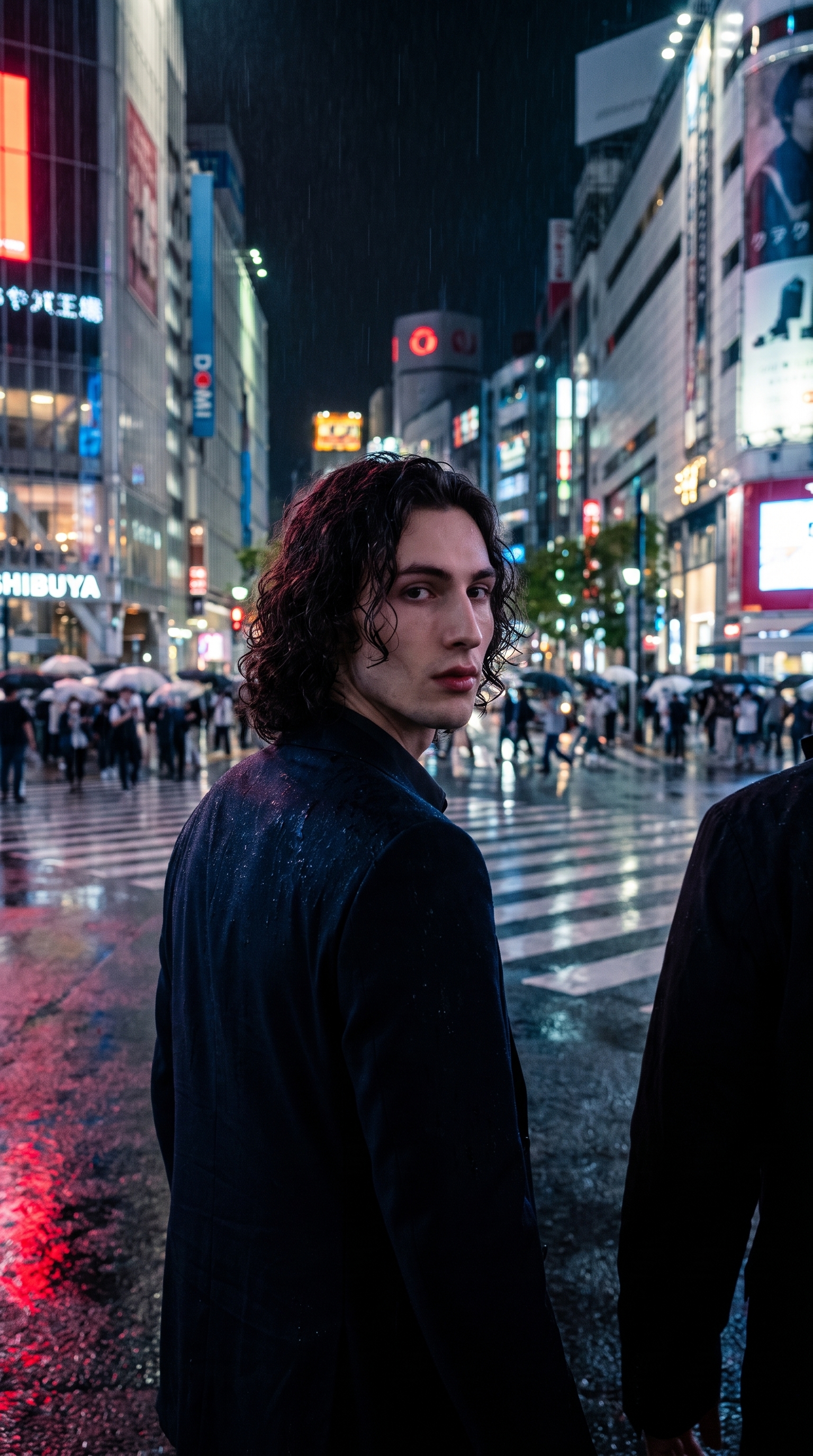
I wanted one shot: me at a rain-slicked Tokyo crossing at night, framed from behind, implying a second presence. Here's how Studio built it.
I had a specific image in my head this morning — not a concept, an actual frame.
Me, standing at a rain-slicked Tokyo pedestrian crossing at night. Shot from behind and to the left. Neon bleeding across wet pavement. And the feeling — that cinematic thing where you sense someone else is in the scene, just out of frame. Two people mid-conversation, but the camera only shows one of them.
That's the shot I wanted. So I opened Studio and went looking for the form picks that would build it.
How Studio actually works
Before I walk through my picks: if you've never used Studio, here's the thing that surprised me most when I first ran it — you don't have to write a prompt at all.
Studio is form-first. You pick from menus — Camera Lab, Pose Library, Camera Angle, Background, Makeup, Fashion, Location — and the tool assembles the prompt for you. The form decides what to shoot; Camera Lab decides how it's shot. When you're done picking, Studio shows you the assembled prompt before you generate. You can edit it, tweak it, rewrite it entirely — or just hit generate and let the form do its job. Most users never touch the prompt. I did, because I had a specific scene in my head, but that's the optional path, not the default one.
What I picked from Studio
Over-the-Shoulder — This is a framing and movement pick from Studio's Pose Library. The catalog calls it simply: implies two people, dialogue. That's exactly it. Three words that describe the entire emotional register of the shot. I wasn't looking for a pose — I was looking for a relationship, and this pick encoded that into the generation without me having to explain it. The figure in frame isn't alone. Someone else is there. You just can't see them.
Over Shoulder Left — This is the corresponding Camera Angle preset. The catalog describes it as: behind-left angle looking over the shoulder. Cinematic storytelling. Studio gives you 12 camera angle presets or full manual control with azimuth, elevation, and distance sliders on a 3D globe. I didn't need the manual sliders here — Over Shoulder Left placed me exactly where I wanted: behind and to the left, looking forward into the crossing. That angle is what turns a portrait into a scene. You're not observing me. You're following me.
The combination of these two picks — framing that implies a second presence, angle that puts you behind me rather than in front — is what built the shot's tension. Neither pick alone would have done it.
One thing the operating tips reinforce: lighting sets the mood. I leaned into moody, high-contrast city light via the prompt's scene description rather than a named Studio lighting preset — but if you're building a similar shot from scratch using the form alone, Studio's Low-Key lighting style (noir, high contrast) would be my recommendation. Pair it with a fast prime lens in Camera Lab and you'd land in the same emotional register.
Worth knowing while you're in Studio: when I set up this shot, I picked myself as the character — which auto-loaded my reference photos and locked my face, hair, and skin tone into the result. That's Studio's character reference-images system working as intended. If you're building your own AI character on ArtCoreAI, you can do exactly the same thing: pick your character, and Studio loads their reference photos automatically. Identity stays consistent across every shot you generate.
The assembled prompt
This is what the form composed for me — you don't have to write any of this yourself unless you want to.
A tall young man with long dark curly hair and porcelain skin stands at a rain-slicked Tokyo pedestrian crossing at night, shot from behind and to the left, looking over his shoulder toward the camera. The frame implies a second presence just out of shot. Neon signs in red and blue bleed across wet pavement. The over-the-shoulder composition creates cinematic depth, with the crowd and crossing stretching into a blurred foreground. Moody, high-contrast city light, editorial street photography feel.What I noticed about the result
The neon bleed on wet pavement worked better than I expected. That combination — rain-slicked surface, red and blue signage — creates natural light painting without any extra prompt work. The pavement became a mirror. That's a Tokyo night in one texture.
The crowd blur in the foreground surprised me. I asked for it in the scene description, but Studio rendered it with real depth — it reads like a long lens shot, which is exactly right for this kind of street photography. The bokeh is doing narrative work, not just aesthetic work.
The one thing I'd change: I'd push the second presence further. Right now the shot implies someone off-frame — but I'd try a version where there's a faint shoulder or arm visible at the left edge, just enough to make the dialogue undeniable. That's a prompt adjustment I'd make on the next iteration.
What it cost
- Credits spent: 2.70
- What you'd pay: $0.27
- Generation time: ~30s
For a 9:16 editorial frame that I'd put in a character's social feed without hesitation — $0.27 is not a difficult decision.
If this shot appeals to you, go build your own version at Studio. Pick your character, pick Over Shoulder Left from Camera Angle, pick Over-the-Shoulder from the Pose Library — and hit generate. You don't need to write a word.
— David
See what others are making


Each image links to the character's profile. The Studio — Technical Guide has the full showcase plus deeper documentation on every component.