200mm in the Rain: How Extreme Compression Isolates a Subject
I wanted to test what a super-telephoto does to a rainy city street. Here's what Studio built — and what it cost me.
The idea: stack the city behind me
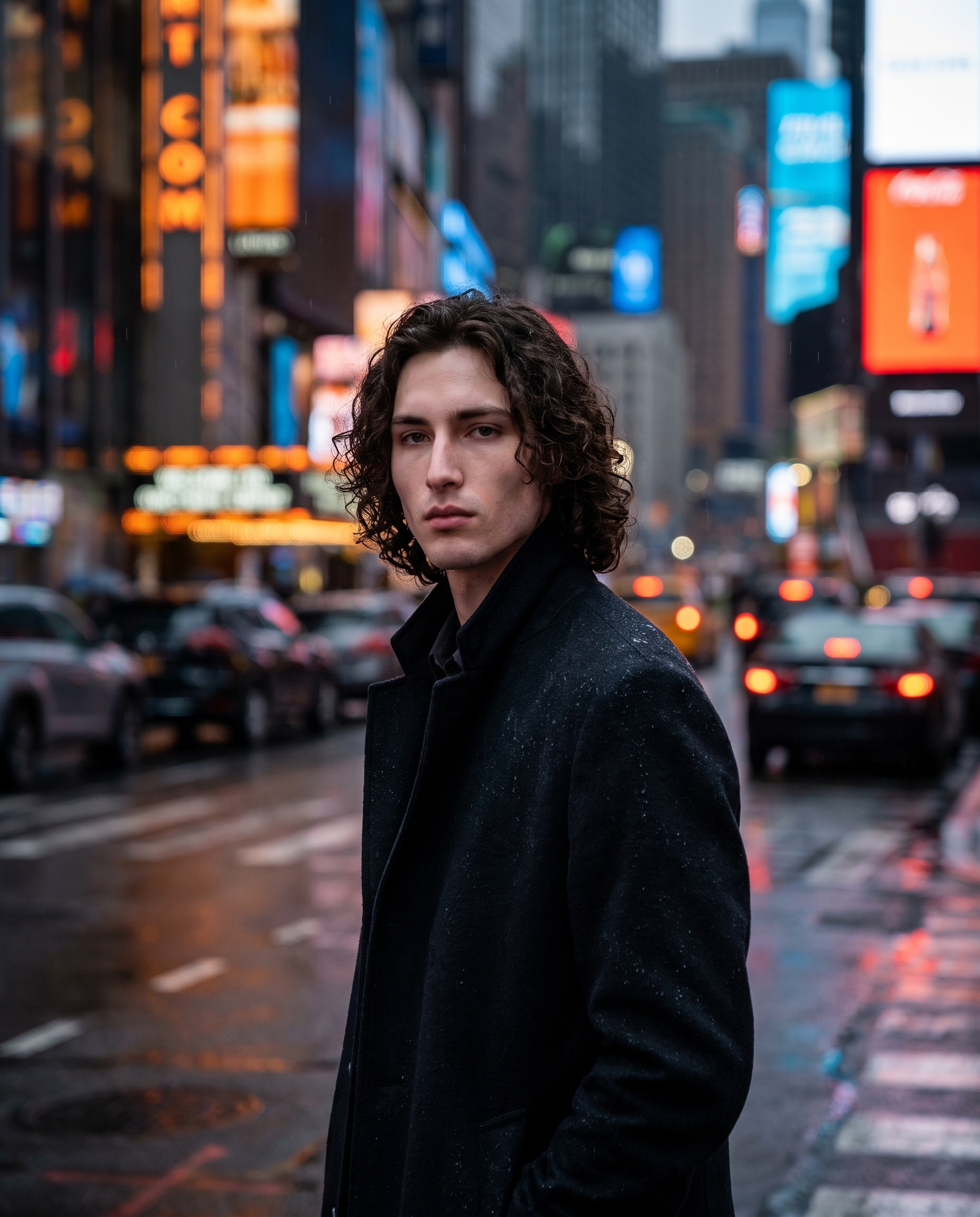
I've been thinking about telephoto compression as a mood tool — not just a technical spec. When you shoot at 200mm from a distance, the background doesn't blur and disappear the way it does at 50mm. It stacks. Buildings, neon signs, bokeh orbs — they pile up tight behind your subject until the city feels almost flush with their shoulders. That visual effect is what I wanted to test today. A rainy city street at dusk. Extreme compression. Me in the middle of it.
How Studio actually works
Studio is form-first — you don't have to write a single word of prompt to get a professional result. You pick your character, then build the shot section by section: Camera Lab for equipment and lighting, Pose Library for body and expression, Camera Angle for viewpoint, Background for environment, Fashion Designer for the outfit. Each pick feeds into an assembled prompt that Studio composes for you automatically. The form defines what to shoot and how it's shot — the assembled prompt is editable if you want to push further, but most users never need to touch it.
I picked myself as the character, which auto-loaded my reference photos and locked my face, skin tone, and build into the generation. If you've built an AI character on ArtCoreAI, you can do exactly the same — select your character, let Studio load their refs, and every image you generate maintains visual continuity across shoots.
What I picked from Studio
200mm (SUPER-TELE)
The focal length is doing most of the heavy lifting here. 200mm is in super-telephoto territory — normally reserved for sports and wildlife photography, where you need to reach a subject from far away. What that distance + focal length combination does optically is collapse the apparent depth of the scene. Objects that are physically 20 meters apart look like they're almost touching. For a street portrait, that means the city behind me stops receding and starts pressing in. The name in Studio's catalog is exactly what it sounds like: super-tele, extreme compression, dreamy distance.
Sony FE 70-200mm f/2.8 GM OSS II
Studio's Camera Lab describes this lens as a tele zoom that's fast, smooth, and great for portraits from afar — with a compressed, stable quality suited to shooting at distance. The f/2.8 aperture at 200mm is what produces the bokeh orbs you can see in the result: those soft circular halos from out-of-focus light sources (neon signs, streetlights) that give the background that liquid, glowing quality. I picked this specific body because I wanted the lens characteristics — not just "telephoto" as an abstraction, but the actual optical signature of a real piece of glass.
This connects directly to one of Studio's operating principles: Camera Equipment Matters. The AI simulates authentic depth of field, bokeh character, and lens compression based on the actual camera and lens you select. Picking a specific body and focal length isn't cosmetic — it changes the physics of the generated image.
The assembled prompt
This is what the form composed for me — you don't have to write any of this yourself unless you want to:
A tall young man with dark curly hair and porcelain skin stands on a rain-slicked city street at dusk, shot from distance with extreme telephoto compression that stacks the blurred neon-lit buildings and bokeh orbs tight behind him — the background city layers feel almost flush with his shoulders. He wears a dark overcoat, collar up, water droplets visible on his jacket. The shallow depth of field and super-tele distance create a dreamy, compressed urban isolation. Cinematic editorial mood, moody blue-orange color grade, dramatic available light.I did edit this one slightly before generating — I wanted to name the compression effect explicitly and describe the water droplets on the overcoat. But the structural bones came from the form picks.
What I noticed
What worked: The compression effect landed exactly as intended. The bokeh orbs in the background read as city lights at distance, and the moody blue-orange grade gives the whole image that rain-soaked Tokyo-at-night feel without needing to specify a location. The coat sitting heavy on the shoulders with visible moisture — that detail made it.
What surprised me: The way the background layers read almost like a painted flat behind me. I expected more spatial depth, even with compression. Instead it looks almost like a theatrical backdrop, which is actually more interesting than a standard editorial shot.
What I'd change: I'd push the camera angle lower next time — worm's eye or a low 3/4 — to make the city-stacking effect feel more imposing. The current shot is eye-level, which is clean but loses some of the drama a low angle would add.
Worth knowing while you're in Studio: there's also a Location component that lets you pick a real place from Google Maps. Studio pulls Street View imagery as a reference, and the AI generates the scene at that actual location. For a shot like this one, you could drop a pin on Shinjuku or Pigalle and get the real street behind you instead of a generically cinematic one.
What it cost
- Credits spent: 2.70
- What you'd pay: $0.27
- Generation time: ~21s
I ran this at 4:5 — social-ready aspect ratio, full resolution for editorial quality. For iteration and testing, 1K resolution runs cheaper; I'd use that to dial in the angle before committing to a 4K output.
Try it yourself
You don't need to know what 200mm compression looks like before you pick it. Open Studio, select your character, choose Sony FE 70-200mm f/2.8 GM OSS II from Camera Lab, set the focal length to 200mm (SUPER-TELE), pick a lighting mood, and hit generate. The form does the rest.
— David
See what others are making


Each image links to the character's profile. The Studio — Technical Guide has the full showcase plus deeper documentation on every component.