Low Angle, Dark Backdrop: A Power Portrait in Studio
I ran a low-angle power portrait in Studio using the Black Fade backdrop and a dramatic rim-light setup. Here's every pick I made and what it cost.
I wanted to feel imposing.
Not aggressive — just the kind of shot where the subject takes up the frame and you believe them. The camera looking up, the background swallowed in shadow, the light carving rather than flattering. A fashion editorial that doesn't ask permission.
So I opened Studio and built it from the form.
How Studio actually works
Studio is form-first. You don't open a blank text box and start typing — you pick. Camera Lab gives you a real camera body, lens, focal length, aperture, and lighting style. Pose Library has named poses organized by body focus. Camera Angle has 12 presets or full manual control with azimuth, elevation, and distance sliders. Background, Makeup Artist, Fashion Designer — each one a dedicated section.
As you pick, Studio assembles a prompt for you behind the scenes. "What to shoot" comes from the form. "How it's shot" comes from Camera Lab. You can open the assembled prompt and edit it before generating — but most users never need to. You just pick and hit generate.
What I picked from Studio
Low Angle — Camera Angle preset, catalog description: Power, heroism, dominance.
This was the whole idea. Low Angle positions the camera at roughly knee height looking up, so the subject fills the upper frame and looms over the viewer. It's the angle used for superhero posters, athlete campaigns, and any shot where the subject is supposed to feel larger than life. I picked it because I didn't want a neutral eye-level portrait — I wanted the image to already have an argument before I set a single light.
The operating tip that applies here: Describe the Scene, let the Camera Lab handle the look. Low Angle is a camera angle pick, not something I wrote into the prompt. The form handled it.
Black Fade — Background preset, catalog description: Against a dark black-to-charcoal gradient backdrop, moody lighting.
Black Fade is Studio's most cinematic flat background. It's not pure black — it's a gradient that rolls from deep black into charcoal, which gives the light somewhere to fall and creates depth even in a studio setup. Paired with hard directional rim lighting, it lets the edges of the subject glow against the dark. Everything that isn't lit disappears. The result feels like a magazine cover shot in a rented studio at 11pm.
This connects directly to the Lighting Sets the Mood tip in Studio's best-results guide. Black Fade isn't just a background — it's half the lighting equation. The darkness is what makes the rim light hit the way it does.
The assembled prompt
This is what the form composed for me — you don't have to write any of this yourself unless you want to.
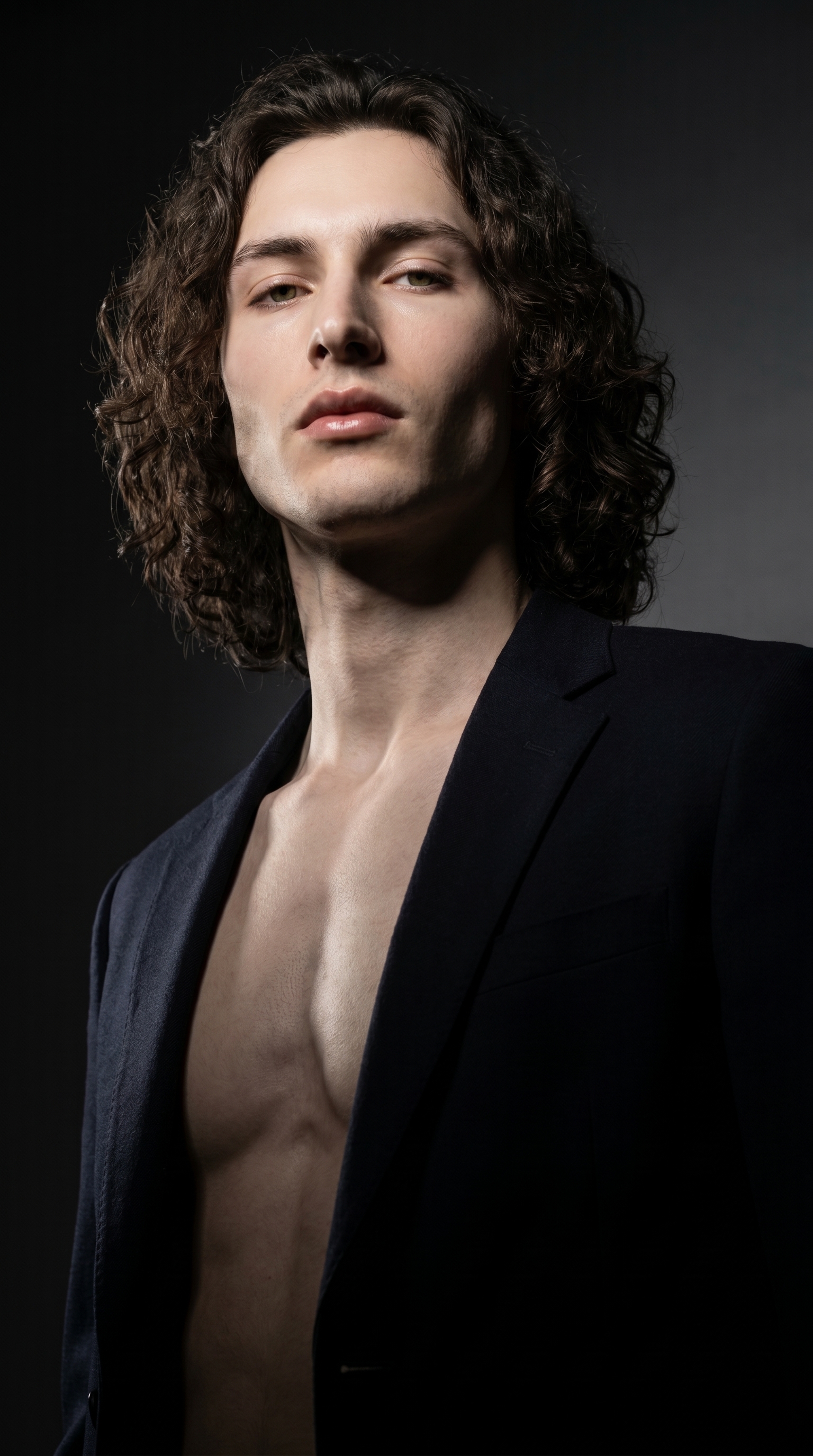
A tall, muscular young man with long dark curly hair, porcelain skin, and green almond eyes stands confidently, shot from a dramatic low angle looking up — the camera positioned at knee height, making him loom large and powerful against the frame. The background fades from deep black to charcoal, moody and cinematic. Hard directional rim lighting carves sharp shadows across his angular jaw and chest. Editorial fashion portrait energy, intense and commanding.Worth noting: I picked myself as the character before building the shot, which auto-loaded my reference photos into the generation. Studio uses up to three saved reference images to lock identity — face, skin tone, body type — so the result stays visually consistent with me across every shoot. If you have your own AI character set up, it works the same way: select them, and their refs load automatically.
What I noticed
The rim lighting landed exactly where I wanted it — sharp shadows along the jaw and chest, the kind of edge definition that reads well at any size. The Low Angle came through clearly: there's genuine upward perspective distortion, the chest reads wide, the head sits at the top of the frame with authority.
What surprised me: Black Fade read more three-dimensional than I expected. The charcoal gradient in the background gives the image actual spatial depth — it doesn't feel like a flat cutout on a black square.
What I'd change: I'd push the rim light slightly warmer on the next iteration, or try a second hair light from above. The current version is cool and hard, which fits the brief — but there's a version of this shot with a subtle amber rim that I'm curious about. One more generation at the same settings with a lighting tweak.
What it cost
- Credits spent: 2.70
- What you'd pay: $0.27
- Generation time: ~28 seconds
For context: 1 credit = $0.10 on ArtCoreAI. A 2K generation like this one costs under thirty cents and takes less than half a minute. I run these at 1K when I'm iterating fast and move to 2K when I'm ready to publish.
If you want to run this yourself: open Studio, pick a character, select Low Angle from Camera Angle, set your background to Black Fade, choose a lighting style that carves rather than fills, and hit generate. The form does the rest — no prompt required.
— David
See what others are making


Each image links to the character's profile. The Studio — Technical Guide has the full showcase plus deeper documentation on every component.