Plum Noir Drama: Quiet Menace in One Studio Frame
I wanted dark romance in a single frame — no set, no props, just light and shadow doing the work. Here's how Studio's form built it for me.
I wanted to see how far Studio could push a single-person portrait without a location, without props, without anything except light carving into shadow. No rooftop. No environment. Just me, a black void, and the right makeup look doing something quietly threatening.
That's the shot I had in my head: editorial stillness with a dark romantic edge. So I opened Studio and started picking.
How Studio actually works
If you've never used Studio before, here's the thing that surprises most people: you don't write a prompt. You pick from the form — Camera Lab, Pose Library, Camera Angle, Background, Makeup Artist, Fashion Designer, Location — and Studio assembles the prompt for you. The form answers what to shoot and Camera Lab answers how it's shot. Once you've made your picks, you can preview the assembled prompt and edit it if you want. Most people never need to.
What I picked from Studio
Makeup Artist — Plum Noir Drama
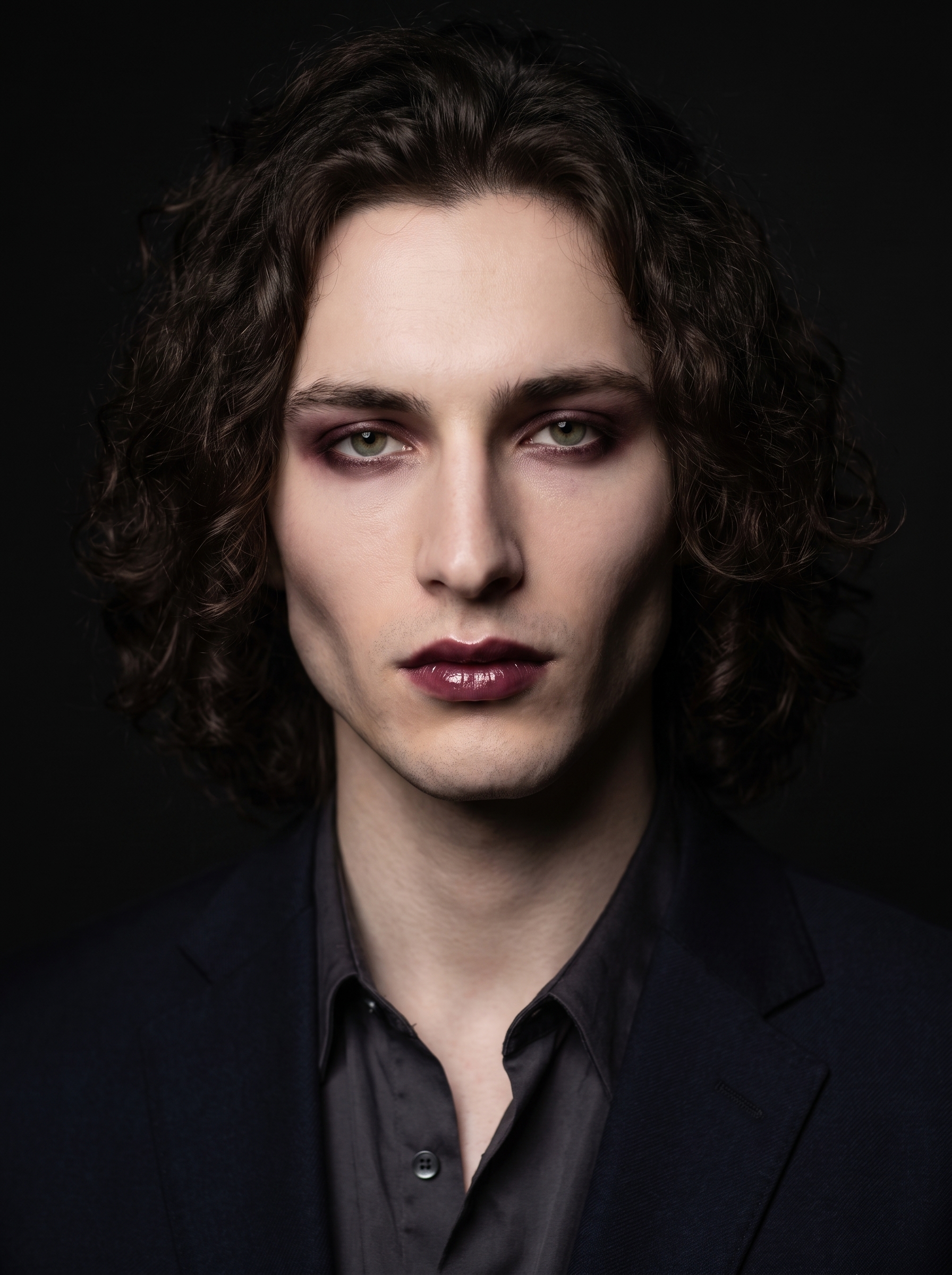
The catalog description reads: dark romantic vampy — mysterious, smoky, elegant. In practice that means deep plum eyeshadow smoked hard at the outer corners, dark berry lips with a glossy finish, and contour that doesn't blend into warmth — it dissolves into shadow. I picked this because I wanted the face to do the storytelling. No setting or costume needed to sell the mood if the makeup is already this loaded.
The result landed exactly on the vampy side of the description rather than the elegant side, which is fine by me. The lip color reads almost black in the directional light, and the contour turns the cheekbones into architecture. That's what I was hoping for.
Background — Black Cove
The catalog description: in a professional black cove studio, dramatic directional lighting. A cove studio means the floor and walls curve into each other with no visible seam — you get that infinite black void behind the subject. The "dramatic directional lighting" part is what makes this more than a flat backdrop. It's a lighting contract built into the background pick.
This ties directly to one of Studio's operating principles: Lighting Sets the Mood. The black cove isn't just a color — it's a lighting environment. Directional light from one side forces deep shadows on the other, which is exactly what gives this shot its film noir quality. If I'd picked the same makeup against a high-key white seamless, the effect would have collapsed completely.
The assembled prompt
This is what the form composed for me — you don't have to write any of this yourself unless you want to.
A tall young man with long dark curly hair, porcelain skin, and sharp angular jaw stands in a professional black cove studio, dramatic directional lighting carving deep shadows across his face. His makeup is vampy and mysterious — deep plum eyeshadow smoked out at the corners, dark berry-toned lips with a glossy finish, contoured cheekbones that fade into shadow. The black seamless studio floor and walls dissolve behind him. Film noir mood, intense forward gaze, upper body portrait, editorial stillness.One thing worth knowing about character references
When I opened Studio and selected myself as the character, my reference photos auto-loaded and locked my face, body type, and skin tone into the generation. I didn't upload anything manually — Studio pulled them from my character profile and applied them silently. If you're building AI characters on the platform, this is the feature that keeps your shoots visually consistent across different setups. Pick your character, pick your settings, generate. The face is always yours.
What I noticed
The directional light did more work than I expected. The shadow side of the face goes almost completely dark — if I'd wanted detail there, I'd have dialed in some fill. But for this shot, the total shadow read as intentional, and that's what the cove + directional combo delivers.
The lip color came out darker than plum in the final image, which I think is the directional light absorbing the gloss. In flat light it might read differently. Something to test.
If I ran this again, I'd probably push the pose into something with slightly more body tension — a subtle tilt of the chin, hands visible. The editorial stillness worked, but I think there's a version of this frame that's even more loaded.
What it cost
- Credits spent: 2.70
- What you'd pay: $0.27
- Generation time: ~25 seconds
For a 3:4 portrait frame with this level of component control — makeup zones, lighting environment, camera setup, character reference — that's the kind of cost that lets you iterate without anxiety.
If this is the kind of shot you want to make, don't start with a blank prompt — open Studio, pick a lighting environment, pick a makeup look, select your character, and hit generate. The form does the heavy lifting.
— David
See what others are making


Each image links to the character's profile. The Studio — Technical Guide has the full showcase plus deeper documentation on every component.