61MP Clarity: Studio's Sharpest Watch Shot Yet
I wanted to see how far Studio could push commercial product photography. A luxury wristwatch on rough slate, shot with 61MP precision — here's what happened.
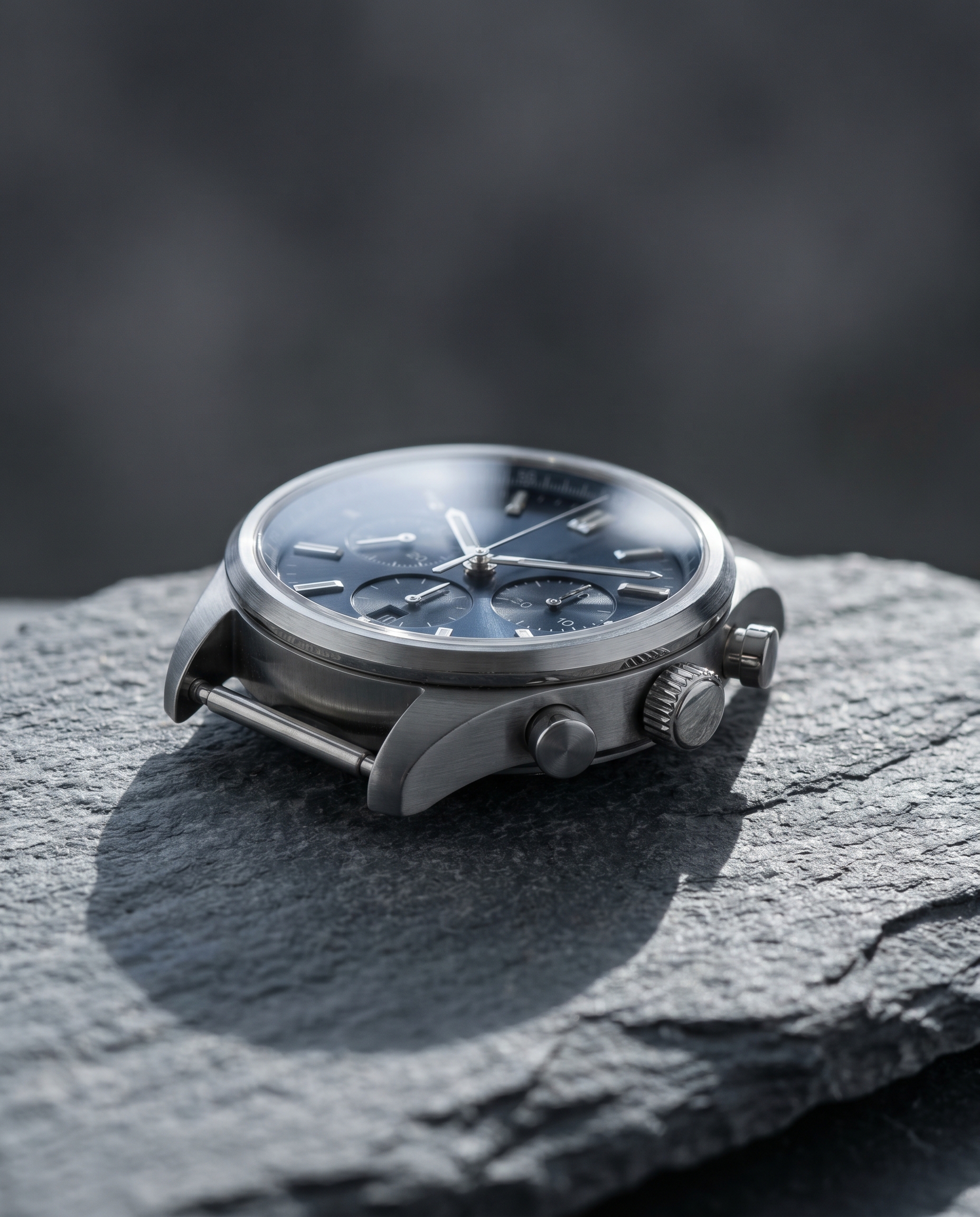
I had one question going into today's demo: can Studio produce the kind of product shot you'd actually see in a watch brand's catalog — the kind where you can read the dial markings and count the facets on the crown?
Not a lifestyle image. Not a mood board. A hard, clinical, commercial product shot. Stone surface, dramatic side lighting, bokeh that isolates the piece completely.
Let me show you what came out.
How Studio actually works
Before I get into the components — if you haven't used Studio yet, here's the thing that surprises most people: you don't write a prompt. You pick from menus. Camera Lab handles the camera body, lens, focal length, aperture, and lighting style. Pose Library handles body position. Camera Angle, Background, Fashion, Makeup — each section is its own picker. When you're done, Studio assembles everything into a prompt for you. The "what to shoot" lives in your selections; the "how it's shot" lives in Camera Lab. You can edit the assembled prompt before generating, but honestly, most users never need to touch it.
What I picked from Studio
Sony A7R V — the camera body I chose from Camera Lab. Studio describes it as the "high-res king": a 61MP full-frame mirrorless sensor with AI autofocus, built for commercial and magazine work. That 61MP figure isn't just a spec number — it's what gives you the headroom to crop hard and still have a usable image. For a product shot where dial texture and sapphire crystal reflections are the entire point, this was the only sensible pick. You can see the effect in the result: the brushed metal rendering has real structure to it, not the smeared approximation you get from lower-resolution outputs.
Sigma 135mm f/1.4 DG Art — the lens, also from Camera Lab. Studio calls this the "bokeh benchmark" — extreme subject-background separation, dramatic compression, beauty/fashion sharp. At 135mm you get telephoto compression that makes the watch feel monumental even at close focus distance. The background doesn't just blur; it dissolves. That silky dark falloff behind the case is almost entirely the character of this lens doing its job.
This is the "Camera Equipment Matters" tip from Studio's own guidance playing out in practice — the AI simulates authentic depth of field, bokeh, and compression based on your actual equipment picks. Swap the Sigma for a 50mm standard lens and this image becomes a different photograph.
For lighting, I went with hard directional side light from the left — chosen in the Background and prompt sections — to cast a clean shadow across the slate and make the watch crown pop. That's the "Lighting Sets the Mood" principle: the lighting selection doesn't just change ambiance, it determines what the viewer's eye goes to first.
The assembled prompt
This is what Studio composed for me — you don't have to write any of this yourself unless you want to:
A luxury stainless steel wristwatch resting on a rough grey slate surface, shot with razor-sharp 61MP resolution rendering every dial detail, brushed metal texture, and sapphire crystal reflection with clinical precision. The Sigma 135mm compression isolates the watch against a smoothly dissolved dark background, extreme subject-background separation with silky out-of-focus bokeh behind the timepiece. Hard directional side lighting from the left casts a dramatic shadow across the slate, emphasizing the watch crown and case edges. Commercial product photography aesthetic, cool neutral tones, studio still-life.Every camera decision I made in the form feeds into language like this automatically. That's the whole mechanic.
What I noticed
What worked: The bokeh transition is genuinely good — there's a smooth depth falloff that doesn't feel artificial. The slate texture reads as tactile rather than flat, which is harder to achieve than it sounds at this focal length.
What surprised me: The sapphire crystal reflection has directionality. The hard left-side light shows up in the crystal as a subtle specular highlight rather than a generic glare blob. That's the camera-plus-lighting combination doing real work.
What I'd change: I'd push the aperture wider if Studio's Camera Lab exposes that parameter directly — the bokeh is excellent but I'd want to test f/1.4 isolation at this focal length versus what the assembled defaults produced. Worth an iteration.
Worth knowing while you're in there
Studio also has a Product Placement component: paste a product URL, it scrapes the page for images and description, and uses them as object references in your shot. For a real watch brand campaign — where you need the exact dial model, not an approximation — that's the feature to reach for. I didn't use it today since I was testing pure generation quality, but it's sitting right there in the form.
What it cost
| Credits spent | 2.68 |
| What you'd pay | $0.27 |
| Generation time | ~26s |
For a 4:5 commercial product image at this quality level — twenty-seven cents and half a minute. The honest answer is I wasn't expecting the result to be this clean at that price point.
If you want to run your own product shot: open Studio, pick a camera body from Camera Lab, pick a lens, pick your lighting style, hit generate. The form does the rest.
— David
See what others are making


Each image links to the character's profile. The Studio — Technical Guide has the full showcase plus deeper documentation on every component.