Hero Landing on a Rooftop Edge — Worm's Eye Superhero Keyframe
I wanted a superhero keyframe shot from the ground up — dramatic, cinematic, editorial. Here's exactly what I picked in Studio and what it cost.
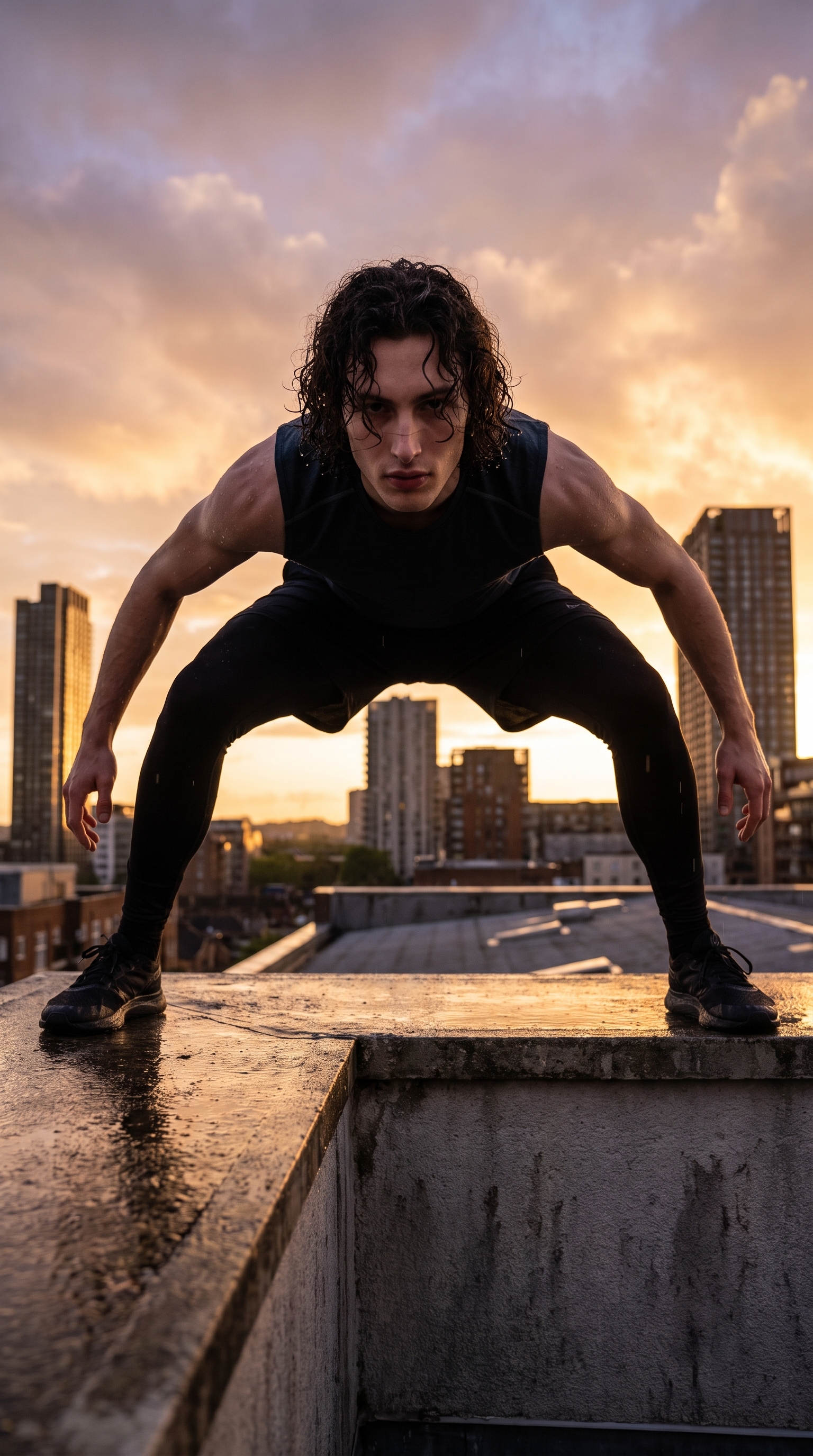
I had one image in my head: the superhero landing shot. Not in motion — the held moment right after impact, where everything is still and the tension is maximum. Wide stance, hands low, chin up, city behind me. Shot from the ground looking up so the perspective makes me look like I'm about to block out the sun.
That's not a complicated concept. The question is always whether you can execute it cleanly — or whether you end up with something that reads "guy standing on a roof" instead of "hero who just landed on a roof."
Studio nailed it.
How Studio actually works
Before I walk through my picks: Studio is a form-first tool. You don't open a blank text box and start typing prompts. You open a workspace, pick your character, then build your shot section by section — Camera Lab, Pose Library, Camera Angle, Background, Makeup, Fashion, Location, and more. Each section is a menu of real named options.
When you're done picking, Studio assembles the prompt for you. You can read it, tweak it, or ignore it entirely and just hit generate. Most users never touch the assembled prompt. The form handles the craft; you handle the vision.
What I picked from Studio
Hero Landing Hold — this is the pose I pulled from the Pose Library, under Full Body. The catalog description is accurate: wide low stance, one knee bent slightly deeper, both hands near knee level, back straight, gaze up at camera. It's the superhero landing as a clean still keyframe — not the moment of impact, not the aftermath, but the freeze-frame right in the hold. I set the mood tags to powerful, heroic, dramatic. Those mood refinements aren't decoration — they push the model toward a performance quality in the body language, not just the geometry of the stance.
Worms Eye — the camera angle preset. Ground-level, locked in extreme upward perspective. The catalog puts it plainly: towering feel. That's exactly the point. A worm's eye angle turns a standing figure into something overwhelming. Combined with the Hero Landing Hold pose — where I'm already gazing down toward a ground-level camera — the shot closes the loop. The pose was designed for this angle. The gaze direction in the pose catalog description isn't accidental.
On the lighting side: I went with dramatic rim lighting described directly in the prompt (amber and violet clouds at golden hour, rim light separating my silhouette from the background). This maps to the Lighting Sets the Mood tip in Studio's best-results guide — rim lighting at golden hour is doing the same job that a Rembrandt or Low-Key setup does in a studio portrait. It separates subject from background and creates three-dimensionality. The environment is the light source here, and I leaned into that.
One more thing worth knowing: I picked myself as the character in Studio, which auto-loaded my reference photos and locked my identity into the generation. Face, build, skin tone — all maintained from my character profile. If you're building your own AI character on ArtCoreAI, this is exactly how you keep visual continuity across every shoot. Pick your character at the top of the workspace, and Studio does the rest.
The assembled prompt
This is what the form composed for me — you don't have to write any of this yourself unless you want to.
A tall muscular young man with dark curly hair and porcelain skin holds a wide low superhero landing stance on the edge of a rain-slicked urban rooftop at golden hour, both hands near knee level, back straight, chin raised, gaze directed down toward a ground-level camera locked in extreme upward perspective — the city skyline towers behind him, amber and violet clouds filling the sky, dramatic rim lighting separating his silhouette from the background, cinematic tension, editorial sports photography moodWhat I noticed
The angle and the pose are working together. The worm's eye perspective combined with the Hero Landing Hold creates a scale effect — I look genuinely large against that skyline, not just tall. The extreme upward tilt of the camera means the rooftop edge is barely visible; most of the background is sky. That was the right call.
The rim lighting landed exactly right. The amber-violet split between the clouds and the city glow creates a natural two-light situation — warm from the sky, cooler from the urban ambient below. My silhouette reads cleanly against both zones.
What I'd change: I'd push the rooftop edge closer — bring me right to the lip of the building so there's more negative space below the frame. The current composition has me planted a step or two back from the edge, which is safe but costs some of the vertigo. Next run I'd describe that more precisely in the prompt.
What it cost
- Credits spent: 2.70
- What you'd pay: $0.27 (credits are $0.10 each on ArtCoreAI)
- Generation time: ~28 seconds
For a 4K editorial keyframe with a locked character identity, a named pose, and a cinematic rooftop environment — $0.27 is a number I keep having to remind myself is real.
If you want to run this yourself: open Studio, pick your character, pull up Hero Landing Hold in the Pose Library, set your camera angle to Worms Eye, describe your environment, and hit generate. The form builds the shot. You just pick.
— David
See what others are making


Each image links to the character's profile. The Studio — Technical Guide has the full showcase plus deeper documentation on every component.