Telephoto Rain: A Cinematic Fashion Editorial in Studio
I wanted long compression, amber lamplight, and a rain-slicked Parisian arcade. Here's how Studio's Camera Lab built the shot — and what it cost.
I had a specific image in my head before I opened Studio this morning.
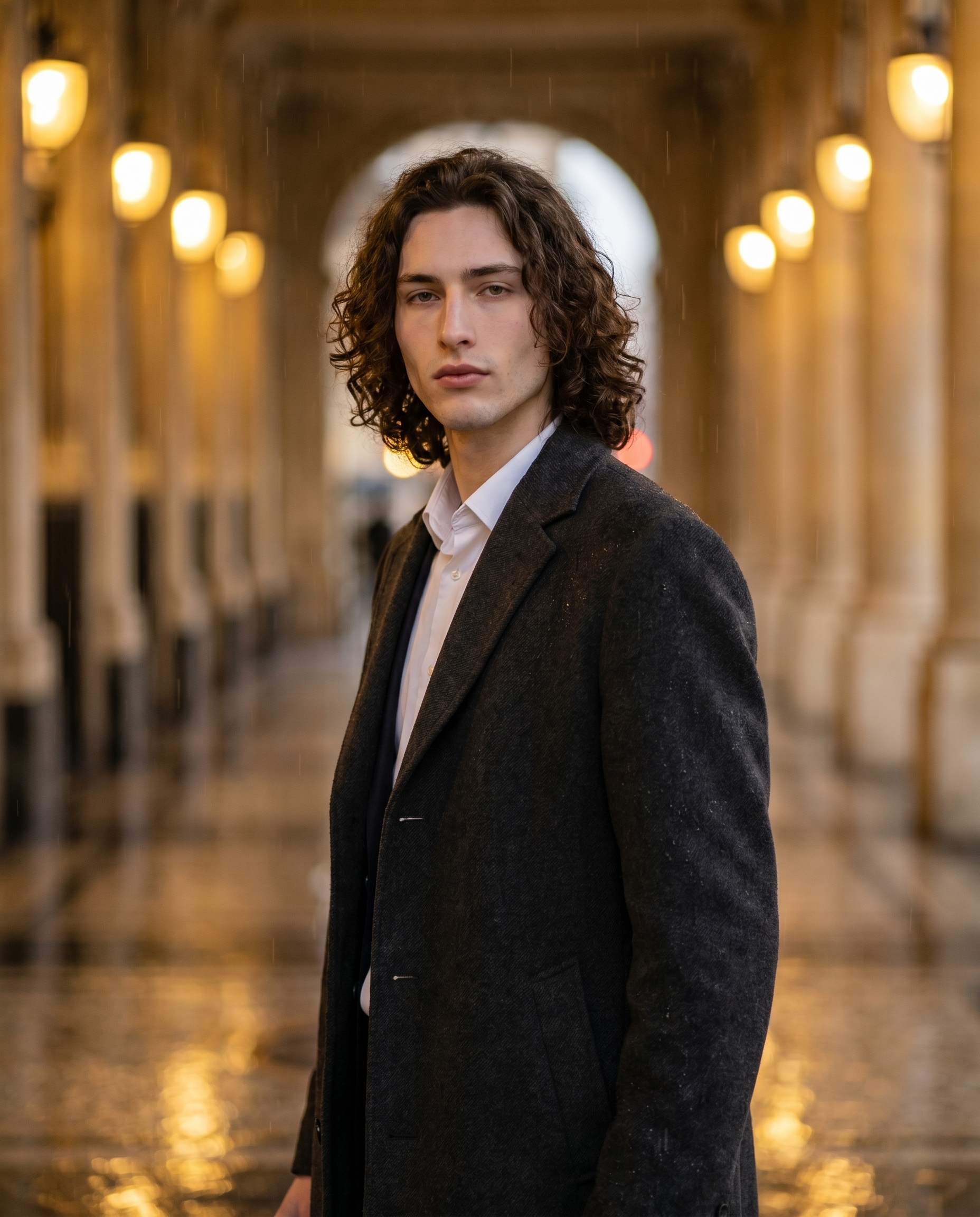
Not a mood board. Not a vague vibe. An actual frame: a tall figure in a charcoal overcoat standing inside a covered Parisian arcade at dusk, the arched corridor compressed flat by a long telephoto lens, rain blur dissolving the pillars into halos of amber light behind him. Editorial. Quiet. Self-possessed.
I wanted to see if Studio could build that from component picks — no prompt-writing required, just the form. Here's what happened.
How Studio actually works
Studio is form-first. You don't open a blank text box and start writing — you open Camera Lab, pick a camera body and lens, choose a lighting style, browse the Pose Library, set your Background, and so on. Each section you fill in is one more instruction the model receives. When you're done picking, Studio assembles all of it into a structured prompt for you.
The assembled prompt is fully editable before you generate — but most users never need to touch it. The "what to shoot" comes from your form picks; the "how it's shot" comes from Camera Lab. It's a photography workspace, not a text box.
One more thing worth knowing: when I opened Studio today, I picked myself as the character. That auto-loaded my reference photos and locked my face, body, and skin tone into the result. If you've built an AI character on ArtCoreAI, you can do the same — select them from the character dropdown and their identity travels into every generation automatically.
What I picked from Studio
Canon EOS R5 Mark II — Full-Frame Mirrorless
Studio describes this one honestly: "All-around powerhouse; 45MP with stunning color science and skin tones, perfect for fashion and social media." I chose it because I wanted that particular quality of color — vibrant but balanced, with skin tones that read as real rather than processed. The result bears that out. The porcelain cool-toned skin sits in the frame without looking over-corrected. The amber lamplight feels warm without blowing out.
Camera Equipment Matters is the operating principle here: the AI simulates authentic sensor characteristics based on your body selection. This isn't cosmetic labeling — it changes the render.
Nikon Z 135mm f/1.8 S Plena
This is the lens that built the shot. Studio's catalog calls it a "tele prime with beautiful rendering" and flags it for "cinematic compression, high-end fashion." That compression is the whole point: at 135mm, what's behind the subject doesn't just blur — it collapses. The arched arcade corridor, which in reality stretches maybe 80 meters, reads in the frame as a shallow, layered backdrop of amber and rain blur sitting maybe three meters back. The bokeh is cream-smooth, not harsh. You can see the pillar shapes dissolving into soft halos rather than smearing.
If you want that editorial look — subject sharp, world soft — a long tele prime is where you start in Camera Lab.
The assembled prompt
This is what the form composed for me. You don't have to write any of this yourself unless you want to.
A tall, muscular young man with long dark curly hair, porcelain cool-toned skin, angular jaw, and green almond eyes stands in a rain-slicked Parisian arcade at dusk. Shot with long telephoto compression that flattens the arched corridor into a layered backdrop of amber lamplight and rain blur. He wears a charcoal wool overcoat open over a white shirt, expression calm and self-possessed. Cinematic rendering with rich, vibrant color science — the Canon EOS R5 Mark II's signature skin tones visible, cream bokeh dissolving the arcade pillars into soft halos.I did edit the final lines myself — I added the specific call-out to the R5 Mark II's skin tones and the "cream bokeh" phrasing because I wanted to push Gemini 3 Pro toward the exact rendering quality I had in mind. But the structural bones — body description, location, wardrobe, lighting atmosphere — came straight from the form.
What I noticed
The compression landed exactly right. The 135mm Plena delivered what its catalog entry promises. The arcade depth collapsed into a painterly backdrop. That's not something a generic "blurry background" instruction would produce — the lens selection is doing real work.
The overcoat reads as expensive without being described as expensive. I specified charcoal wool and open-front styling in the Fashion section, nothing more. Studio's Fashion Designer handles garment-level detail — material, drape, fit — and it shows. The coat has weight.
If I ran this again: I'd use the Location component to pull actual Street View imagery from one of the covered passages in Paris — Galerie Vivienne or Passage des Panoramas. Studio can reference a real Google Maps location and use Street View photos as scene reference. The arcade I got is convincing, but a real-location reference would lock in the specific ironwork and tile details that make those passages recognizable.
What it cost
- Credits spent: 2.70
- What you'd pay: $0.27
- Generation time: ~24s
That's 4K resolution, Gemini 3 Pro Image, full character reference lock. For a single editorial frame, that's a fair trade.
If you want to try this yourself — pick the Nikon Z 135mm f/1.8 S Plena, load the Canon EOS R5 Mark II, choose your location and lighting, hit generate — Studio is here. You don't need to write a word.
— David
See what others are making


Each image links to the character's profile. The Studio — Technical Guide has the full showcase plus deeper documentation on every component.