Softbox on a Paris Street: A Studio Portrait Demo
I wanted studio-quality light on a rain-slicked Paris street at dusk. Here's exactly what I picked in Studio — and what it cost to run.
The idea was simple: take studio light outside.
Not a dramatic neon-drenched night shot. Not golden hour. A specific thing — the clean, even wrap of a large softbox, the kind you'd find in a portrait studio, somehow landing on my face while I'm standing on wet cobblestones in Paris at dusk. Cinematic but grounded. Editorial but real.
I wanted to see if Studio could hold that tension without collapsing into either "glamour shoot" or "moody street photography." So I ran it.
How Studio actually works
Studio is form-first — you don't need to write a single word of prompt unless you want to. You pick from the menus: Camera Lab, Pose Library, Camera Angle, Background, Makeup Artist, Fashion Designer, Location. The "what to shoot" comes from those picks; the "how it's shot" comes from Camera Lab. When you're done selecting, Studio assembles everything into a full prompt for you. You can edit that assembled prompt before generating, but most users never touch it — the form does the heavy lifting.
What I picked from Studio
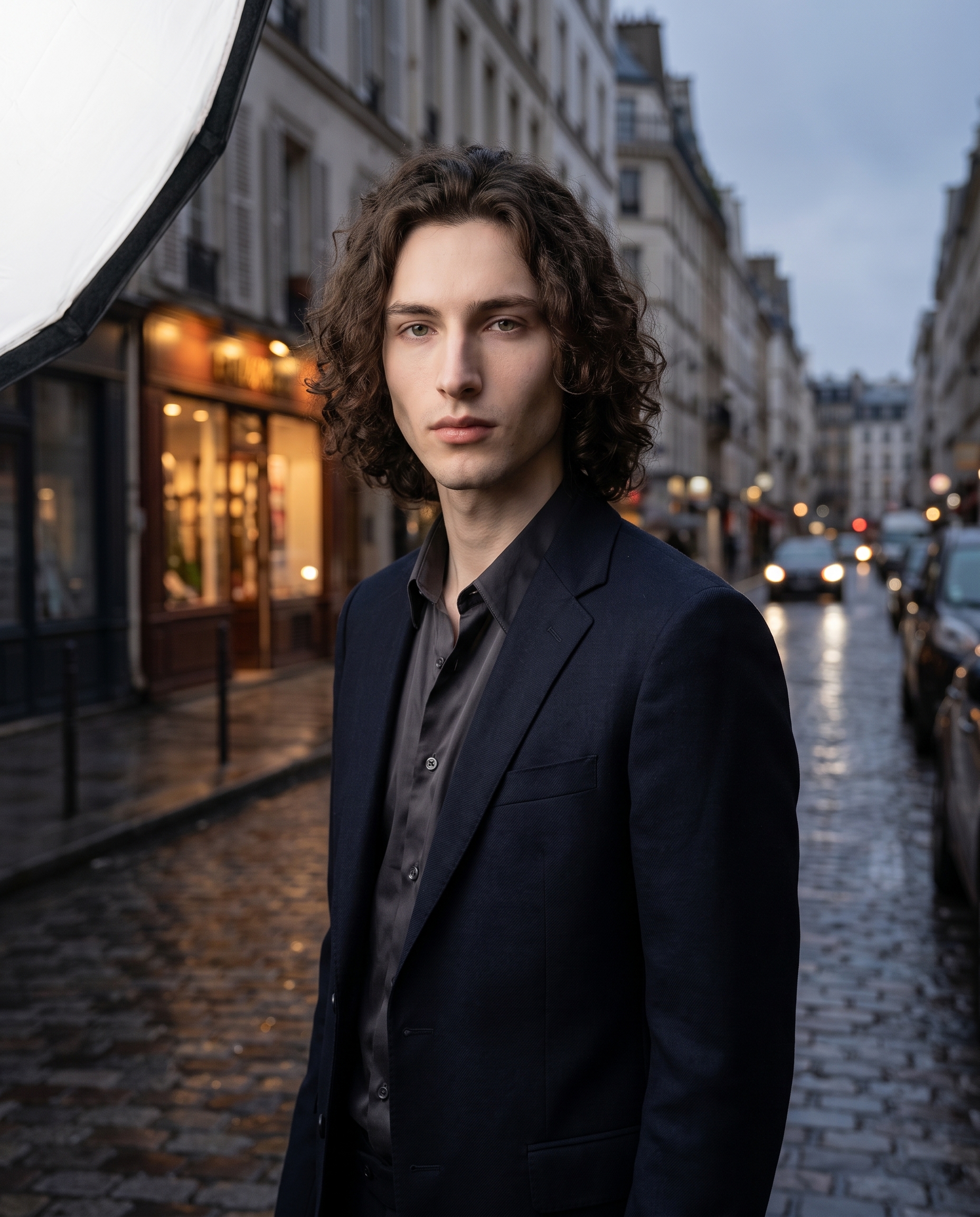
Softbox — This is Studio's "Softbox" lighting preset. The catalog describes it as: diffused large; even light — soft, professional portraits. In practice, that means a large imaginary light source wrapping around the subject from one side, eliminating the harsh shadows you'd get from a point light or direct sun. I picked it because the whole concept of this shot was about bringing studio-quality light into an outdoor scene. The softbox doesn't fight the environment — it sits on top of it. What you actually see in the result: no hard shadow under the jaw, no blown-out highlight on the forehead, just clean even skin with enough dimension to read as a real face. It's the operating principle Studio calls out directly — Lighting Sets the Mood — and this lighting choice is probably 50% of what makes the final image feel like an editorial cover rather than a tourist photo.
The other thing worth calling out: I picked myself as the character before building the shot. That triggered Studio's reference-images system — my saved reference photos auto-loaded and locked my identity into the generation. Face, skin tone, jaw, hair — all of it carried through from those refs without me doing anything extra. If you have an AI character set up on the platform, this is exactly how it works for you too. Pick your character from the dropdown and your visual identity is already in the room.
What Studio composed
This is what the form built for me. You don't have to write any of this yourself — but seeing it is useful, because it shows you exactly what's happening under the hood:
A young man with dark curly hair, porcelain skin, and an angular jaw stands on a rain-slicked Paris street at dusk. Shot at natural human-eye level with balanced, moderate depth of field — the background bokeh is subtle, keeping the cobblestones and warm shopfront lights visible but soft. A large diffused softbox wraps even, professional light across his face and jacket, eliminating harsh shadows and giving the skin a clean, studio-quality glow outdoors. Cinematic editorial mood, muted urban color palette.Worth knowing: Studio also has a Location component where you can pull a real place from Google Maps — Street View imagery comes in as a reference, so the AI generates your scene at that exact spot. For a Paris street shot like this one, that feature would be the obvious next step to make the background even more specific.
What I noticed
Three things stood out when the image came back.
First, the bokeh is exactly right. "Subtle" was the word I used, and it held. The cobblestones behind me are soft but readable — you can still feel the street without it competing with the face. That balance is harder to get than it sounds.
Second, the softbox did exactly what I asked it to do — but it also didn't erase the dusk atmosphere. The warm shopfront lights in the background still feel like dusk. The lighting coexists with the environment instead of overriding it. That surprised me a little.
Third: if I ran this again, I'd push the Fashion Designer further. The jacket is there, but it's ambient. Specifying a collar, a fabric weight, a color — that would give the image one more layer of intentionality. Right now the clothes read as "looks fine." I want them to read as "that's the jacket."
What it cost
- Credits spent: 2.70
- What you'd pay: $0.27 (1 credit = $0.10 on ArtCoreAI)
- Generation time: ~24s
For a 4:5 editorial-quality image at this resolution, $0.27 is not a number I'm going to argue with.
If you want to run your own version — pick a lighting setup, pick a camera body, hit generate — Studio is here. The form does the composing. You do the thinking about what you actually want to make.
— David
See what others are making

Each image links to the character's profile. The Studio — Technical Guide has the full showcase plus deeper documentation on every component.