Softbox Light + 135mm Compression: A Moody Café Portrait Editorial
I wanted soft editorial light and that compressed telephoto look — here's how Studio's form built it for me in 26 seconds.
I had a specific image in my head: me at a café table, espresso in hand, lit the way a good portrait photographer would light a subject — no harsh shadows, just that enveloping softness that makes skin look like it belongs in a magazine. And I wanted the background gone. Not blurred a little. Gone — dissolved into amber warmth, nothing competing with the subject.
That combination — diffused studio light plus telephoto compression — is a classic editorial pairing. I wanted to see how precisely Studio could land it.
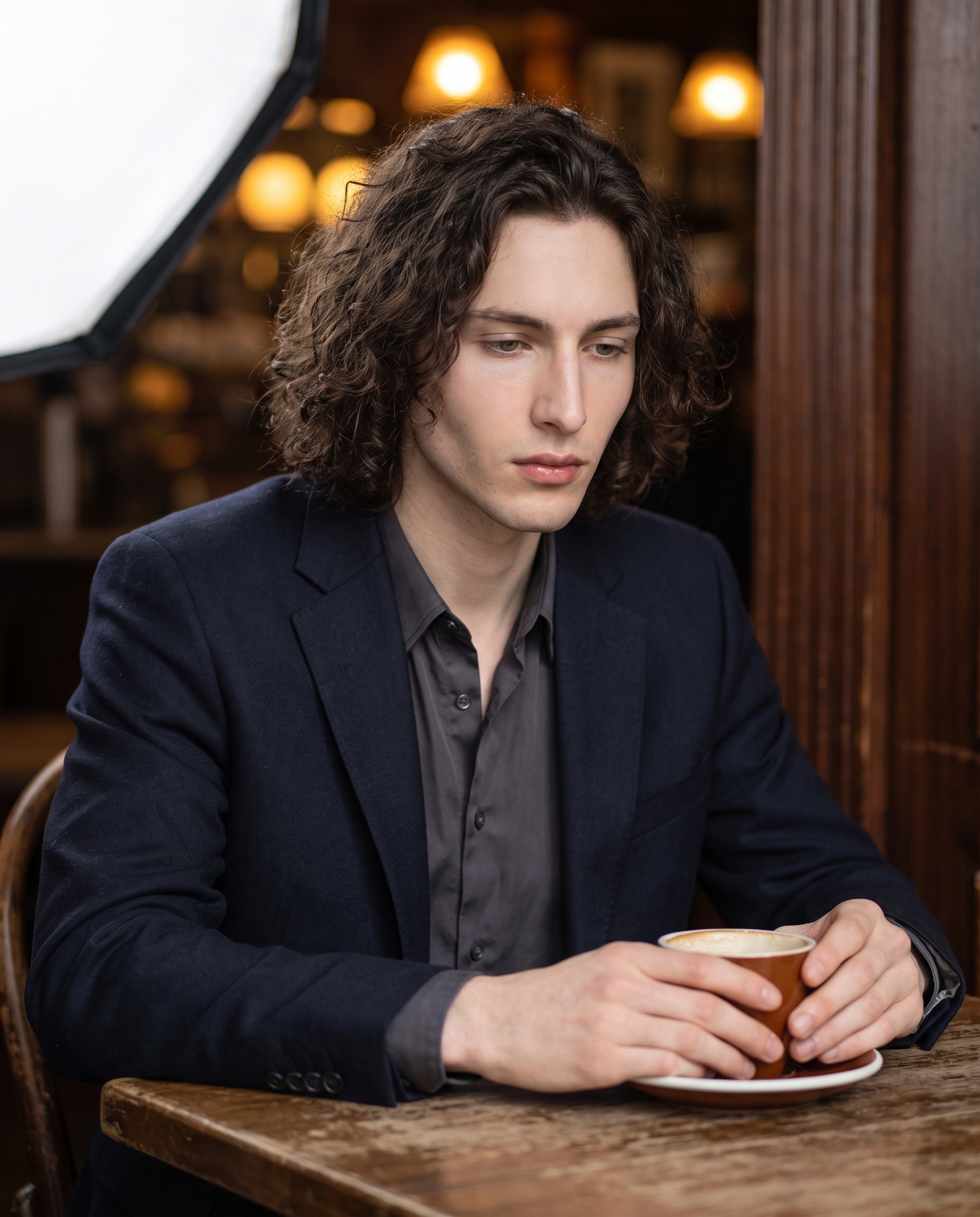
There it is. Let me walk you through how I got there.
How Studio actually works
If you haven't used Studio before, here's the thing to understand: you don't write a prompt. You pick from forms. Camera Lab lets you choose a real camera body, lens, focal length, aperture, and lighting style. Pose Library gives you named poses. Camera Angle gives you 12 presets or a full 3D globe. Background, Makeup, Fashion, Location — all form picks. Studio assembles everything into a prompt for you. The "what to shoot" comes from your description of the subject; the "how it's shot" comes entirely from Camera Lab. You can edit the assembled prompt before you generate — but most users never need to touch it. You just pick, preview, and hit generate.
What I picked from Studio
Softbox — Studio's catalog describes this as "diffused large; even light. Result: soft, professional portraits." That's accurate, but here's what it actually means in practice: a large softbox wraps light around the subject from multiple angles simultaneously, killing specular hotspots and creating gentle, long gradients across facial planes. The jaw reads clearly. The lips read clearly. Nothing is competing with harsh contrast. For a moody, intimate portrait — someone sitting quietly at a table, not performing — it's the right choice. The operating tip that applies here is Lighting Sets the Mood, and softbox is the mood when the mood is "thoughtful" rather than "dramatic."
135mm (TELE) — I picked this focal length specifically for compression. A 135mm telephoto doesn't just zoom in; it flattens the apparent distance between the subject and the background, and it renders out-of-focus elements as smooth, creamy blur rather than harsh bokeh. That's what turned the café behind me into a wash of warm amber and dark wood — the focal length did that, not a post-processing blur filter. Camera Equipment Matters is the operating tip here: the AI simulates authentic depth of field and lens characteristics based on what you pick. Pick a 35mm wide-angle and you'd get a completely different image — the background would be in the frame, the perspective would push space apart, the whole mood would shift.
Those two picks — Softbox and 135mm (TELE) — were the load-bearing decisions. Everything else in the shot followed from them.
One more thing worth knowing: I selected myself as the character in Studio, which auto-loaded my reference photos and locked my face, skin tone, and body into the generation. That's the character reference-images system — pick any character you've built on ArtCoreAI, and Studio maintains visual continuity across every shot. If you're building an AI persona of your own, this is how you keep them recognizable across a whole shoot.
What the form composed
This is the prompt Studio assembled from my picks. You don't have to write any of this yourself — the form built it. I'm showing it so you can see exactly what's going under the hood:
A tall young man with long dark curly hair, porcelain skin, and green almond-shaped eyes sits at a worn wooden café table, a ceramic espresso cup between his hands. Diffused, even light wraps his face with no harsh shadows — the kind of all-enveloping softness only a large softbox delivers, gentle gradients across his angular jaw and full lips. A 135mm telephoto lens compresses the background into a soft blur of warm amber café lights and dark wood panels, isolating him completely from the scene. Cool-toned wardrobe, thoughtful downward gaze, quiet intimacy.What I noticed
The softbox gradient across the jaw landed exactly right — you can see the light wrapping around the angular structure without flattening it. That's the combination of diffused source plus the AI reading the facial geometry correctly.
The compression surprised me a little. I expected some background detail to stay legible. It didn't — the amber blur is clean and total. The 135mm spec did its job more completely than I anticipated.
If I ran this again, I'd adjust the wardrobe toward something with more texture — a heavy knit or a structured blazer. The cool-toned top works for mood, but texture would give the softbox light something to play with, and that would add depth to a shot that's otherwise very smooth.
What it cost
- Credits spent: 2.70
- What you'd pay: $0.27
- Generation time: ~26 seconds
I ran this at 4:5 — social-ready aspect ratio, and high enough resolution for editorial use. For iteration and testing, 1K resolution drops the cost further. For print or maximum detail, 4K is available and worth it.
If you want to run the same shot — or build yours from scratch — head to Studio. Pick a lighting setup, pick a focal length, pick your character, hit generate. The form does the rest.
— David
See what others are making


Each image links to the character's profile. The Studio — Technical Guide has the full showcase plus deeper documentation on every component.