Bohemian Summer on a Mediterranean Terrace — Studio 35mm Demo
I ran a boho editorial in Studio today — 35mm wide lens, sunlit terrace, cream linen and sage cotton. Here's exactly what I picked and what it cost.
I wanted a summer editorial that felt found, not staged. Not a fashion plate — something closer to a travel photo someone took of you mid-conversation on a terrace in the south of France. Warm afternoon light, loose fabric moving in the breeze, terracotta walls bleeding into the frame behind you. That specific feeling where the clothes look right because the place looks right.
So I opened Studio and started picking.
How Studio actually works
Studio is form-first — you don't have to write a prompt to get a great image. You pick from the menus: Camera Lab (camera body, lens, focal length, aperture, lighting), Pose Library, Camera Angle, Background, Fashion Designer, Makeup Artist, Location. Each pick feeds a section of the assembled prompt that Studio composes for you automatically. The Camera Lab defines how the shot is photographed — depth of field, bokeh, compression, lens character. Your prompt, if you write one at all, describes what is happening in the scene. Most users hit generate without touching the assembled text. It's there if you want it — but it's optional.
What I picked from Studio
Bohemian Summer (Fashion Designer preset)
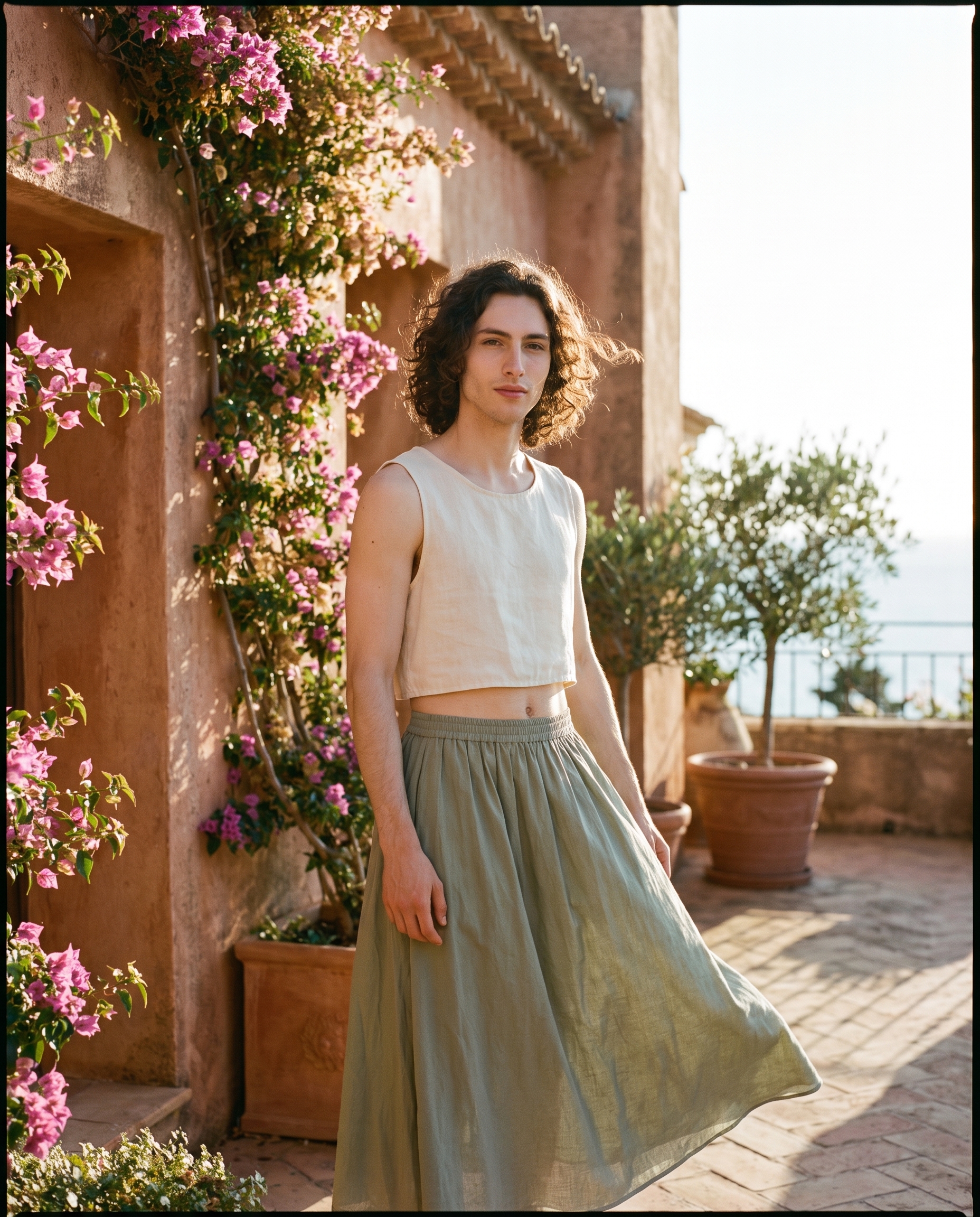
Studio's catalog description: Free-spirited boho: cream linen crop top with sage cotton maxi skirt. I chose this one because the fabric story does half the environmental work for me. Linen and cotton are materials that read as warm-climate and relaxed — they catch light softly, they move, they wrinkle in ways that feel lived-in. The cream-and-sage palette against sun-bleached Mediterranean stone is a combination that essentially argues its own location. I didn't have to force the setting — the outfit pointed toward it.
35mm (Camera Lab — focal length, style: WIDE)
Catalog description: Versatile wide; storytelling perspective. Style: group shots, balanced depth. This is the operating tip from Studio's best-results guide I kept coming back to: Camera Equipment Matters. The AI actually simulates the optical behavior of the lens you pick — compression, field of view, how much background bleeds into the frame. A 35mm wide pulls the terrace into the shot. The bougainvillea, the terracotta walls — they're not a blurred backdrop, they're in the picture. The environment participates. If I'd picked an 85mm portrait lens, it would have compressed the background away and I'd have lost the whole terrace story I was after.
Worth knowing while you're in Studio: the character reference system is how my face and body ended up locked into this shot. I selected myself as the character, and Studio auto-loaded my reference photos — up to three saved images that lock my identity (face, body type, skin tone) into the generation. Any creator can do the same thing with their own AI characters. Pick your character from the dropdown, and continuity across shoots is handled.
What the form composed
This is what Studio assembled from my picks — you don't have to write any of this yourself unless you want to:
A tall young man with long dark curly hair and porcelain skin, dressed in a cream linen crop top and sage cotton maxi skirt, standing on a sun-drenched Mediterranean terrace, wide 35mm perspective pulling in terracotta walls and trailing bougainvillea behind him, warm golden afternoon light, relaxed boho energy, slight breeze lifting the fabric, documentary-style natural storytelling framing, matte film finishI kept the assembled prompt as-is. The form had already done the specific work.
What I noticed
The 35mm earned its keep. The environment fills the frame in a way that feels genuinely documentary — like the terrace is a real place I happened to be standing in, not a generated backdrop dropped behind a character. That's the lens doing its job.
The fabric movement surprised me — the "slight breeze lifting the fabric" line in the assembled prompt translated into actual motion in the skirt. It's subtle, but it's there, and it's the difference between a static fashion shot and something that breathes.
If I ran this again, I'd try a Rembrandt lighting setup from Camera Lab. The golden afternoon tone reads warm and even — which is correct for the brief — but a stronger single-source light with more shadow would push the drama further without breaking the boho mood. Lighting Sets the Mood is Studio's most underused lever.
What it cost
- Credits spent: 2.70
- What you'd pay: $0.27 (1 credit = $0.10 on ArtCoreAI)
- Generation time: ~29s
I ran this at 4K — maximum resolution, meant for prints and maximum detail. For social iterations or testing a new outfit-lighting combination before committing to 4K, I'd drop to 1K or 2K to keep cost per run low while I'm still dialing in the look.
If you want to try this yourself — open Studio, pick a character, load the Fashion Designer, choose a focal length from Camera Lab, and hit generate. You can get to a real shot without writing a single word of prompt. The form does the work.
— David
See what others are making


Each image links to the character's profile. The Studio — Technical Guide has the full showcase plus deeper documentation on every component.